TRIGGER "ON-OFF" SWITCH
Your tool is equipped with a "Lock-ON" feature
which allows continuous operation without
holding the trigger.
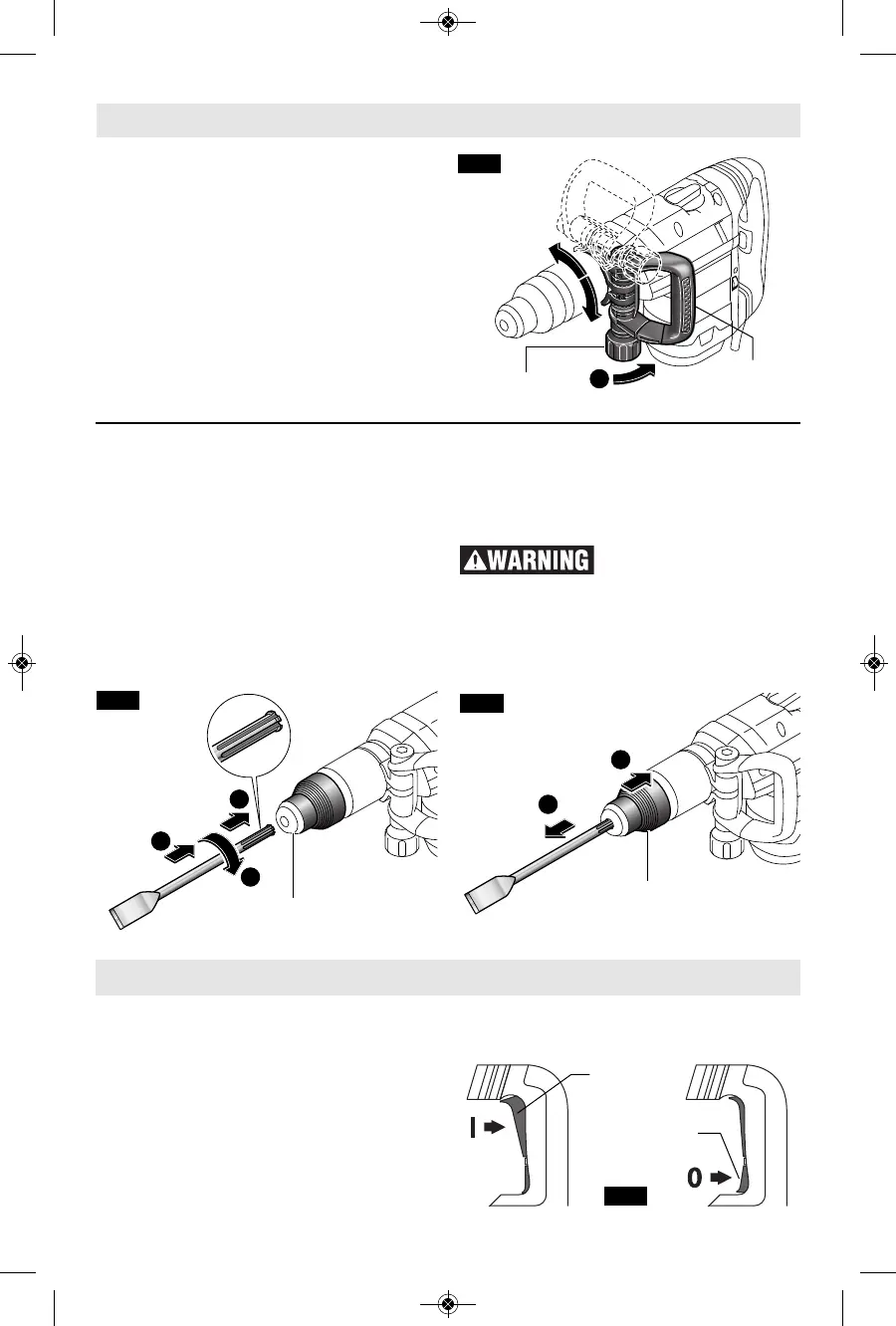
TO LOCK TOOL “ON”:squeeze the trigger
switch until it locks (Fig. 5).
TO TURN TOOL: “OFF“ press the trigger
release switch and the trigger will return to the
“OFF” position automatically (Fig. 5).
To increase switch life, do not turn switch on
and off while tool is under load.
INSTALLING ACCESSORIES
Clean the insert shank end of the accessory to
remove any debris, then lightly grease with a
light oil or lubricant.
Insert accessory into the tool holder through
the dust shield, while twisting and pushing
inward until it locks automatically into place.
Pull outward on the accessory to be certain it is
locked into the tool holder (Fig. 3).
NOTE: The high efficiency available from the
hammers can only be obtained if sharp and
undamaged accessories are used. The "cost"
to maintain sharp and undamaged
accessories is more than offset by the "time
saved" in operating the tool with sharp
accessories.
REMOVING ACCESSORIES
Accessories may be hot
after use. Avoid contact
with skin and use proper protective gloves or
cloth to remove.
To remove an accessory, pull locking sleeve
backward and pull bit forward. All accessories
should be wiped clean after removing (Fig. 4).
AUXILIARY HANDLE
T
he tool must be supported with the auxiliary
handle, which can be swiveled 360˚. To
reposition and/or swivel the handle, loosen the
lock knob, move the handle to the desired
position along the barrel and securely retighten
the lock knob (Fig. 2).
-8-
Operating Instructions
Assembly



 To Next Page