en Additional functions
16
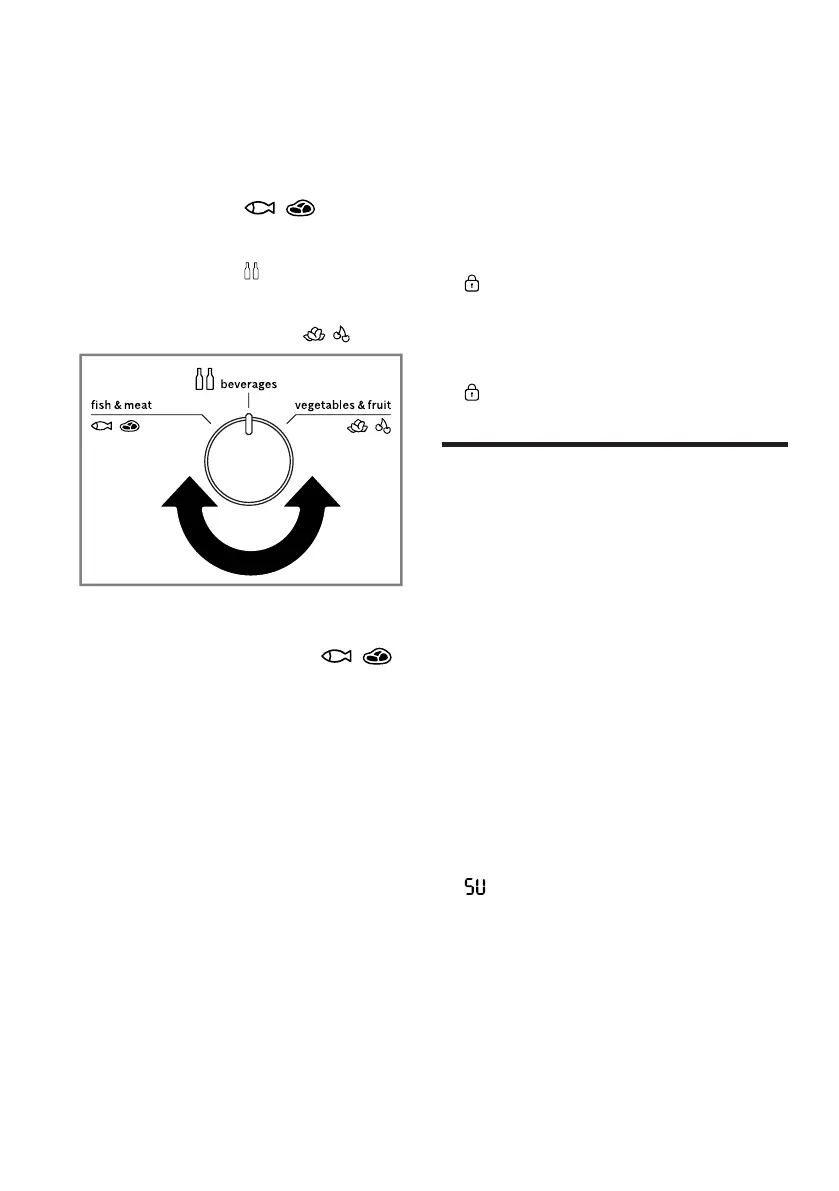
Setting the storage container
temperature
▶ Select one of the options:
‒ For storing meat and fish, turn
the temperature controller to the
storage setting .
‒ For storing beverages, turn the
temperature controller to the
storage setting .
‒ For storing fruit and vegetables,
turn the temperature controller
to the storage setting .
Tip:Fruit, vegetables, drinks and
snacks may freeze below 0°C.
Only use the storage setting
for meat and fish.
Setting the freezer compartment
temperature
▶ Press Freezer repeatedly until the
temperature display (freezer com-
partment) shows the required tem-
perature setting.
The recommended temperature in
the freezer compartment is
−18°C.
7.5 Lock
The button lock prevents the appli-
ance from being operated accident-
ally or incorrectly while running.
Switching on the button lock
▶ Press and hold lock3sec. for
threeseconds.
a lights up.
Switching off the button lock
▶ Press and hold lock3sec. for
threeseconds.
a goes out.
Additional functions
8 Additional functions
Additional functions
Find out which additional functions
can be used for your appliance.
8.1 Super cooling
With Super cooling, the refrigerator
compartment cools as cold as pos-
sible.
Switch on Super cooling before pla-
cing large quantities of food in the re-
frigerator compartment.
Note:When Super cooling is
switched on, increased noise may
occur.
Switching on Super cooling
▶ Press mode repeatedly until "super
cool" lights up.
a lights up in the temperature dis-
play (refrigerator compartment).
Note:After approx. 6hours, the ap-
pliance switches to normal operation.
Switching off Super cooling
▶ Press mode repeatedly until "super
cool" goes out.
a The previously set temperature is
displayed.



 To Next Page