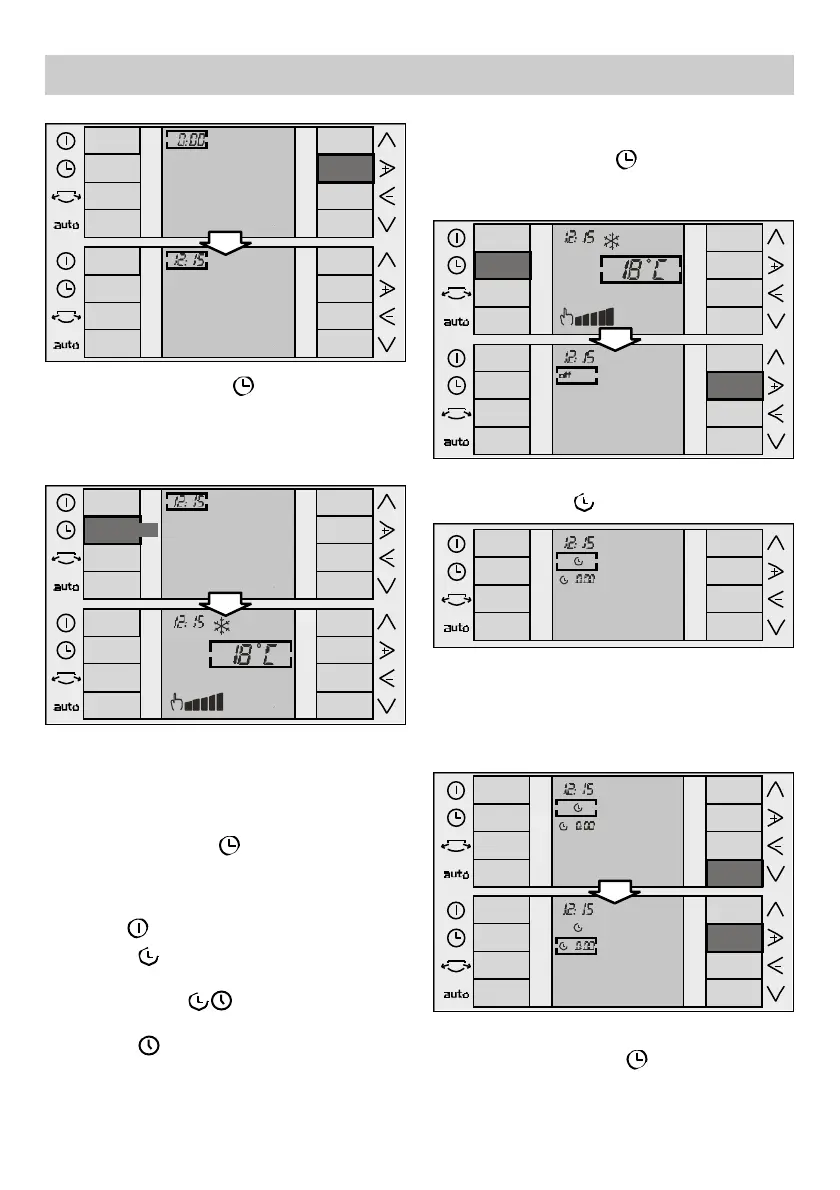
❏ The time changes 15 minutes at a time.
❏ Press the "Timer" key , or wait for 10
seconds without touching any keys to
memorise the set start time.
❏ Use the "+" and "–" keys to select the
"Start" function , (see "+" and "–" keys).
❏ Use the "down" key (see "up" and "down"
keys) to lower the cursor to the start time
menu. Then use the "+" and "–" keys to
modify the programmed time until the
desired time is reached.
39
Programming the timer
The appliance needs to be turned on with the
clock set in order to programme the start /
stop times.
Press the "Timer" key , to navigate through
the timer menu. Press the "+" key to
programme the different functions available on
your appliance. These are:
• "Off" : appliance not programmed.
• "Start" : programming the appliance
start time.
• "Start/ Stop" : programming the
appliance start and stop time.
• "Stop" : programming the appliance .
Instructions for Use
❏ Press the "Ti m e r" key , to memorise the
time. If you do not press this key, the time is
automatically memorised when a period of 10
seconds has passed without pressing any key.
The screen returns to the main menu.
10 sec/
Programming the appliance start time
❏ Press the "Ti m e r " key , to position the
cursor on the timer menu. The last function
programmed appears by default





 To Next Page