40
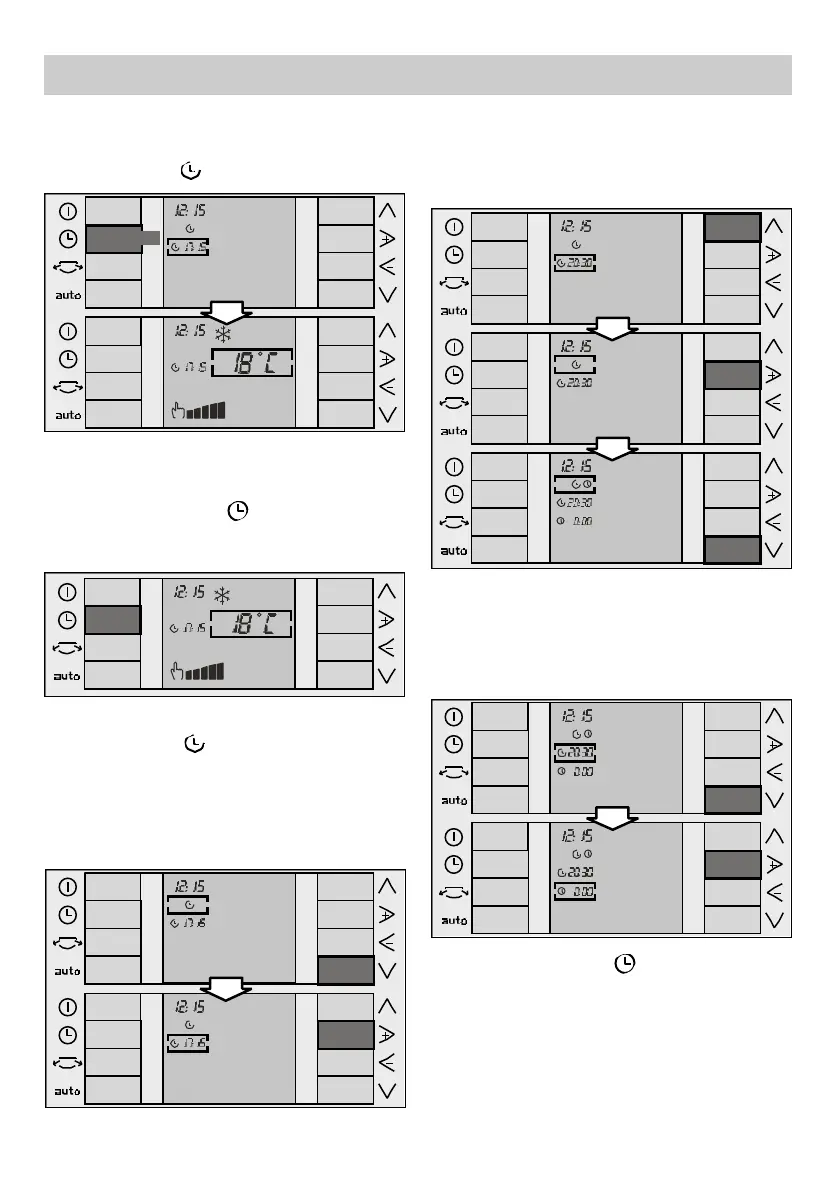
❏ Use the "+" and "–" keys to select the
"Start" function , (see "+" and "–" keys).
❏ Use the “down“ key (see “Up“ and “down“
keys) to lower the cursor to the start time
menu. Then use the "+" and "–" keys to
modify the programmed time until the
desired time is reached.
Instructions for Use
Programming the appliance "Start" / "Stop"
timer
❏ Press the "Ti m e r" key , to position the
cursor on the timer menu. The last function
programmed appears by default.
❏ Press the "u p " key again to position the
cursor on the timer menu. Use the "+" and "–"
keys to select the "S t a r t" / "S t o p" f u n c t i o n .
(see "+" and "–" k e y s ) .
10 sec/
❏ Use the "down" key to position the cursor
on the stop time menu. Then use the "+"
and "–" keys to modify the stop time until the
desired time is reached.
❏ The time changes 15 minutes at a time.
❏ The set time is displayed on the screen
together with the relevant symbol (the
"Start" symbol ) and the set functions.
❏ Press the "Time" key , or wait for 10
seconds without touching any keys to
memorise the set start / stop times.
❏ The set time is displayed on the screen.





 To Next Page