Need help?
Do you have a question about the Bosch Rotterdam UBT40/80 and is the answer not in the manual?
Detailed description of all buttons, sockets, and indicators on the device's control panel.
Instructions for intended use, road safety, and optional remote control.
Instructions for enabling or disabling the anti-theft code entry feature.
Procedure to enter the anti-theft code after power interruption.
Methods for powering the device on and off, including button and ignition control.
Configuration of the automatic device shutdown timer.
How to increase or decrease the system volume from 0 to 32.
Instantly mute and then resume listening to the previously set volume level.
Enable or disable audible feedback for button presses and actions.
Setting the initial volume level when the device is switched on.
Automatic volume adjustment based on vehicle speed and driving noise.
Managing audio during phone calls and setting call volume.
Customizing audio equalization by adjusting bass, middle, and treble levels.
Configuring audio distribution between speakers for balance.
Enabling or disabling loudness compensation for enhanced low-frequency response.
Restoring all sound adjustments to factory default settings.
How to view the current time on the display for a short period.
Instructions for setting the current time and adjusting hours/minutes.
Choosing between 12-hour and 24-hour display formats for the clock.
Setting a one-off alarm time and managing alarm signals.
Steps to select the radio mode from other operating modes.
Utilizing AF and REG features for enhanced radio reception and program consistency.
Enabling or disabling the RDS convenience functions like AF and REG.
Switching between FM, MW, LW, SW, AM, WX wavebands and memory banks.
Overview of methods for tuning into radio stations, including automatic and manual.
Selecting low (LO) or high (DX) sensitivity for station searching.
How to save favorite radio stations to memory buttons.
Automatically storing the six strongest available stations.
Accessing and playing previously saved radio stations.
Briefly listening to all stored stations for selection.
Scanning stored stations for short listening periods.
Scanning all receivable stations for short listening periods.
Enabling or disabling the display of RDS radio text information.
Information on program types broadcast by FM stations.
Enabling/disabling PTY and selecting stations by program type.
Improving sound quality in weak reception by reducing interference.
Configuring short press functions for navigation buttons (<, >).
Enabling or disabling traffic announcement priority (TA).
Adjusting the volume boost for traffic announcements relative to the set volume.
Stopping an ongoing traffic announcement and returning to the previous audio source.
Requirements for USB devices: mass storage, FAT16/FAT32, and MP3/WMA files.
Information on how MP3 tracks contain and display metadata like artist and album.
Connecting USB devices and selecting MP3/USB mode.
Switching between time display and showing ID3 tag information.
Enabling or disabling scrolling text display for track information.
Navigating through directories on the USB storage device.
Switching tracks, fast searching, and random playback (MIX).
Scanning tracks and setting repeat modes for tracks or directories.
Temporarily stopping and resuming playback of the current track.
Switching to and from playlist mode for playing only playlists.
Enabling the infrared receiver and preparing the remote control.
Detailed mapping of remote control buttons to device functions.
Procedure for replacing the battery in the IR remote control.
Connecting and adjusting the level of an external subwoofer.
Connecting an additional amplifier to the device.
Connecting and selecting the front AUX input.
Connecting, enabling/disabling, and adjusting rear AUX inputs.
Matching the external audio source level to the device's audio output.
Enabling or disabling the Bluetooth function on the device.
Steps for manual connection of Bluetooth devices.
Steps for establishing a Bluetooth connection using the device's PIN.
Information on PIN usage, connection status, and automatic reconnection.
Instructions for accepting, rejecting, and ending incoming phone calls.
Selecting and initiating calls to contacts stored in the phone book.
Showing the name of the currently connected Bluetooth device.
Steps to enable and start audio playback via Bluetooth.
Switching tracks and pausing/resuming Bluetooth audio playback.
Specifications for operating voltage, amplifier, tuner, and inputs.
Pin assignments for power supply and speaker connectors.
Pin assignments for preamp, phone, and AUX connectors.
Field for recording the device's model name and serial number.
Field for recording the device's security or identification code.
 General
| Brand | Bosch |
|---|---|
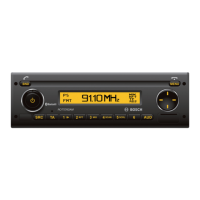
| Model | Rotterdam UBT40/80 |
| Category | Car Stereo System |
| Language | English |

 To Next Page