en Water softening system
22
5. Set the amount of rinse aid to be
dispensed. →Page25
6.
Add detergent →Page26.
7. Start the Programme with the
highest cleaning temperature
without tableware.
To remove any marks from water
or other residues, we recommend
you operate the appliance without
tableware before using it for the
first time.
Tip:You can change these settings
and other Basic settings →Page33
at any time.
10 Water softening sys-
tem
Hard water leaves limescale on the
tableware as well as the washing
tank, and parts of the appliance may
become blocked.
To ensure good dishwashing results,
you can treat the water with special
salt and the water softening system.
To avoid damage to the appliance,
water with a hardness above 9°E
must be softened.
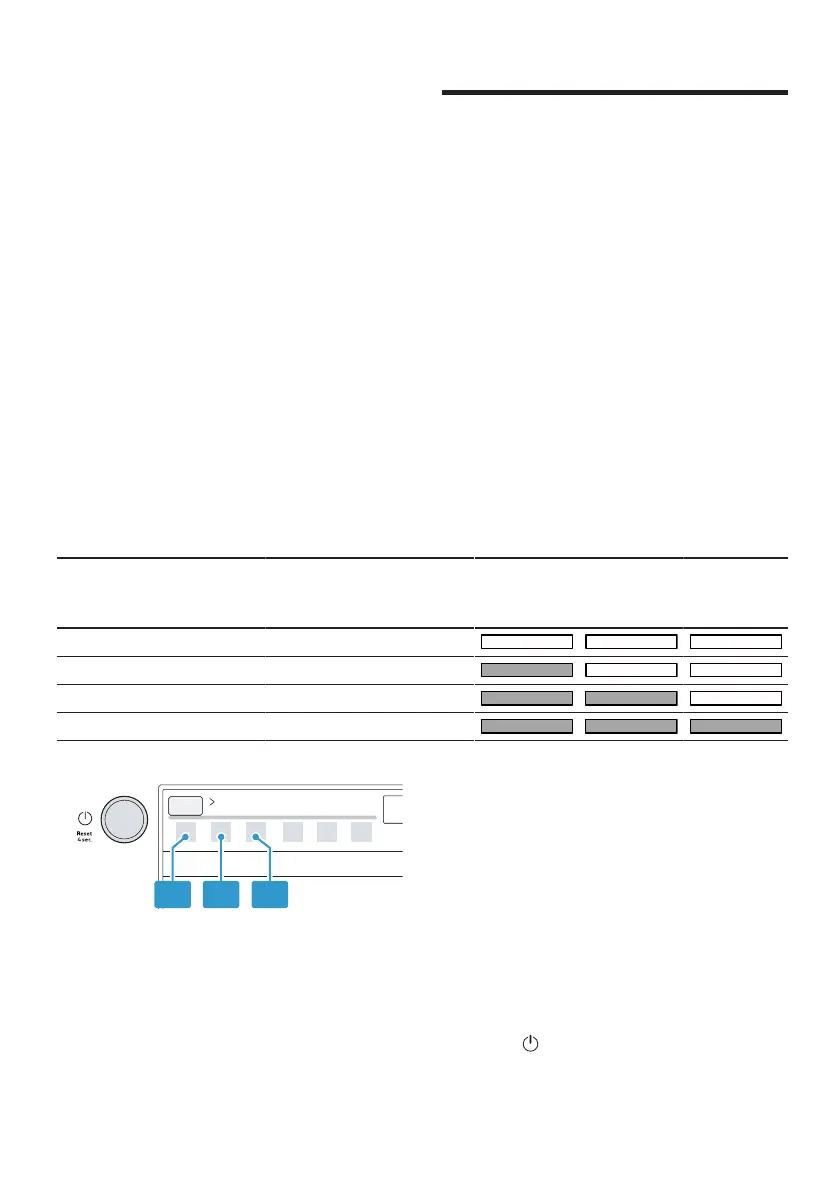
10.1 Overview of water hardness settings
You can find an overview of the water hardness values that can be selected
here.
You can find out how hard your water is from your local water company or by
using a water hardness tester.
Water
hardness
value °E
Hardness
range
mmol/l Level LED A LED B LED C
0 - 8 Soft 0 - 1.1 0
9 - 20 Medium 1.2 - 2.9 1
21 - 26 Hard 3.0 - 3.7 2
27 - 44 Hard 3.8 - 6.2 3
Note:Set the water hardness determ-
ined on your appliance.
→"Setting the water softening sys-
tem", Page22
With a water hardness of 0 - 8°E
you can dispense with special salt for
dishwashers and switch off the water
softening system.
→"Switching off the water softening
system", Page24
10.2 Setting the water soften-
ing system
Set the water hardness on your appli-
ance.
1. Determine the water hardness and
the appropriate setting value.
→"Overview of water hardness set-
tings", Page22
2. Press .



 To Next Page