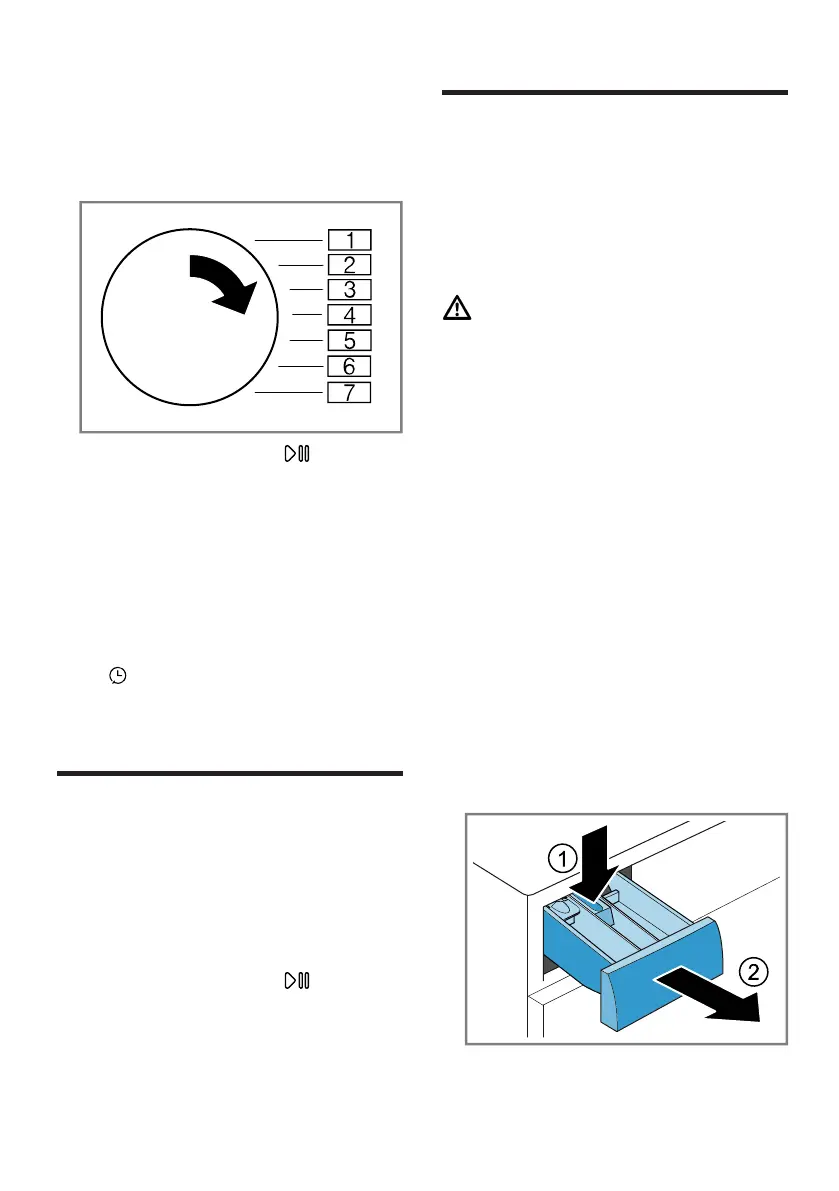
en Programme counter
32
15.2 Changing the basic set-
tings
1. Set the programme selector to po-
sition 1.
2. Press Start / Reload and, at
the same time, turn the pro-
gramme selector to position2.
a The display shows the current
value.
3. Set the programme selector to the
required position.
→"Overview of the basic settings",
Page31
4. To change the value, press Finish
in .
5. To save the changes, switch off
the appliance.
16 Programme counter
The program counter displays the
number of finished programmes.
16.1 Calling up the pro-
gramme counter
1. Set the programme to position1.
2. Press Start / Reload and set
the programme to position 2 at the
same time.
3. Set the programme to position5.
17 Cleaning and servi-
cing
To keep your appliance working effi-
ciently for a long time, it is important
to clean and maintain it carefully.
17.1 Cleaning the drum
CAUTION
Risk of injury!
Permanently washing at low temper-
atures and a lack of ventilation for
the appliance may damage the drum
and cause injury.
▶ Regularly run a programme for
cleaning the drum or wash at tem-
peratures of at least 60°C.
▶ Leave the appliance to dry after
every operation with the door
open, and leave the detergent
drawer to dry.
▶ Run the programme Cottons 90°
without laundry and using washing
powder that contains bleach.
17.2 Cleaning the detergent
drawer
1. Pull out the detergent drawer.
2. Press down on the insert and re-
move the detergent drawer.


 To Next Page