16
Getting to know your appliance
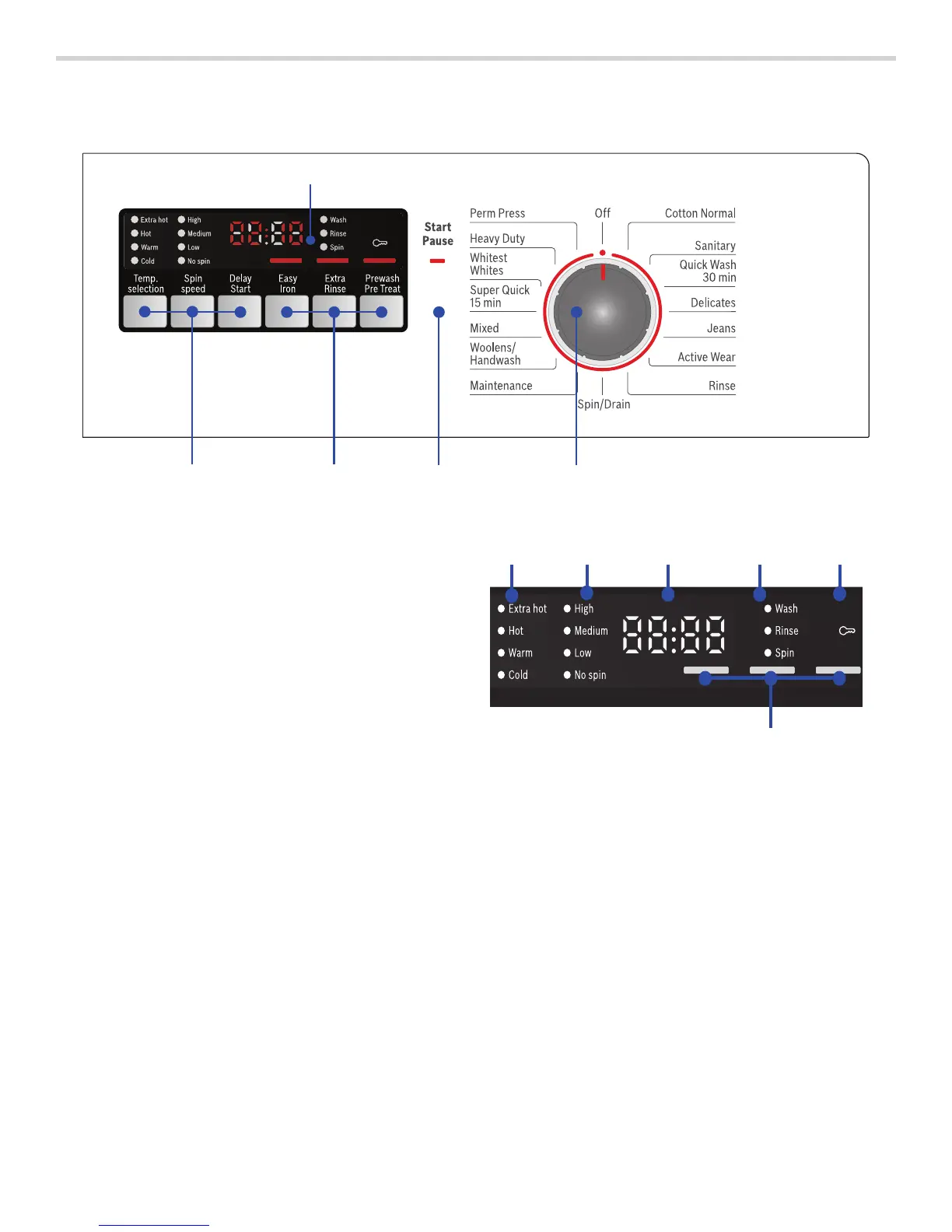
Control panel
Display field
+
(
Temp. selection, Spin Speed, Delay-Start
To change the default cycle settings.
Indicator lamp lights up if the setting is active.
0
Easy Iron, Extra Rinse, Prewash/Pre Treat
Additional option settings.
Indicator on = setting is active.
8
Start/Pause
▯ starts or pauses the selected cycle
▯ lit steady - cycle running, can be paused
▯ blinking - settings can be changed; cycle can
be started; door is locked (water may be hot);
cycle is in Pause mode
@
Cycle Selector for selecting a cycle and on/off
switch;
turns in both directions.
H
Display field for settings and information.
(
Selectable temperature ranges
Extra hot, Hot, Warm, Cold
0
Selectable spin speed ranges
High, Medium, Low, No spin
8
4 Digit Display:
▯ delay start-time
adjustable in 1h (hours) steps to 24 hours
▯ cycle duration
for example 2:40 (hours:minutes)
@
Cycle status sequence
H
Child lock
P
Indicator lamps for additional option settings
#+


 To Next Page