EasyManua.ls Logo

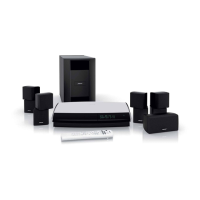
Bose DVD Player - User Manual

Bose DVD Player
185 pages
Print Icon
To Next Page IconTo Next Page
Loading...
LIFESTYLE
®
DVD
HOME ENTERTAINMENT SYSTEMS
Operating Guide
Guía de uso
Notice d’utilisation
®
with the VS-2 Video Enhancer

Table of Contents

Questions and Answers

  • G
    Gregory DeleonAug 21, 2025
    How to fix a Bose DVD Player remote that is not working properly?
    • A
      Andrea DaltonAug 21, 2025
      If your Bose DVD Player remote is behaving erratically, check the batteries and their polarity (+ and –). Ensure the input and output cords are securely connected, uncoiled, and extended. Verify the VS-2 cable is securely connected, uncoiled, and straightened as much as possible. If using a plasma-screen TV, keep the media center as far from the TV as possible. Try moving the remote or media center to avoid dead spots. Also, make sure the remote control and media center house codes match.
  • E
    Eric WalterSep 3, 2025
    Why my Bose DVD Player system doesn’t do anything?
    • B
      Barbara BrownSep 3, 2025
      If your Bose DVD Player system isn’t working, make sure the AC power cord is securely inserted into the power supply, and the power supply DC output cord is securely inserted into the VS-2. Also, ensure the VS-2 cable is securely connected between the VS-2 and the media center. Check that the Acoustimass® module and the power supply are fully plugged into operating AC wall outlets. Press a source button (CD/DVD, AM/FM, etc.) on the remote. Unplug the power supply for 60 seconds, then reconnect it.
  • D
    Dawn Smith DDSSep 1, 2025
    Why is there no sound coming from my Bose DVD Player?
    • L
      Lisa FitzgeraldSep 1, 2025
      If your Bose DVD Player has no sound, first, increase the volume and check if 'MUTE' is on. If so, press the Mute button on the remote. Verify the connections for external components and ensure you've selected the correct source. For CDs or DVDs, make sure the disc is correctly placed, label-side up. Connect the FM and AM antennas. Confirm the Acoustimass module's power switch is set to ON (I). Check the audio input cable connection to both the media center and Acoustimass module. Also, check connections between the cube speakers and the module. As a last resort, turn off the media center for 60 seconds, then on again.
  • C
    Charles GarzaAug 30, 2025
    How to fix distorted FM sound on Bose ?
    • A
      Amy BirdAug 30, 2025
      If the FM sound on your Bose DVD Player is distorted, adjust the antenna position to reduce interference.
  • R
    ronaldbrownAug 29, 2025
    What to do if a CD or DVD does not play correctly on Bose DVD Player?
    • E
      Elijah RoweAug 29, 2025
      If a CD or DVD does not play correctly on your Bose DVD Player, check the disc for scratches, fingerprints, smears, or dirt.
  • M
    Mary DavisAug 27, 2025
    What causes distorted sound on my Bose DVD Player?
    • L
      Laura ShepherdAug 27, 2025
      If the sound from your Bose DVD Player is distorted, ensure the speaker cables are not damaged and the connections are secure. Also, reduce the output level from any external components connected to the media center.
  • M
    Mary KingAug 26, 2025
    How to troubleshoot no sound from surround speakers on Bose DVD Player?
    • E
      emily03Aug 27, 2025
      If there's no sound from the surround speakers of your Bose DVD Player, select 5-speaker mode. Increase the Surround setting for the source being played. Make sure the video sound source is stereo- and surround-encoded, and the component used (TV, VCR, DVR, etc.) is stereo.
  • D
    Donald PowersAug 25, 2025
    How to fix no sound from center speaker on Bose DVD Player?
    • Z
      zenglishAug 25, 2025
      If there is no sound from the center speaker of your Bose DVD Player, ensure the center speaker cable is connected at both ends. Also, select 3- or 5-speaker mode.
  • B
    Brittany WhiteAug 22, 2025
    What to do if a disc does not play on my Bose DVD Player?
    • M
      Michael ChambersAug 23, 2025
      If your Bose DVD Player disc does not play, after pressing the CD/DVD button, wait a few seconds before pressing Play. Make sure the disc is properly inserted, label side up. Eject and re-load the disc. The CD may be dirty, or the CD may be defective or incompatible.

Summary

Safety Information

General Safety Precautions

Essential precautions regarding fire, electrical shock, and product usage.

System Controls and Operation

Remote and Media Center Interface

Overview of remote control buttons and media center controls and display.

Initial Setup and Media Playback

Guidance on turning on, playing DVDs, CDs, radio, and managing stored music.

Controlling External Sources and System Menus

Universal Remote Setup

How to configure the remote to control external devices.

System Menu Customization

Navigating and adjusting settings for audio, video, and remote control.

Advanced Features and Reference

Source Settings and uMusic System

Adjusting source settings and exploring the uMusic intelligent playback system.

System Maintenance and Troubleshooting

Procedures for maintenance, care, and solutions for common problems.

End User License Agreement

Legal Terms of Use

The legal agreement governing the use of the system's technology and software.

Bose DVD Player Specifications

General IconGeneral
BrandBose
ModelDVD Player
CategoryDVD Player
LanguageEnglish

Related product manuals