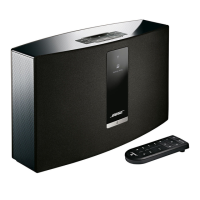
This document outlines the procedure for enabling a low-power standby mode on Bose SoundTouch 30 and SoundTouch 20 wireless speakers. This mode is designed to reduce power consumption by disabling key connectivity features.
Function Description:
The primary function of this procedure is to put the SoundTouch 30 or SoundTouch 20 wireless speaker into a low-power standby state. This state is achieved by systematically disabling the speaker's network connectivity (Wi-Fi and Ethernet) and clearing its Bluetooth pairing list. By doing so, the speaker is prevented from actively connecting to a network or maintaining Bluetooth connections, thereby reducing its power draw. This mode is particularly useful for users who wish to minimize energy consumption when the speaker is not in active use for extended periods, or when they want to temporarily disconnect the speaker from their network and Bluetooth devices without fully powering it off. The standby mode is a temporary state, as the speaker will automatically enter this mode within 2.5 hours after the specified deactivation steps are completed.
Important Technical Specifications (Implied):
While the document doesn't explicitly list technical specifications, it implies several key aspects of the speaker's design and functionality:
- Wireless Connectivity: The speakers support both Wi-Fi and Bluetooth connectivity, which are the primary features disabled to achieve low-power standby. This indicates their capability to stream audio wirelessly from various sources.
- Wired Connectivity: The mention of an "Ethernet cable" suggests that the speakers also support wired network connections, providing an alternative to Wi-Fi for network access. This option must be physically disconnected to enable standby.
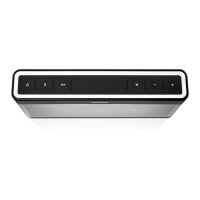
- Control Interface: The instructions refer to physical buttons on the speaker ("3," "Volume down," "Bluetooth button") and visual indicators ("Wi-Fi indicator," "Bluetooth indicator"). This confirms the presence of an on-device control panel for basic operations and status feedback.
- SoundTouch App Integration: The document notes that disabling Wi-Fi and Ethernet will prevent the system from being controlled by the "SoundTouch® app." This highlights the speaker's integration with a dedicated mobile application for advanced control and management, which relies on network connectivity.
- Power Management: The core concept of "low power mode" indicates that the speakers are designed with power efficiency in mind, offering a method to reduce energy consumption beyond a simple off state.
- Timed Standby Entry: The detail that the unit will enter standby mode "Within 2.5 hours" after deactivation steps implies an internal timer or power management logic that transitions the speaker to the low-power state automatically if no activity or re-activation occurs.
Usage Features:
The document outlines specific usage features related to enabling and disabling the standby mode:
- Enabling Standby:
- Ethernet Disconnection: Users must physically remove the Ethernet cable if one is connected. This is a manual step, indicating that the speaker does not automatically detect and disable wired connections.
- Wi-Fi Deactivation: Wi-Fi is deactivated by pressing and holding the "3" button and the "Volume down" button simultaneously until the Wi-Fi indicator turns off. This is a specific button combination, suggesting a dedicated command for Wi-Fi control.
- Bluetooth Deactivation (Clearing Pairing List): Bluetooth is deactivated by clearing the pairing list. This is achieved by pressing and holding the "Bluetooth button" until the Bluetooth indicator blinks white. Clearing the pairing list ensures that the speaker is not actively trying to connect to previously paired devices.
- Automatic Standby Entry: After these steps, the speaker will automatically enter standby mode within 2.5 hours. This provides a grace period before the low-power state is fully engaged.
- Reactivating Connectivity:
- Wi-Fi Reactivation: To reactivate Wi-Fi, users need to press and hold the "3" button and "Volume down" button again until the Wi-Fi indicator turns on. This uses the same button combination as deactivation, acting as a toggle.
- Bluetooth Reactivation: To reactivate Bluetooth, users must pair the speaker with a Bluetooth source. This implies that once the pairing list is cleared, the speaker is ready for a new pairing process to re-establish Bluetooth functionality.
Maintenance Features:
The document primarily focuses on operational procedures rather than traditional maintenance. However, the described process can be considered a form of "digital maintenance" or power management:
- Power Conservation: The low-power standby mode serves as a maintenance feature for energy conservation, helping to reduce electricity bills and environmental impact when the speaker is not in use.
- Troubleshooting (Implied): While not explicitly stated as troubleshooting, the ability to disable and re-enable Wi-Fi and Bluetooth can be a useful step in diagnosing and resolving connectivity issues. By resetting these connections, users can often clear temporary glitches.
- System Reset (Partial): Clearing the Bluetooth pairing list can be seen as a partial system reset for Bluetooth functionality, ensuring a clean slate for new connections.
- User Control Over Connectivity: The detailed steps empower users to manage their speaker's connectivity status actively, providing a level of control over its network presence and Bluetooth availability. This can be beneficial for privacy or to prevent unintended connections.
In summary, this document provides a clear, step-by-step guide for users of SoundTouch 30 and SoundTouch 20 wireless speakers to engage a low-power standby mode. This mode is achieved by disabling all forms of wireless and wired network connectivity, as well as clearing Bluetooth pairing data, ultimately leading to reduced power consumption. The instructions highlight the speaker's reliance on physical buttons for control and visual indicators for status feedback, while also acknowledging its integration with the SoundTouch app for full functionality. The process is designed to be reversible, allowing users to easily reactivate connectivity when needed.

 Need help?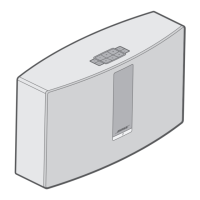




 To Next Page
 General