REGULATORY AND LEGAL INFORMATION
5
|
ENG
Low-power Radio-frequency Devices Technical Regulations: Without permission granted by the NCC, any
company, enterprise, or user is not allowed to change frequency, enhance transmiing power or alter original
characteristic as well as performance to an approved low power radio-frequency devices. The low power
radio-frequency devices shall not influence aircraft security and interfere legal communications; If found,
the user shall cease operating immediately until no interference is achieved. The said legal communications
means radio communications is operated in compliance with the Telecommunications Management Act. The
low power radio-frequency devices must be susceptible with the interference from legal communications or
ISM radio wave radiated devices.
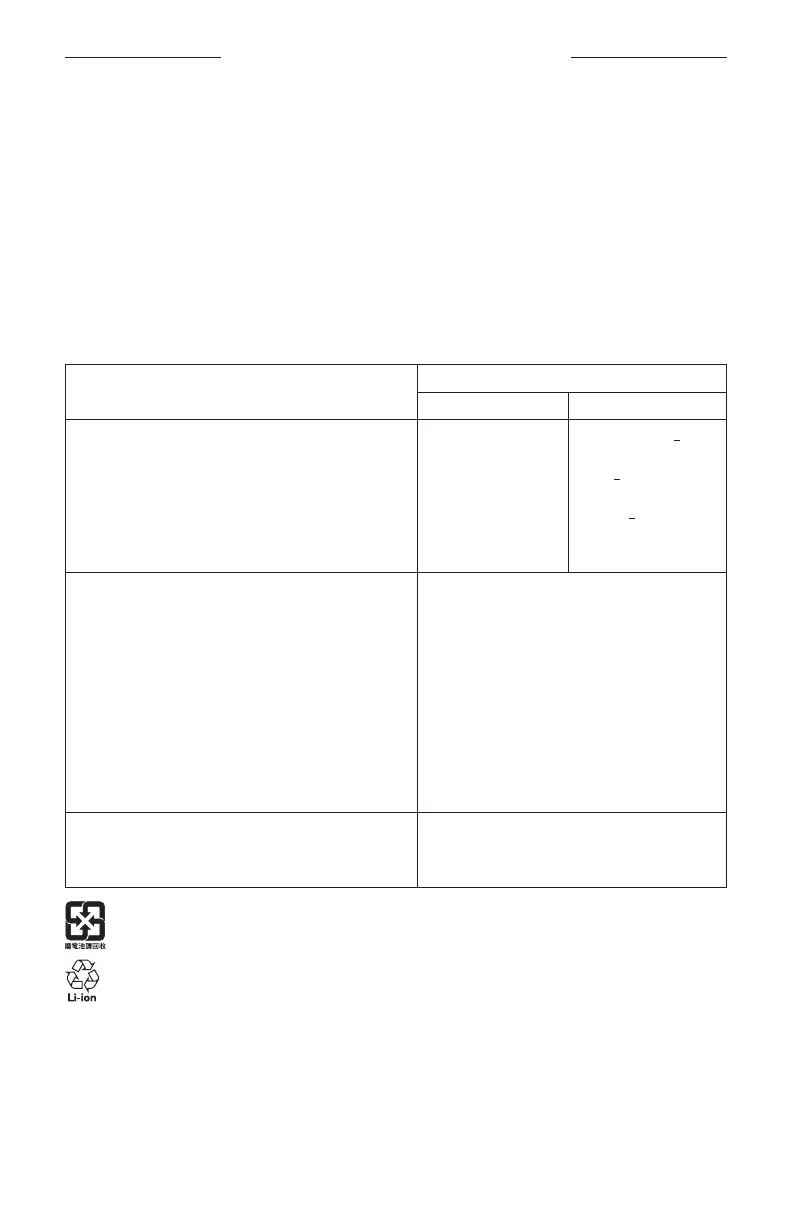
Product Power State Table
The product, in accordance with the Ecodesign Requirements for Energy Related Products Directive
2009/125/EC and the Ecodesign for Energy-Related Products and Energy Information (Amendment) (EU Exit)
Regulations 2020, is in compliance with the following norm(s) or document(s): Regulation (EC) No. 1275/2008,
as amended by Regulation (EU) No. 801/2013.
Required Power State Information
Power Modes
Standby Networked Standby
Power consumption in specified power mode, at
230V/50Hz input
Time after which equipment is automatically switched into mode
Power consumption in networked standby if all wired network
ports are connected and all wireless network ports are activated,
at 230V/50Hz input
< 0.5 W
< 2.5 hours
N/A
all network types < 2.0 W
< 20 minutes
< 2.0 W
Wireless network port activation/deactivation procedures.
Deactivating all networks will enable standby mode.
Wi-Fi®: Tap the Microphone buon atop the soundbar
until the microphone is turned on and the indicator light
is no longer a solid red. Activate Wi-Fi using the Bose
app. Deactivate Wi-Fi by pressing and holding the Mute
and Bluetooth buons on the remote simultaneously.
Bluetooth®: Tap the Microphone buon atop the
soundbar until the microphone is turned on and the
indicator light is no longer a solid red. Activate by pairing
with a Bluetooth source by pressing the Bluetooth
buon on the remote then selecting the soundbar in
your mobile device Bluetooth list or by using the Bose
app. Deactivate by clearing the pairing list by pressing
and holding the Bluetooth buon on the remote for
10 seconds.
Wired network port activation/deactivation procedures.
Deactivating all networks will enable standby mode.
Ethernet: Tap the Microphone buon atop the soundbar
until the microphone is turned on and the indicator light
is no longer a solid red. Activate by inserting the Ethernet
cable. Deactivate by removing the Ethernet cable.
Please dispose of used baeries properly, following local regulations. Do not incinerate.



 To Next Page