EasyManua.ls Logo

Boss Audio Systems BVB9358RC - User Manual

Boss Audio Systems BVB9358RC
21 pages
Print Icon
To Next Page IconTo Next Page
Loading...
USERS MANUAL
BV9358B
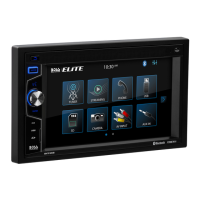
BLUETOOTH® | DVD/MP3/CD AM/FM RECEIVER
BLUETOOTH® | DVD/MP3/CD Y AM/FM RECEPTOR
1016
iPod® / iPhone® are trademarks of Apple, Inc. registered in the U.S. and other countries.
BOSS Audio Systems is not affiliated with Apple, Inc.
The Bluetooth® word mark and logos are registered trademarks owned by Bluetooth SIG, Inc. and any use of such marks by BOSS Audio Systems is under license.
Other trademarks and trade names are those of their respective owners.
iPod® / iPhone® son marcas comerciales de Apple, Inc., registradas en los EE.UU. y otros países.
BOSS Audio Systems no está afiliado con Apple, Inc.
Las marcas registradas marca Bluetooth® y sus logotipos son marcas registradas propiedad de Bluetooth SIG, Inc. y cualquier uso de dichas marcas por parte de
BOSS Audio Systems es bajo licencia. Otras marcas y nombres comerciales pertenecen a sus respectivos propietarios.
USERS MANUAL
BV9358B
BLUETOOTH®
DVD/MP3/CD AM/FM RECEIVER
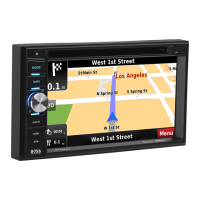
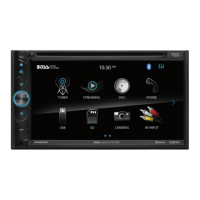
FEATURING 6.2" (157mm) WIDESCREEN TOUCHSCREEN
DIGITAL TFT LED MONITOR
BLUETOOTH®
DVD/MP3/CD Y AM/FM RECEPTOR
CON PANTALLA DIGITAL TFT LED DE 6.2" (157mm)
BOSS Audio Systems
3451 Lunar Court • Oxnard, CA 93030
www.bossaudio.com
800-999-1236 US Toll-free
805-988-0192 US Local Main
tech support: www.bossaudio.com/support/technical-support

Questions and Answers

  • S
    susandeanAug 17, 2025
    How to fix Boss Audio Systems BVB9358RC when it doesn't turn on?
    • R
      Rose LopezAug 17, 2025
      If your Boss Audio Systems Receiver isn't powering on and producing no sound, there are a couple of potential reasons. First, the fuse might be blown. Replace it with a fuse of the same amperage. If it blows again, it is recommended to consult your store of purchase. Another possibility is incorrect wiring. In this case, it is recommended to consult your local retailer.
  • S
    Stephen SanchezAug 20, 2025
    What to do if Boss Audio Systems BVB9358RC Receiver has no power?
    • W
      William ThompsonAug 20, 2025
      If your Boss Audio Systems Receiver isn't getting any power, make sure the car ignition is on. If the power supply is properly connected to the car accessory switch, turn the ignition key to “ACC”. Also, check the fuse; if it's blown, replace it.
  • R
    Robert MedinaAug 22, 2025
    Why is there no sound from my Boss Audio Systems Receiver?
    • N
      Nathaniel CamachoAug 22, 2025
      If you're not getting any sound from your Boss Audio Systems Receiver, start by checking the volume level; make sure it isn't set to the minimum. Also, verify that all wiring connections are properly connected.
  • T
    Timothy MooreAug 25, 2025
    What to do if my Boss Audio Systems Receiver disc cannot be read?
    • K
      kaitlyn77Aug 26, 2025
      If your Boss Audio Systems Receiver can't read discs, first ensure that you're inserting the disc with the label facing upward. If that's not the issue, the disc might be extremely dirty or defective; try cleaning it or playing a new one. Also, if the temperature inside the car is too high, cool off the car until the ambient temperature returns to normal.
  • K
    Karen Brown PhDAug 28, 2025
    How to stop Boss Audio Systems BVB9358RC Receiver sound from skipping?
    • Z
      zsanchezAug 28, 2025
      If the sound skips on your Boss Audio Systems Receiver, it could be due to the installation angle being more than 30 degrees. Adjust the installation angle to less than 30 degrees. Also, the disc might be extremely dirty or defective, so try cleaning the compact disc or playing a new one.
  • P
    Philip GarzaAug 30, 2025
    What to do if buttons don't work on Boss Audio Systems BVB9358RC?
    • D
      Darren MedinaAug 31, 2025
      If nothing happens when you press the buttons on your Boss Audio Systems Receiver and the display is not accurate, the unit may need to be reset. Use a pen or toothpick to press and release the Reset button. Also, the panel or main unit connectors could be dirty. Wipe the dirt off with a soft cloth moistened with cleaning alcohol.
  • T
    thomaswestSep 2, 2025
    Why is there no sound output from Boss Audio Systems BVB9358RC with amplifiers?
    • M
      marygordonSep 2, 2025
      If you're experiencing no sound output when operating your Boss Audio Systems Receiver with amplifiers or a power antenna attached, it could be due to the power antenna lead being shorted to ground, excessive current being required, or remote issues with the amplifiers or power antenna. Here’s what to do: 1. Turn off the unit. 2. Remove all wires attached to the power antenna lead and check each wire for a possible short to ground using an ohm meter. 3. Turn on the unit. 4. Reconnect each amplifier remote wire to the power antenna lead one by one. If the amplifiers turn off before all wires are attached, use an external replay to provide remote-on voltage (excessive current required).
  • D
    Daniel MelendezSep 5, 2025
    How to fix Boss Audio Systems Receiver when radio doesn't work?
    • I
      iknappSep 5, 2025
      If the radio on your Boss Audio Systems Receiver isn't working, and the automatic station selection isn't working either, the antenna cable might not be connected, or the signals might be too weak. Insert the antenna cable firmly and select a station manually.
  • K
    Kyle AustinSep 8, 2025
    What to do if Boss Audio Systems BVB9358RC sound is bad after start because of humidity?
    • S
      Stephanie PollardSep 8, 2025
      If the sound quality of your Boss Audio Systems Receiver is poor right after you turn it on, and you suspect it's due to humidity, water droplets may have formed on the internal lens when the car was parked in a humid place. Let it dry for about 1 hour with the power on.
  • C
    Carl HooverSep 12, 2025
    What to do if Boss Audio Systems Receiver disc cannot be loaded?
    • J
      Jasmine WaltersSep 12, 2025
      If your Boss Audio Systems Receiver disc cannot be loaded, it may be due to the presence of a disc inside the player. Remove the disc in the player, then put a new one upward.

Summary

Button Description

1. MIC

Microphone input details and optimal receiving range.

2. EJECT Button

Functionality for ejecting discs and auto-reinsertion.

3. MENU BUTTON

Button to return to the main menu.

4. BAND BUTTON

Switches between FM and AM radio bands.

5. POWER; MUTE Button; VOL

Controls power, mute, and volume adjustment.

6. USB Slot; SD;MMC CARD Slot; AUX-IN Jack

Ports for connecting USB, SD cards, and external audio.

7. DISC Slot

Slot for inserting discs for playback.

8. Info Display

LCD screen for displaying operational information.

9. Remote Sensor

Infrared receiver for the remote control signal.

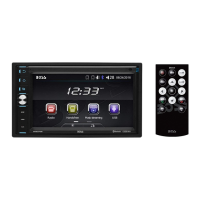
Remote Control

1. MODE button

Selects operating modes such as radio, disc, USB, and Bluetooth.

2. POWER button

Powers the unit on or off.

3. UP button

Navigates cursor upwards in menus.

4. BAND;RDM;CLEAR button

Changes radio bands or controls random/clear functions.

5. ENTER

Confirms selections and enters menu options.

6. LEFT button

Navigates cursor leftwards in menus.

7. DOWN button

Navigates cursor downwards in menus.

8. EJECT button

Ejects the disc from the player.

9. STEREO;MONO;* button

Switches between stereo and mono audio modes.

Main Menu

Radio Operation

Instructions for operating the radio tuner interface.

DVD Operation

DVD Player

Guidance on using the DVD playback features.

Settings Operation

Setting Control

Customizing device settings for personal needs.

Bluetooth Operation

Calling Button

Controls phone calls via Bluetooth.

Voice Transfer

Mechanism to switch calls between phone and unit.

Music Mode

Enables music playback from a Bluetooth-enabled device.

Pairing Mode

Process for pairing mobile phones with the unit.

Aux in

AUX-IN MODE

Connects external audio sources to the unit.

Notes of Disc

Handling discs

Proper methods for holding and touching discs.

Cleaning discs

Guidelines and methods for cleaning discs.

Storing discs

Recommendations for storing discs properly.

Troubleshooting

General Issues

Common operational problems and their solutions.

Boss Audio Systems BVB9358RC Specifications

General IconGeneral
BrandBoss Audio Systems
ModelBVB9358RC
CategoryReceiver
LanguageEnglish

Related product manuals