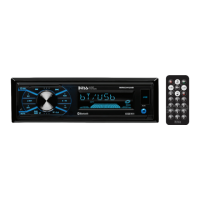
The BOSS Audio Systems MR634UAB is a fully marinized, Bluetooth-enabled, MP3-compatible digital media AM/FM receiver designed for marine environments. This device serves as a central audio unit, allowing users to play music from various sources, including Bluetooth-connected devices, USB drives, and AM/FM radio. Its marinized design ensures durability and resistance to harsh marine conditions.
Function Description:
The MR634UAB functions as a versatile audio receiver, offering multiple input options and control features. It supports Bluetooth for wireless audio streaming, allowing users to connect their smartphones or other Bluetooth-enabled devices to play music. The unit also features a USB port for playing MP3/WMA files directly from a USB stick, making it compatible with a wide range of digital music libraries. An auxiliary input jack provides an additional option for connecting external audio devices via a 3.5 mm stereo plug.
For radio enthusiasts, the receiver includes an AM/FM tuner with automatic and manual station tuning, as well as preset memory for storing favorite stations. It supports both USA and European frequency bands, making it adaptable for use in different regions. The unit features a detachable front panel for security, which can be removed when not in use.
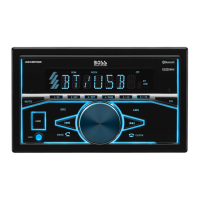
Control over the device is managed through a combination of buttons and a rotary volume knob on the front panel. Key functions include power on/off, source selection, volume adjustment, track navigation (for USB and Bluetooth), radio tuning, and various menu options for sound settings (e.g., bass, treble, balance, fader, loudness, EQ presets). A push-to-talk button enables voice assistant capability via Bluetooth, enhancing hands-free operation. The LCD display provides visual feedback on the current mode, track information, radio frequency, and clock.
The MR634UAB also comes with a remote control, offering convenient operation from a distance. The remote duplicates many of the front panel controls, including power, volume, band selection, track navigation, and preset recall.
Important Technical Specifications:
- Power Supply Requirement: DC 12V
- Maximum Power Output: 50W x 4 channels, providing ample power for marine speakers.
- Speaker Impedance: 4 - 8 Ohm, compatible with standard marine speakers.
- Unit Dimensions (WxHxD): 7.0 x 2.0 x 2.76 inches (178 x 50 x 70 mm), a compact size suitable for dashboard installation.
- Weight: 0.88 Lb (0.4 kg), lightweight for easy handling.
- Fuse: 10 A, for circuit protection.
- FM Frequency Range:
- USA: 87.5 MHz - 107.9 MHz (200 KHz channel step)
- Europe: 87.5 MHz - 108.0 MHz (50 KHz channel step)
- AM Frequency Range:
- USA: 530 KHz - 1710 KHz (10 KHz channel step)
- Europe: 522 KHz - 1620 KHz (9 KHz channel step)
- USB:
- Usable Audio Formats: MP3/WMA
- USB Port Type: 2.0
- USB Charging: 5V/1A, allowing for charging of connected devices.
- Pre-amp Output: Front and Rear, for connecting external amplifiers.
- Frequency Response: 20 Hz - 20 KHz
- S/N Ratio: 60dB
- Bluetooth (BT):
- BT Profile Supports: Headset, Handsfree, A2DP (Advanced Audio Distribution Profile), and AVRCP (Audio/Video Remote Control Profile).
- Range of Frequency: 2.4GHz.
Usage Features:
- Fully Marinized: Designed to withstand the marine environment, offering protection against elements like salt, moisture, and UV exposure.
- Bluetooth Connectivity: Seamless wireless audio streaming from smartphones and other Bluetooth-enabled devices. Supports hands-free calling with a built-in microphone and push-to-talk functionality for voice assistants.
- USB Playback: Direct playback of MP3/WMA files from USB drives, with support for track navigation, repeat, and random playback. The USB port also provides 5V/1A charging for mobile devices.
- AM/FM Tuner: High-quality radio reception with 18 FM and 12 AM preset stations, manual and automatic tuning, and switchable USA/Europe frequency bands.
- Auxiliary Input: A 3.5mm stereo jack for connecting non-Bluetooth audio sources.
- Detachable Front Panel: Enhances security by allowing the user to remove the front panel when the unit is not in use.
- General Operation Controls: Intuitive controls for source selection, volume adjustment, mute, clock setting, and various audio settings (bass, treble, balance, fader, EQ presets, loudness).
- Remote Control: Provides convenient operation from a distance, replicating most front panel functions.
- Installation Flexibility: Standard single-DIN chassis design for easy installation into most dashboards. Includes a mounting collar and sleeve.
- Wiring Connections: Clearly labeled wiring harness for straightforward connection to power, ground, speakers, and antenna. Includes a 10A fuse for protection.
Maintenance Features:
- Lithium Battery Cell Warnings: Important safety information regarding the remote control's lithium battery, including warnings against throwing cells into fire, keeping them out of reach of children, and proper disposal.
- General Use Cautions: Guidelines for safe operation, such as avoiding extreme temperatures, ensuring proper ventilation, and not attempting to repair the unit if damaged.
- Troubleshooting Guide: A comprehensive section in the manual to help users diagnose and resolve common issues, including problems with power, wiring, fuse, volume, sound skips, operation keys, radio reception, and USB connectivity.
- Installation Procedures: Detailed instructions for proper installation, including mounting the unit and making correct electrical connections, which are crucial for the device's longevity and performance.
- Cleaning: While not explicitly detailed as a maintenance feature, the marinized design implies a degree of resistance to environmental factors, suggesting that routine cleaning with appropriate marine-safe products would be beneficial to maintain its appearance and functionality.
- Fuse Replacement: The unit is protected by a 10A fuse, and the manual provides guidance on checking and replacing it if necessary, which is a common maintenance task for electrical devices.
- Reset Function: A reset button is available to restore the unit to its factory default settings, which can be useful for resolving software-related issues or clearing unwanted configurations.

 Need help?
 General

 To Next Page