BOSS 120-220 Quickstart Guide Windows Page of 60011R051 6
120-220 Quickstart Guide for Windows
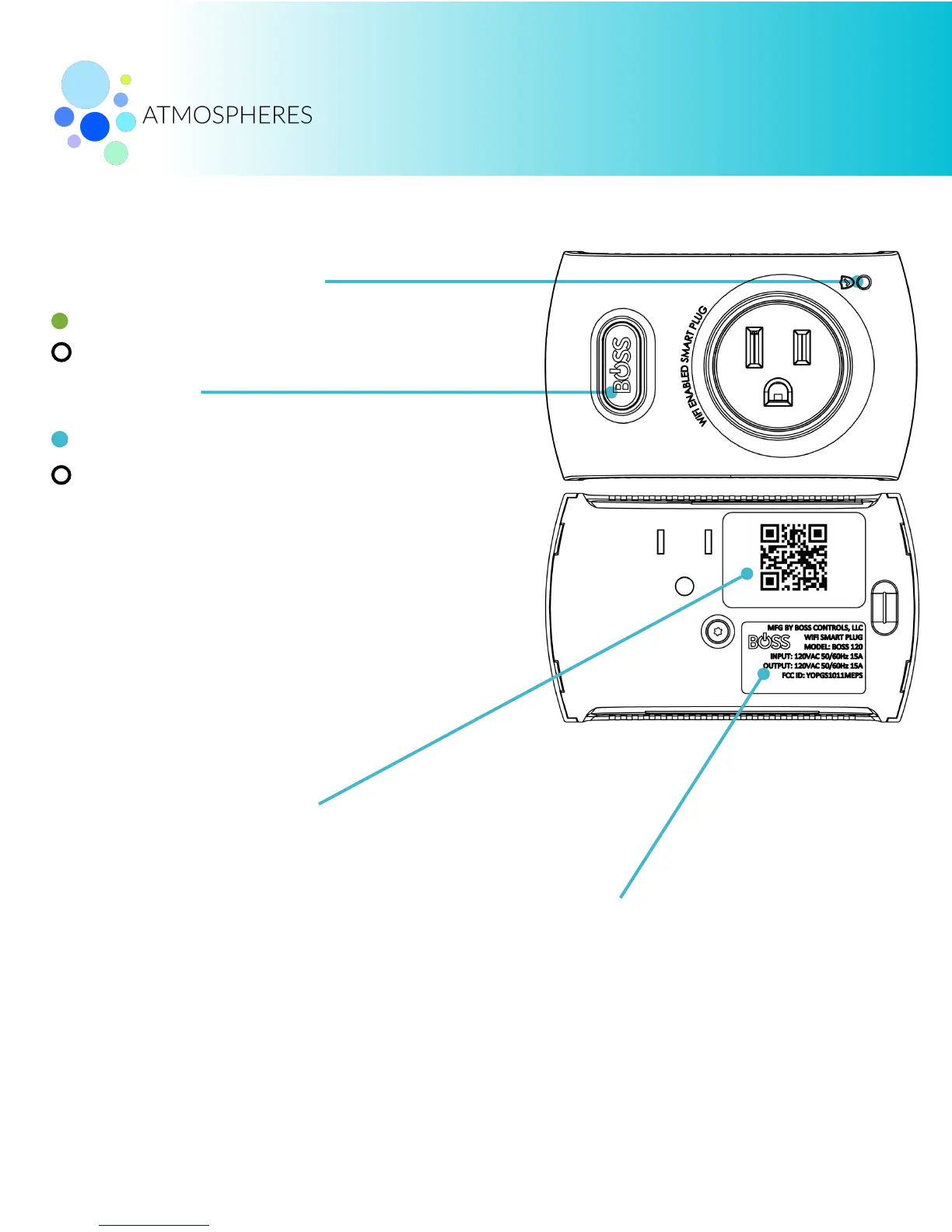
Surge Protection Indicator
(ON) Surge Protection is Working.
Smart Plug is ON and will power load.
Smart Plug is OFF and will not power load.
Press power button to manually turn Smart Plug ON-OFF.
Factory Reset:
•
Hold power button down firmly (≈ 10s) until blue light
flashes and release button.
•
Device will restart to factory settings (Factory Default
mode).
•
Device in Factory Default mode will have to be re-
connected to your WiFi network but will not need to be re-
added to your BOSS account.
Important electrical information listing
voltage and max amperage information.
(OFF) Device has absorbed a surge and protection is off.
Use QR Code to add and provision Smart Plug
from a mobile device using iOS or Android.


 To Next Page