The
Description
of
the
Wires
Connection
Fixing Screw Bolt
Wiring Connecting
Socket
1
Wiring
og
~c
o~
~o~
~
00
~o
~~.~
..
~o
~
-=
~
GREEN
Black ,....-----, Radio Antenna)<lck Black
Connecting Socket 2
PAR~~iT~NE
REVERSAL LINE
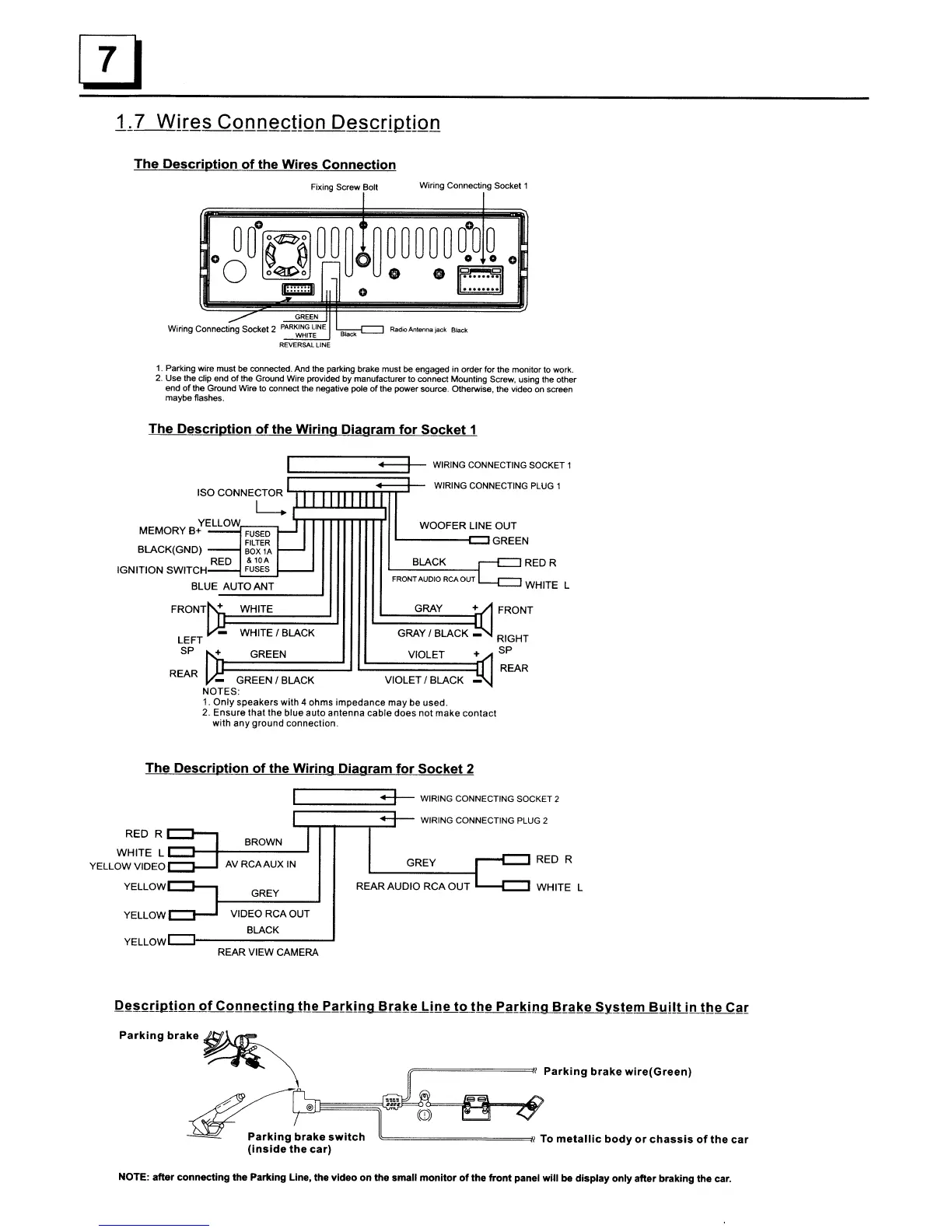
1.
Parking wire
must
be connected. And the parking brake
must
be engaged in order for the
monitor
to
work.
2.
Use
the
dip
end
of
the Ground Wire provided by manufacturer
to
connect Mounting Screw, using the
other
end
of
the Ground Wire
to
connect the negative pole
of
the
power
source. Otherwise, the video on screen
maybe
flashes.
The
Description
of
the
Wiring
Diagram
for
Socket
1
WOOFER LINE OUT
'------c:JGREEN
WHITE L
RED R
FRONT
+
GRAY
BLACK
FRONTAUDIO RCA
OUT
~
WIRING
CONNECTING
SOCKET
1
e~~~~~~~~~
WIRING
CONNECTING
PLUG 1
YELLOW
MEMORY B+
FUSED
FILTER
BLACK(GND)
BOX
lA
RED &
lOA
IGNITION SWITCH
FUSES
BLUE AUTO ANT
FRONT + WHITE
GREEN
I BLACK VIOLET I BLACK
NOTES:
1.
Only
speakers with 4 ohms impedance
may
be used.
2.
Ensure
that
the blue auto antenna
cable
does not
make
contact
with
any
ground connection.
LEFT
SP +
REAR
WHITE I BLACK
GREEN
GRAY
I BLACK _
VIOLET +
RIGHT
SP
REAR
The
Description
of
the
Wiring
Diagram
for
Socket
2
r--t:=:::J
RED R
GREY
REAR AUDIO RCA
OUT
.....
-t:=::J
WHITE L
:======:3-~
WIRING
CONNECTING
SOCKET
2
WIRING
CONNECTING
PLUG 2
GREY
BROWN
AVRCAAUX
IN
RED R
C:l-.....,
WHITE
L
C:l--+--------I
YELLOW
VIDEOC:::J-.J
YELLOWC:::J-,
YELLOW _ .....
_.J
VIDEO RCA OUT
BLACK
YELLowLJ--------~
REAR VIEW CAMERA
/F========I
Parking
brake
wire(Green)
P"kI."
.,
...
~
~~@
~~~~
--=-
Parking
brake
switch
I To
metallic
body
or
chassis
of
the
car
(Inside
the
car)
NOTE: after connecting
the
Parking Line, the video on the small
monitor
of
the
front
panel
will
be display only after braking the car.



 To Next Page