EasyManua.ls Logo

Boss BX-8 - Page 9

Boss BX-8
16 pages
Print Icon
To Next Page IconTo Next Page
To Previous Page IconTo Previous Page
Loading...
m
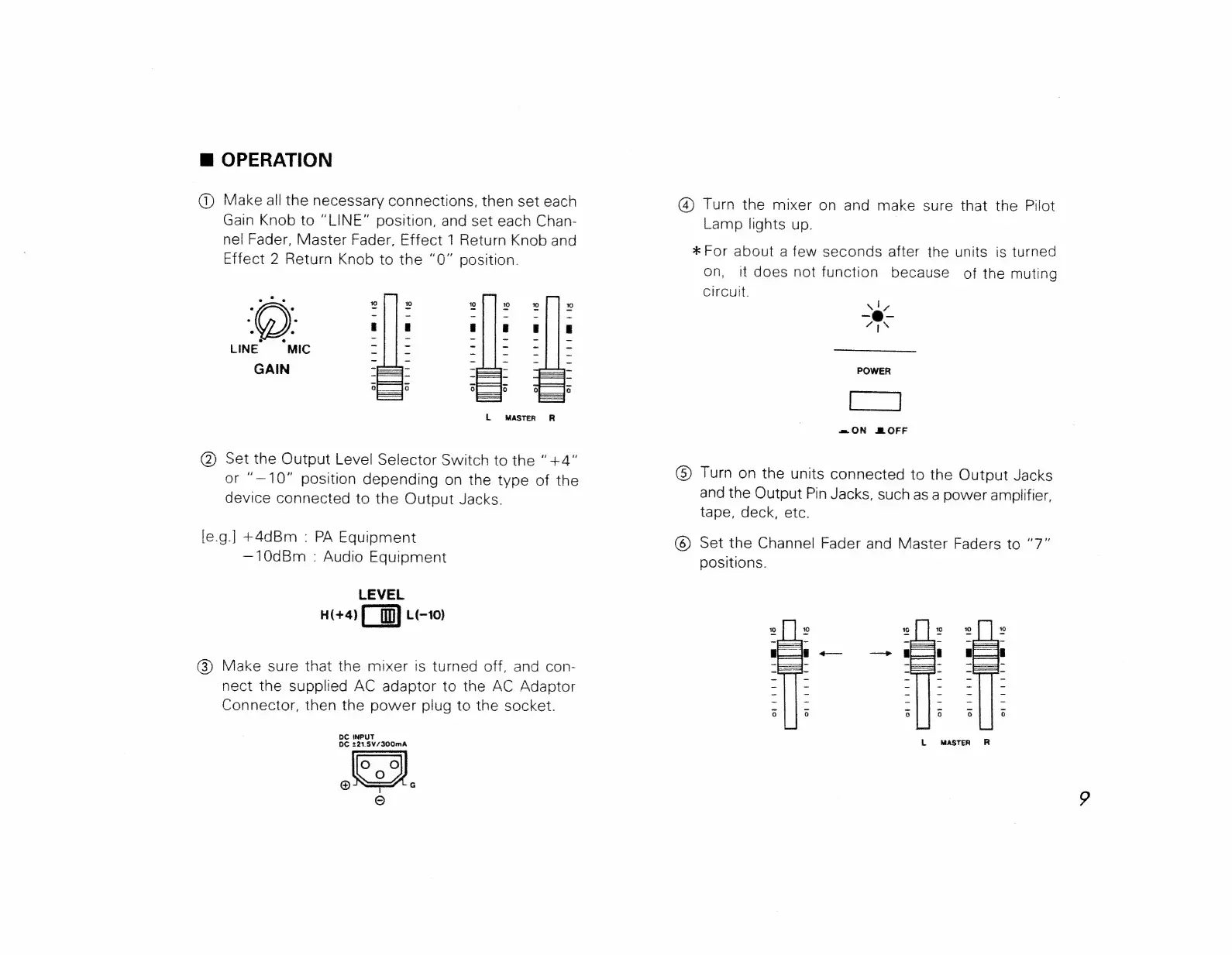
OPERATION
@
Make
all
the
necessary
connections,
then
set
each
(4)
Turn
the
mixer
on
and
make
sure
that
the
Pilot
Gain
Knob
to
“LINE”
position,
and
set
each
Chan-
Lamp
lights
up.
|
Fader
ce
r,
Eff
1
Return
Knob
an
wes
nel
Fader,
Master
Fader,
E
ee
7
.
S
ange
*
For
about
a
few
seconds
after
the
units
is
turned
Effect
2
Return
Knob
to
the
“0”
position.
;
.
on,
it
does
not
function
because
of
the
muting
2
circuit.
10
10
10
10
10
10
ly,
2
Situs
|
eis
-@-
:
:
a|
fio
si
is
alle
a
LINE
“MIC
a
|
es
Sikes.
eee
GAIN
—=-
eS
-—--
POWER
=mON
BOFF
(2)
Set
the
Output
Level
Selector
Switch
to
the
“+4”
:
or
“—10"
position
depending
on
the
type
of
the
@
Turn
on
the
units
connected
to
the
Output
Jacks
device
connected
to
the
Output
Jacks.
and
the
Output
Pin
Jacks,
such
as
a
power
amplifier,
tape,
deck,
etc.
le.g.]
+4dBm
:
PA
Equipment
©
Set
the
Channel
Fader
and
Master
Faders
to
“7”
—10dBm
:
Audio
Equipment
positions.
LEVEL
H(+4)
L(-10)
cae
so
wots
@)
Make
sure
that
the
mixer
is
turned
off,
and
con-
=
S-
=.
nect
the
supplied
AC
adaptor
to
the
AC
Adaptor
Ss
ie
oe
Ses.
“Say
(22
Connector,
then
the
power
plug
to
the
socket.
aie
a
eee
es
Be
221.5¥/300mA
L
MASTER
R
oJ
i
1S)
G

Related product manuals