EasyManua.ls Logo

Boss Chorus CE-3 - Radio and Television Interference; CE-3 Controls and Functions; Effect Adjustment Controls; Connection Jacks

Boss Chorus CE-3
2 pages
Print Icon
To Previous Page IconTo Previous Page
Loading...
RADIO
AND
TELEVISION
INTERFERENCE
“Warning
-
This
equipment
has
bean
verifiad
to
comply
with
tha
limits
for
a
Class
B
computing
devico,
pursuant
to
Subpart
J,
of
Part
15,
of
FCC
rules
Operation
with
non
certified
or
non
verified
equip
mentis
likely
to
result
in
interference
to
radio
and
TV
reception.’
The
equipment
described
in
this
manual
generates
and
uses
radio-frequency
energy
If
it
is
not
installed
and
used
properly,
that
is,
tn
strict
accordance
with
our
instructions,
it
may
cause
interfer
ence
with
radio
and
television
reception
This
equipment
has
bean
tested
and
found
to
comply
with
tha
limits
for
a
Class
B
computing
dovicoa
in
secordoaneca
with
the
spocifieations
in
Subpart
J,
of
Part
15,
of
FCC
Aulas
Those
tulos
ara
designed
to
provide
reasonable
protection
against
such
a
interference
in
a
residential
installation
However,
there
is
no
guarantee
that
the
interference
will
not
occur
in
a
particular
installation,
If
this
equipment
does
causa
interfarence
to
radio
or
television
reception,
which
can
be
determinad
by
turning
the
equipment
on
and
off,
the
user
is
encouraged
to
try
to
correct
the
interference
by
the
following
measure:
e
Disconnect
other
devices
and
thor
input/output
cables
one
ato
tine
If
the
mtarferenca
stops,
it
is
caused
by
either
the
other
device
or
its
I/O
cable.
These
devices
usually
require
Roland
designated
shielded
I/O
cables.
For
Roland
devices,
you
can
obtain
the
proper
shielded
cable
from
your
dealer,
For
non
Roland
devices,
contact
the
manufacturer
or
deater
for
assistance.
breakers
or
fuses.)
TV.
22)
If
your
equipment
does
cause
interference
to
radio
or
television
reception,
you
can
try
to
correct
the
interference
by
using
one
or
more
of
the
following
measures:
@
Turn
the
TV
or
radio
antenna
until
the
interference
stops.
Move
the
equipment
to
one
side
or
the
other
of
the
TV
or
radio
Move
the
equipment
farther
away
from
the
TV
or
radio.
Plug
the
equipment
into
an
outlet
that
is
on
a
different
circuit
than
the
TV
or
radio.
(That
is,
make
certain
the
equipment
and
the
radio
or
television
set
are
on
circuits
controlled
by
different
circuit
e
Consider
installing
a
rooftop
television
antenna
with
coaxial
cable
lead-in
between
the
antenna
and
If
necessary,
you
should
consult
your
dealer
or
an
experienced
radio/television
technician
for
additional
suggestions.
You
may
find
helpful
the
following
booklet
prepared
by
the
Federal
Com-
munications
Commission:
"How
to
Identify
and
Resolve
Radio
TV
Interference
Problems”
This
booklet
is
available
from
the
US
Government
Printing
Office,
Washington,
D.C.,
20402,
Stock
No.
004.:000.00345.4
OUTPUT
jacks
A
&
B
These
are
output
jacks
to
connect
the
ampli-
fier
to.
AC
Adaptor
jack
This
is
to
connect
the
AC
Adaptor
(BOSS
ACA
series)
to.
Pedal
Switch
This
Pedal
Switch
is
used
to
turn
the
effect
on
or
off.
*
Adopting
the
FET
switching
system,
this
Pedal
Switch
is
released
from
the
click
noise,
which
makes
even
more
successful
studio
recording
possible.
Indicator
If
you
press
the
Pedal,
this
Indicator
lights
up,
displaying
that
the
effect
is
on.
It
goes
out
in
pressing
it
again
showing
that
the
effect
is
off
*1f
the
indicator
fails
to
light
or
become
dim-
mer,
replace
the
battery
with
a
new
one.
Thumb
Screw
Loosen
this
screw
when
replacing
the
battery.
*
Do
not
remove
the
screw
from
the
Pedal.
OPERATION
Set
the
knobs
as
shown
left.
2
Press
the
Pedal
Switch
down,
and
the
Indicator
lights
up
displaying
that
the
effect
is
on.
It
goes
out
in
pressing
it
again
showing
that
the
effect
is
off.
If
the
Indicator
fails
to
light
up
or
becomes
dimmer,
replace
the
battery
with
a
new
one.
3
Adjust
the
rate
of
the
effect
by
using
the
RATE
knob.
4
Adjust
the
depth
of
the
effect
by
using
the
DEPTH
knob.
*As
you
turn
the
RATE
knob
clock-
wise,
the
depth
of
the
effect
will
grow
deeper.
5
Select
the
mode
you
like
with
the
STEREO
MODE
switch.
RATE
knob
This
knob
is
to
control
the
rate
of
the
chorus
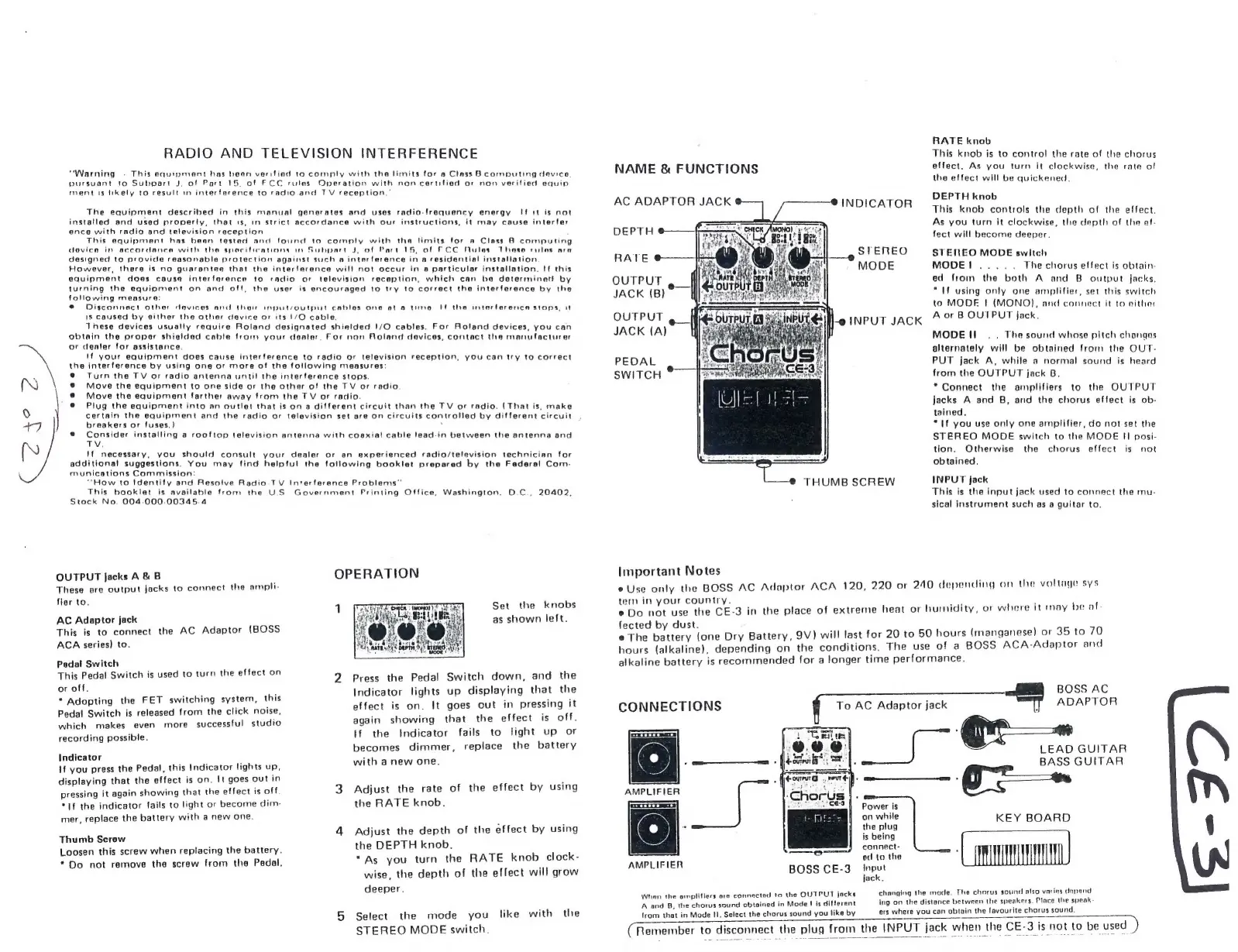
NAME
&
FUNCTIONS
effect.
As
you
turn
it
clockwise,
the
rate
of
the
effect
will
be
quickened.
DEPTH
knob
AC
ADAPTOR
JACK
INDICATOR
This
knob
controls
the
depth
of
the
effect.
As
you
turn
it
clockwise,
the
depth
of
the
ef-
fect
will
become
deeper.
RATE
U
i
i
STEREO
STEREO
MODE
switeh
i
Fyi
MODE
MODE!.....
The
chorus
effect
is
obtain-
ed
from
the
both
A
and
B
output
Jacks.
"If
using
only
one
amplifier,
set
this
switch
to
MODE
I|
(MONO),
and
connect
it
to
either
OUTPUT
“a:
jigi
-o
INPUT
JACK
A
or
B
OUTPUT
jack.
JACK
(A)
i
OUTPUT
JACK
(B)?
MODE!
.
.
The
sound
whose
pitch
changes
alternately
will
be
obtained
from
the
OUT-
PUT
jack
A,
while
a
normal
sound
is
heard
from
the
OUTPUT
jack
B.
*
Connect
the
amplifiers
to
the
OUTPUT
jacks
A
and
B,
and
the
chorus
effect
is
ob-
tained.
“If
you
use
only
one
amplifier,
do
not
set
the
STEREO
MODE
switch
to
the
MODE
II
posi-
tion.
Otherwise
the
chorus
effect
is
not
obtained.
THUMB
SCREW
INPUT
jack
This
is
the
input
jack
used
to
connect
the
mu-
sical
instrument
such
as
a
guitar
to.
PEDAL
SWITCH
Important
Notes
e
Use
only
the
BOSS
AC
Adaptor
ACA
120,
220
or
240
depending
on
the
voltage
sys
tem
in
your
country.
-
f
è
Do
not
use
the
CE-3
in
the
place
of
extreme
heat
or
humidity,
or
where
it
may
be
al-
fected
by
dust.
e
The
battery
(one
Dry
Battery,
9V)
will
last
for
20
to
50
hours
(manganese)
or
35
to
70
hours
(alkaline),
depending
on
the
conditions.
The
use
of
a
BOSS
ACA-Adaptor
and
alkaline
battery
is
recommended
for
a
longer
time
performance.
BOSS
AC
To
AC
Adaptor
jack
|
ADAPTOR
SS
LEAD
GUITAR
BASS
GUITAR
co
T
CONNECTIONS
Power
is
onnie
KEY
BOARD
the
plug
$
is
being
connect-
2
od
to
the
AMPLIFIER
BOSS
CE-3
Input
jack.
Whan
the
omplifiers
oro
connactad
to
the
QUTPUT
jacks
changing
the
mode.
The
chorus
sound
also
varies
depend
A
and
B,
the
chorus
sound
obtained
in
Mode
|
is
different
ing
on
the
distance
betwen
the
speakers.
Place
the
speak
{from
that
in
Mode
II.
Select
the
chorus
sound
you
like
by
ers
where
you
can
obtain
the
favourite
chorus
sound.
(Remember
to
disconnect
the
plug
from
the
INPUT
jack
when
the
CE-3
is
not
to
be
used
)

Related product manuals