EasyManua.ls Logo

Boss Chorus Ensemble CE-1 - Connecting and Operating the BOSS CE-1; Stereo and Monaural Connection; Initial Setup and Operation

Boss Chorus Ensemble CE-1
4 pages
Print Icon
To Next Page IconTo Next Page
To Previous Page IconTo Previous Page
Loading...
e
Connecting
the
CE-1
Connecting
in
stereo
Amplifier
Connecting
in
monaural
e
After
connecting
all
the
necessary
cords,
turn
all
the
knobs
to
the
extreme
left.
@
Turn
on
the
power
switch.
The
chorus/vibrato
indicator
light
should
either
blink
on
and
off
or
remain
on.
elif
the
chorus/vibrato
indicator
light
is
blinking
on
and
off,
push
the
effect/normal
changeover
switch
so
that
the
chorus/vibrato
indicator
light
remains
on.
@
When
the
chorus/vibrato
indicator
light
remains
constantly
on,
the
effect/normal
switch
is
in
the
normal
position,
and
the
sound
produced
should
be
normal.
When
using
an
instrument,
set
the
chorus
intensity
knob
towards
the
left
to
produce
a
shallow
chorus
effect.
When
using
a
microphone,
set
the
knob
towards
the
right
SiGe
icrophone
Keyboard
——
Guitar
Guitar
to
produce
a
deeper,
more
intense
sound.
By
adjusting
the
chorus
intensity
knob,
a
clear,
clean
sound
is
produced.
®
Depending
on
the’
instrument
used,
the
input
sensitivity
change-
over
switch
may
be
set
in
either
the
‘‘high’’
or
“‘low”'
position.
®
Adjust
the
level
control
knob
so
that
when
using
an
instrument
or
microphone
at
the
maximum
desired
volume
the
peak
level
indicator
light
glows
slightly.
@if
the
peak
level
indicator
light
does
not
glow
even
when
both
instrument
volume
control
and
level
control
are
turned
up
high,
turn
the
input
sensitivity
change-
over
switch
to
the
‘‘high”’
position.
On
the
other
hand,
if
the
peak
level
indicator
lamp
glows
brightly
even
at
a
low
volume,
turn
the
BOSS
CE-1
input
sensitivity
switch
to
the
“low”
position.
Depending
on
the
instrument
or
microphone
in
use,
it’s
advisable
to
try
both
the
“high’’
and
the
“‘low”’
positions
to
determine
which
position
produces
the
better
sound.
Then,
push
the
effect/normal!l
change-
over
switch
again
so
that
the
chorus/vibrato
indicator
light
blinks
on
and
off
and
the
chorus/
vibrato
effect
can
be
heard.
@Next,
push
the
chorus/vibrato
changeover
switch
and
check
the
chorus/vibrato
indicator
light.
When
the
chorus/vibrato
indicator
light
blinks
rapidly,
the
vibrato
effect
is
produced.
When
the
vibrato
rate
knob
is
turned
to
the
right,
the
chorus/vibrato
indi-
cator
light
should
blink
more
rapidly.
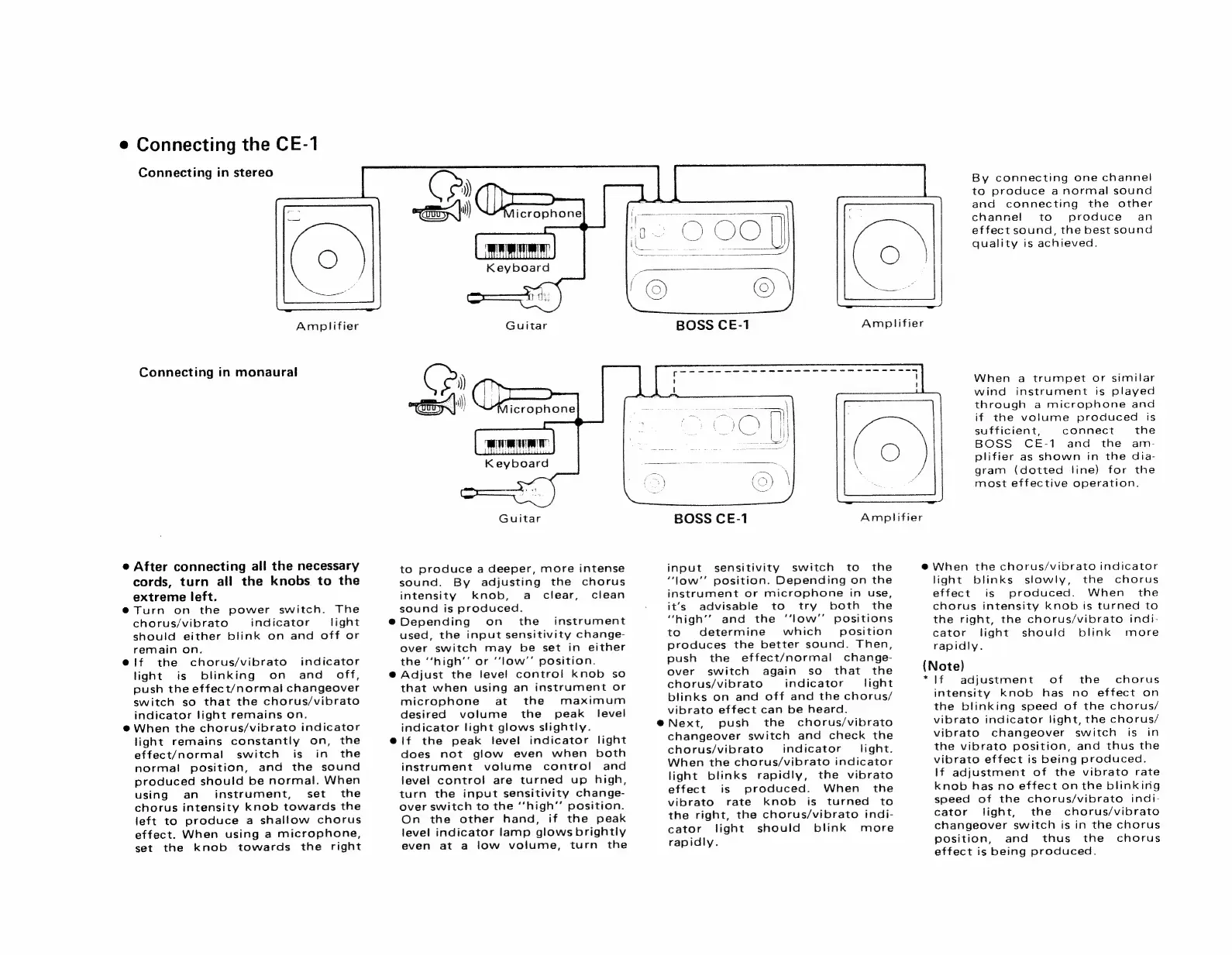
By
connecting
one
channel
to
produce
anormal
sound
and
connecting
the
other
channe!
to
produce
=
an
effect
sound,
the
best
sound
quality
is
achieved.
When
a
trumpet
or
similar
wind
instrument
is
played
through
a
microphone
and
if
the
volume
produced
is
sufficient,
connect
the
BOSS
CE-1
and
the
am-
plifier
as
shown
in
the
dia-
gram
(dotted
line)
for
the
most
effective
operation.
Amplifier
@
When
the
chorus/vibrato
indicator
light
blinks
slowly,
the
chorus
effect
is
produced.
When
the
chorus
intensity
knob
is
turned
to
the
right,
the
chorus/vibrato
indi-
cator
light
should
blink
more
rapidly.
(Note)
*
If
adjustment
of
the
chorus
intensity
knob
has
no
effect
on
the
blinking
speed
of
the
chorus/
vibrato
indicator
light,
the
chorus/
vibrato
changeover
switch
is
in
the
vibrato
position,
and
thus
the
vibrato
effect
is
being
produced.
lf
adjustment
of
the
vibrato
rate
knob
has
no
effect
onthe
blinkirig
speed
of
the
chorus/vibrato
indi-
cator
light,
the
chorus/vibrato
changeover
switch
is
in
the
chorus
position,
and
thus
the
chorus
effect
is
being
produced.

Related product manuals