EasyManua.ls Logo

Boss CL-50 - Panel Layout and Control Descriptions; Front Panel Overview

Boss CL-50
16 pages
Print Icon
To Next Page IconTo Next Page
To Previous Page IconTo Previous Page
Loading...
Mi
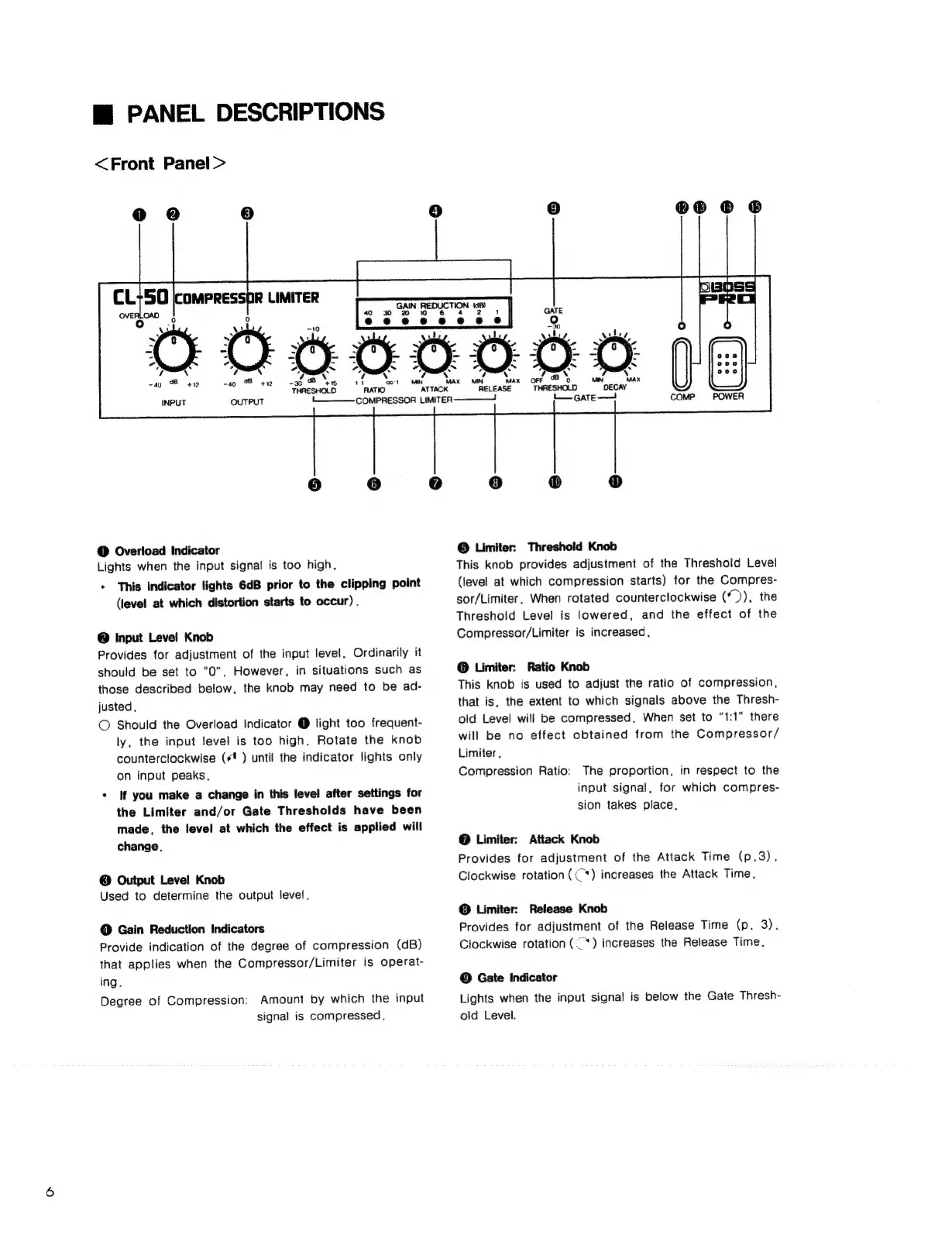
PANEL
DESCRIPTIONS
<Front
Panel>
N
so
8
412
-30
4s
THRESHOLD
MIN
ATTACK
C3)
®®
© ©
vbes
A
y
Ca
&
|
:
;
y~
AY
MN
MA
Mi
RELEASE
OUTPUT
tL.
COMPRESSOR
LIMITER
@
Overload
Indicator
Lights
when
the
input
signal
is
too
high.
*
This
indicator
lights
6dB
prior
to
the
clipping
point
(level
at
which
distortion
starts
to
occur)
.
@
Input
Level
Knob
Provides
for
adjustment
of
the
input
level.
Ordinarily
it
should
be
set
to
"0".
However,
in
situations
such
as
those
described
below,
the
knob
may
need
to
be
ad-
justed.,
©
Should
the
Overload
indicator
@
light
too
frequent-
ly,
the
input
level
is
too
high,
Rotate
the
knob
counterclockwise
(4
)
until
the
indicator
lights
only
on
input
peaks.
*
if
you
make
a
change
in
this
level
after
settings
for
the
Limiter
and/or
Gate
Thresholds
have
been
made,
the
level
at
which
the
effect
is
applied
will
change.
©
Output
Level
Knob
Used
to
determine
the
output
level.
@
Gain
Reduction
Indicators
Provide
indication
of
the
degree
of
compression
(dB)
that
applies
when
the
Compressor/Limiter
is
operat-
ing.
Degree
of
Compression:
Amount
by
which
the
input
signal
is
compressed,
©
Limiter:
Threshold
Knob
This
knob
provides
adjustment
of
the
Threshold
Level
(level
at
which
compression
starts)
for
the
Compres-
sor/Limiter.
When
rotated
counterclockwise
(*)),
the
Threshold
Level
is
lowered,
and
the
effect
of
the
Compressor/Limiter
is
increased,
@
Limiter:
Ratio
Knob
This
knob
is
used
to
adjust
the
ratio
of
compression,
that
is,
the
extent
to
which
signals
above
the
Thresh-
old
Level
will
be
compressed.
When
set
to
“1:1"
there
will
be
no
effect
obtained
from
the
Compressor/
Limiter,
Compression
Ratio:
The
proportion,
in
respect
to
the
input
signal,
for
which
compres-
sion
takes
place.
@
Limiter:
Attack
Knob
Provides
for
adjustment
of
the
Attack
Time
(p.3).
Clockwise
rotation
((“)
increases
the
Attack
Time,
©
Limiter:
Release
Knob
Provides
for
adjustment
of
the
Release
Time
(p.
3).
Clockwise
rotation
(“)
increases
the
Release
Time.
©
Gate
Indicator
Lights
when
the
input
signal
is
below
the
Gate
Thresh-
old
Level.

Related product manuals