EasyManua.ls Logo

Boss CL-50 - Rear Panel Connections and Controls

Boss CL-50
16 pages
Print Icon
To Next Page IconTo Next Page
To Previous Page IconTo Previous Page
Loading...
<Rear
Panel>
———
LINK
GATE
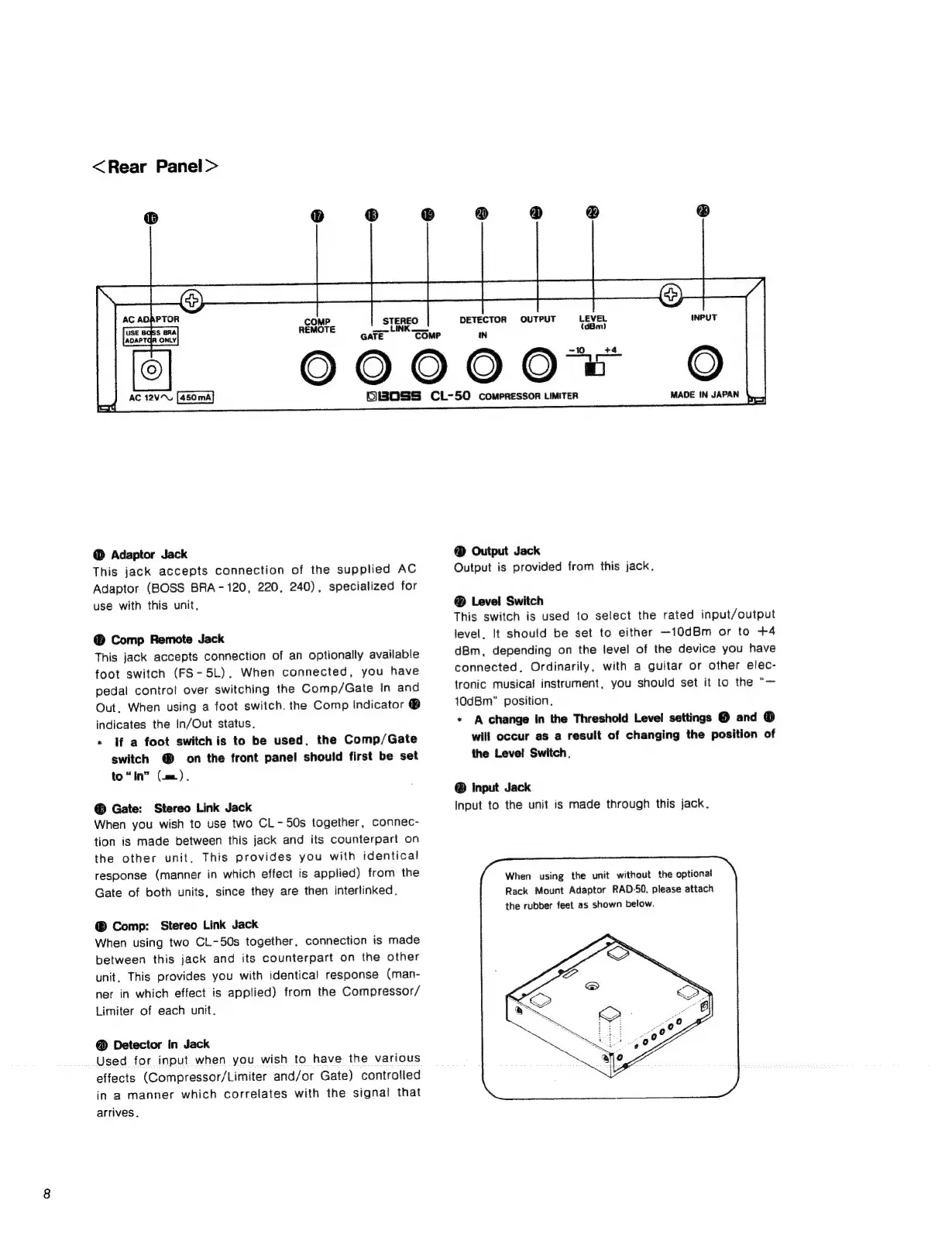
Adaptor
Jack
This
jack
accepts
connection
of
the
supplied
AC
Adaptor
(BOSS
BRA-120,
220,
240),
specialized
for
use
with
this
unit,
®
Comp
Remote
Jack
This
jack
accepts
connection
of
an
optionally
available
foot
switch
(FS-5L).
When
connected,
you
have
pedal
control
over
switching
the
Comp/Gate
In
and
Out.
When
using
a
foot
switch.
the
Comp
Indicator
®
indicates
the
In/Out
status.
*
If
a
foot
switchis
to
be
used,
the
Comp/Gate
switch
@
on
the
front
pane!
should
first
be
set
to
“In”
(ae).
Gate:
Stereo
Link
Jack
When
you
wish
to
use
two
CL-
50s
together,
connec-
tion
is
made
between
this
jack
and
its
counterpart
on
the
other
unit,
This
provides
you
with
identical
response
(manner
in
which
effect
is
applied)
from
the
Gate
of
both
units,
since
they
are
then
interlinked.
Comp:
Stereo
Link
Jack
When
using
two
CL-50s
together,
connection
is
made
between
this
jack
and
its
counterpart
on
the
other
unit.
This
provides
you
with
identical
response
(man-
ner
in
which
effect
is
applied)
from
the
Compressor/
Limiter
of
each
unit.
@
Detector
In
Jack
Used
for
input
when
you
wish
to
have
the
various
effects
(Compressor/Limiter
and/or
Gate)
controlled
in
a
manner
which
correlates
with
the
signal
that
arrives,
“COMP
DETECTOR
OUTPUT
LEVEL
IN
(dBm)
00000
6130SS
CL-50
compressor
Limiter
MADE
IN
JAPAN
4,
@
Output
Jack
Output
is
provided
from
this
jack,
®
Level
Switch
This
switch
is
used
to
select
the
rated
input/output
level.
It
should
be
set
to
either
—10dBm
or
to
+4
dBm,
depending
on
the
level
of
the
device
you
have
connected,
Ordinarily,
with
a
guitar
or
other
elec-
tronic
musical
instrument,
you
should
set
it
to
the
“—
10dBm”
position.
*
A
change
in
the
Threshold
Level
settings
@
and
®
will
occur
as
a
result
of
changing
the
position
of
the
Level
Switch.
Input
Jack
Input
to
the
unit
is
made
through
this
jack.
When
using
the
unit
without
the
optional
Rack
Mount
Adaptor
RAD-50,
please
attach
the
rubber
feet
as
shown
below.

Related product manuals