14
Connecting to Your Computer via USB
Using LOOP FX
You can apply an eect to the phrase playback. The eect
will be applied in synchronization with the tempo of the
phrase.
* You can’t apply an eect to the sound being
recorded (i.e., you can’t record the processed signal).
* The eect will be applied to both tracks 1 and 2.
Turning LOOP FX On/O
1. Press the [LOOP FX ON/OFF] button to
turn LOOP FX on/o.
While stopped or playing, you can turn LOOP FX on/
o by pressing the left pedal twice in succession.
Specifying the LOOP FX Type
1. Press the [LOOP FX TYPE] button to
select the desired LOOP FX type.
LOOP FX Type Explanation
BEND DOWN This eect abruptly lowers the pitch.
STEP PHASER This is a phaser that changes in steps.
SWEEP FILTER
This is a lter whose frequency changes
in synchronization with the tempo.
TEMPO DELAY
This produces a tempo-synchronized
delay eect.
Lo-Fi
This eect intentionally degrades the
sound to create a distinctive character.
You can connect the RC-30 to your computer via a com-
mercially available USB cable, and back up RC-30 phrases
(WAV les) to your computer or load WAV les from your
computer to the RC-30.
Playable WAV le formats
Data Format
WAV
Bit Rate
16-bit linear, stereo
Sampling Frequency
44.1 kHz
Maximum WAV le size is 1.7 GB (total of all les), maximum
time is approximately 3 hours (total of all phrases), and
minimum time is approximately 1.5 seconds.
1. Turn on the RC-30’s power (insert a plug
into the OUTPUT L jack).
* The RC-30 will not operate on USB bus power.
We recommend that you use an AC adaptor (sold
separately) to ensure that the power does not turn
o while connected via USB.
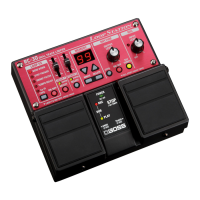
2. Use a commercially available USB cable
to connect the RC-30’s USB connector
to your computer’s USB connector
(a connector that supports USB 2.0
Hi-Speed).
The display will indicate “Cn.”
* You can’t make USB connections if the RC-30 is not
stopped, or if there is a phrase that has not been
saved.


 To Next Page