EasyManua.ls Logo

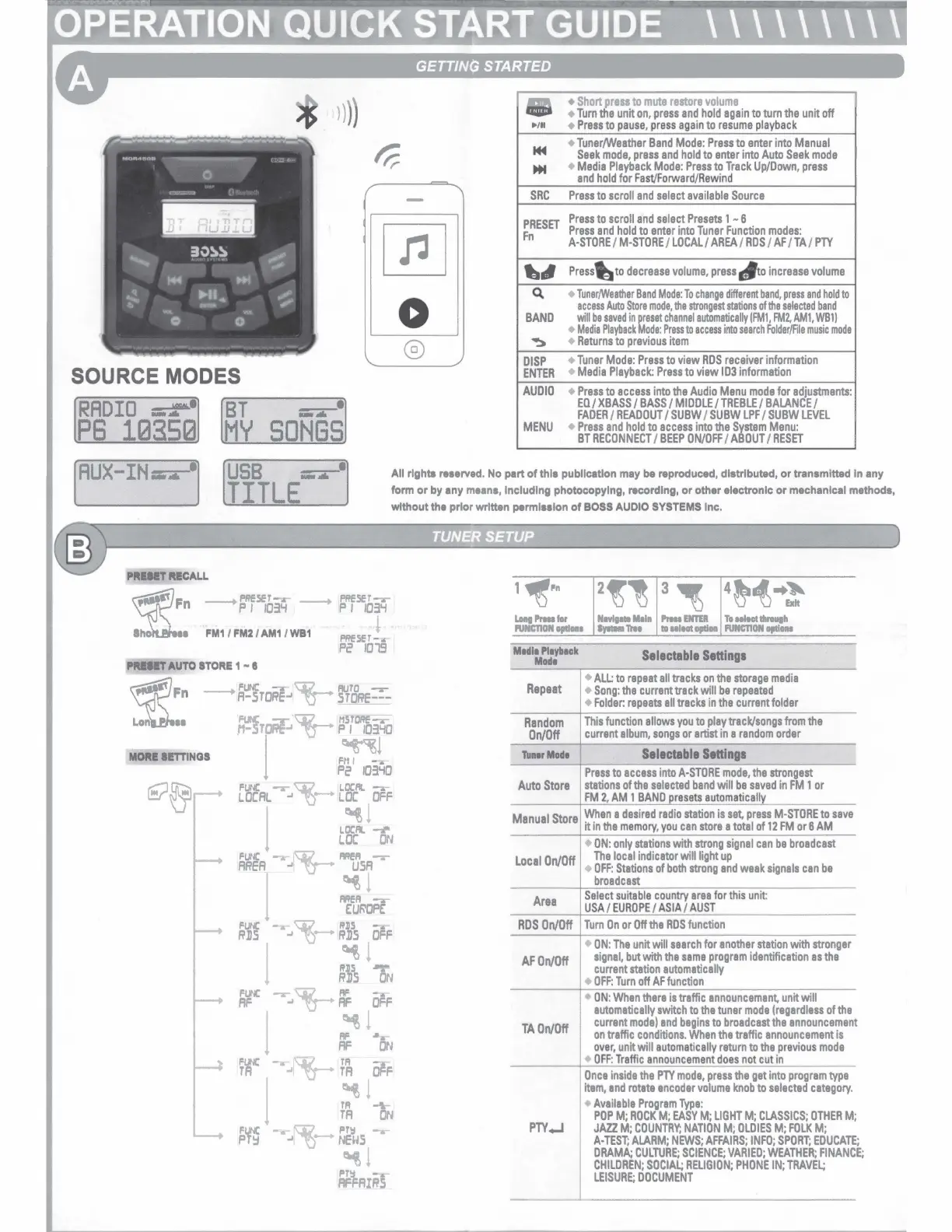
Boss MGR450B - Operation Quick Start Guide; Getting Started and Basic Controls; Source Mode Selection; Tuner Operation: Presets and Setup

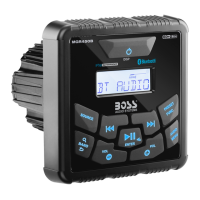
Boss MGR450B
10 pages
Print Icon
To Next Page IconTo Next Page
To Previous Page IconTo Previous Page
Loading...
SOURCE MODES
RADIO
-r•
BT
) )
))
--·
......
PB
10350
MY
SONGS
0
®
/H
~
...
SRC
PRESET
Fn
..
.,
Q,
BAND
~
DISP
ENTER
AUDIO
MENU
Short
press
to
mute
restore
volume
Turn
the
unit
on,
press
and
hold
again
to
turn
the
unit
off
Press
to
pause,
press
again
to
resume
playback
Tuner/Weather
Band
Mode:
Press
to
enter
into
Manual
Seek
mode,
press
and
hold
to
enter
into
Auto
Seek
mode
Media
Playback
Mode:
Press
to
Track
Up/Down,
press
and
hold
for
Fast/Forward/Rewind
Press
to
scroll
and
select
available
Source
Press
to
scroll
and
select
Presets
1 N 6
Press
and
hold
to
enter
into
Tuner
Function
modes:
A-STORE
/
M-STORE
/
LOCAL/
AREA
/
RDS
/
AF
/
TA
/
PTY
Press
I)
to
decrease
volume,
press
tf
to
increase
volume
Tuner/Weather
Band
Mode:
To
change
different
band,
press
and
hold
to
access
Auto
Store
mode,
the
strongest
stations
of
the
selected
band
will
be
saved
in
~esat
channel
automatically
IFMl,
FM2,
AMl,
WBl)
Madia
Playback
ode:
Press
to
access
into
search
Folder/Fila
music
mode
Returns
to
previous
item
Tuner
Mode:
Press
to
view
RDS
receiver
information
Media
Playback:
Press
to
view
ID3
information
Press
to
access
into
the
Audio
Menu
mode
for
adjustments:
EQ
/
XBASS
/
BASS/
MIDDLE/
TREBLE/
BALANCE/
FADER
/
READOUT/
SUBW
I
SUBW
LPF
/
SUBW
LEVEL
Press
and
hold
to
access
into
the
System
Menu:
BT
RECONNECT
/
BEEP
ON/OFF
/
ABOUT
/
RESET
IAux-rn4
USB
_..._
TITLE
All
rights
reaerved.
No part
of
thla publlcatlon may be reproduced, distributed,
or
transmitted In any
form
or
by any
meana,
Including photocopying, recording,
or
other electronlc
or
mechanical methods,
without the prior written permlsalon
of
BOSS
AUDIO
SYSTEMS
Inc.
PRIIIT
RECALL
f'RfSET-.
n
---+
P I
/031.f
--+
PRESET-.-
p I
1031.f
e
FM1
I
FM2
I
AM1
I
WB1
!
PRESET--.
Pe
1019
PRIIIT
AUTO
STORE
1 -
II
~F
n
Ln.a
--+
FUNC
-.-
~
RUTO
-.-
A-STORE-'
U------
STDRE---
'NC
'\j(~
HSTORE--..
.H-ST~
v-
PI
103'-10
I
F~ l
Pe
103'-10
FUNC
-r-W.
L.OCRI.
-.-
LOCAL
.,
'Q-
LDC
OFF
I
L.l
!_.
LDC
ON
FUNC
._-
~-
MER
-.-
AREA
-'
I
~
USA
I
~
!
__
F.:U~OPF.:
FUNC
--..-
~-
R.115
-.-
RDS
-'
'Q-
RDS
OFF
l
~ !
....
RDS
ON
Fl.INC
-r-
c:;:p_
.
RF
-.-
AF
., -U----
RF
OFF
l
~
!
~
RF
ON
Fl.IC
--..-
W.
.
TR
--
TA
-'
1
-U--
TA
OFF
j ( I~
Fl.INC
_..
~.
Pf!:1
-.-
PT~
-'I
'Q-
NEUS
~!
PT!:1
-.-
AFFAIRS
I
1~Pn
LHtl
Prna
for
NIYlpel
111111
l'rta
ENTER
To
Hloot
t11n1111h
l'UNCTION
opllou
a,-
Tm
ti
Mloot
optlH
RJNCTION
optlOM
M1dl1
Pl1yb1ck
Modi
Repeat
Random
On/Off
Tun1rMod1
Auto
Store
Manual
Store
Local
On/Off
Area
RDS
On/Off
AF
On/Off
TA
On/Off
PTY..J
Selectable
Settings
ALL:
to
repeat
all
tracks
on
the
storage
media
Song:
the
current
track
will
be
repeated
Folder:
repeats
all
tracks
in
the
current
folder
This
function
allows
you
to
play
track/songs
from
the
current
album,
songs
or
artist
in
a
random
order
Selectable
Settings
Press
to
access
into
A-STORE
mode,
the
strongest
stations
of
the
selected
band
will
be
saved
in
FM
1
or
FM
2,
AM
1
BAND
presets
automatically
When
a
desired
radio
station
is
set,
press
M-STORE
to
save
it
in
the
memory,
you
can
store
a
total
of
12
FM
or
6
AM
ON:
only
stations
with
strong
signal
can
be
broadcast
The
local
indicator
will
light
up
OFF:
Stations
of
both
strong
and
weak
signals
can
be
broadcast
Select
suitable
country
area
for
this
unit:
USA/
EUROPE/
ASIA/
AUST
Turn
On
or
Off
the
RDS
function
ON:
The
unit
will
search
for
another
station
with
stronger
signal,
but
with
the
same
program
identification
as
the
current
station
automatically
OFF:
Turn
off
AF
function
ON
:
When
there
is
traffic
announcement,
unit
will
automatically
switch
to
the
tuner
mode
(regardless
of
the
current
mode)
and
begins
to
broadcast
the
announcement
on
traffic
conditions.
When
the
traffic
announcement
is
over,
unit
will
automatically
return
to
the
previous
mode
OFF:
Traffic
announcement
does
not
cut
in
Once
inside
the
PTY
mode,
press
the
get
into
program
type
item,
and
rotate
encoder
volume
knob
to
selected
category.
Available
Program
Type:
POP
M;
ROCK
M;
EASY
M;
LIGHT
M;
CLASSICS;
OTHER
M;
JAZZ.
M;
COUNTRY;
NATION
M;
OLDIES
M;
FOLK
M;
A-TEST;
ALARM;
NEWS;
AFFAIRS;
INFO;
SPORT;
EDUCATE
DRAMA;
CULTURE;
SCIENCE;
VARIED;
WEATHER;
FINANC
E:
CHILDREN;
SOCIAL;
RELIGION;
PHONE
IN;
TRAVEL;
LEISURE;
DOCUMENT

Related product manuals