SYSTEM
-
....
BT
BT
t
TIV
I I
BT
MY
~-0
_
..,.
SONGS
~ - 0
_
...,.
SONGS
USB
_
.,,.
0
T
TTLr-
.L
i
C.
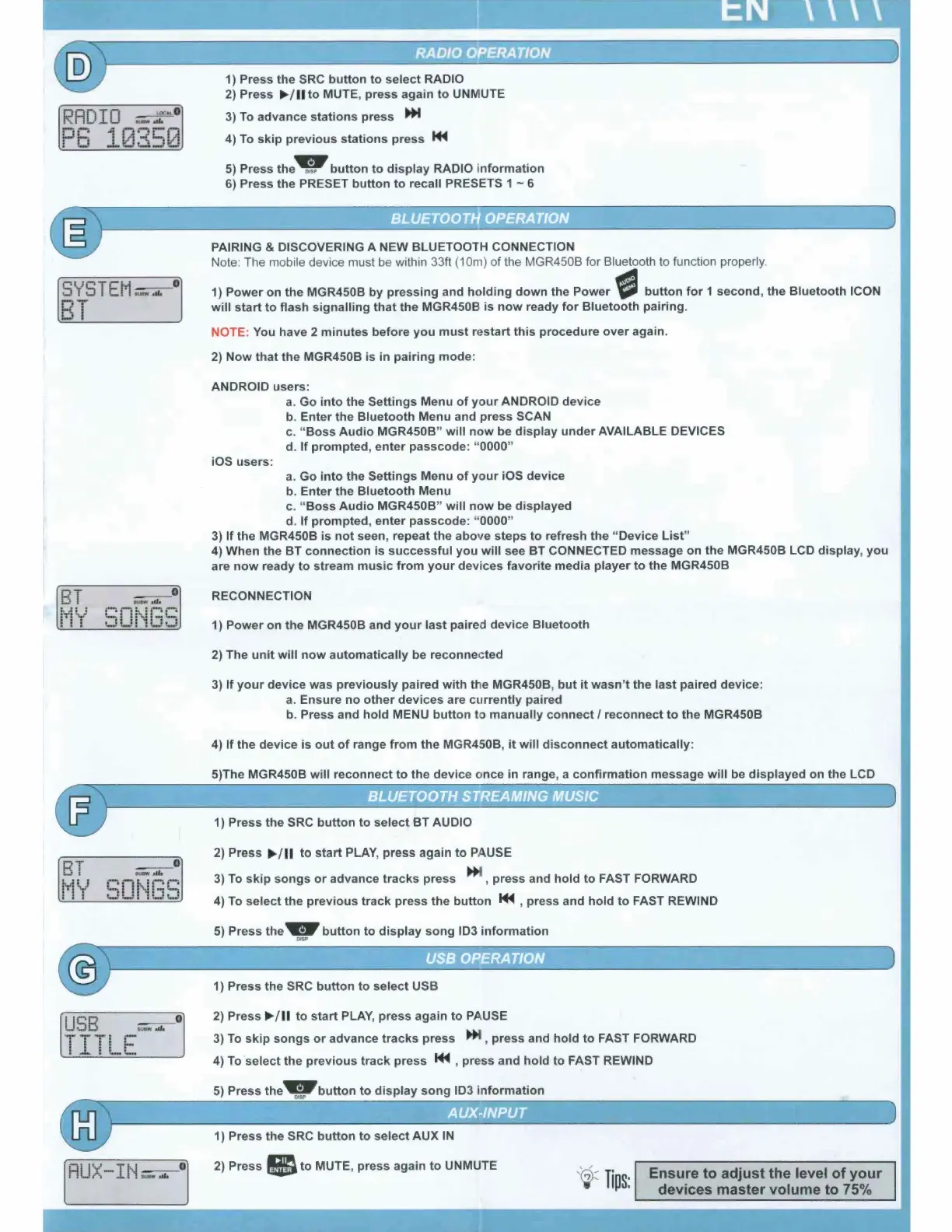
1) Press the
SRC
button
to
select
RADIO
2)
Press
►
/
11
to
MUTE, press again
to
UNMUTE
3)
To
advance stations press
~
4)
To
skip
previous stations press
M-4
5)
Press the9
button
to
display
RADIO i
nformation
6) Press the PRESET
button
to
recall PRESETS 1 ~ 6
PAIRING & DISCOVERING A
NEW
BLUETOOTH CONNECTION
Note: The mobile device must be within 33ft (10m)
of
the MGR450B for Bluetooth to function properly.
1)
Power
on the MGR450B by
pressing
and
holding
down
the Power -
button
for
1
second
, the Bluetooth ICON
will
start
to
flash
signalling
that
the MGR450B is
now
ready
for
Bluetooth pairing.
NOTE: You have 2
minutes
before
you
must
restart
this
procedure
over
again.
2)
Now
that
the MGR450B
is
in pairing mode:
ANDROID users:
a. Go
into
the Settings Menu
of
your
ANDROID device
b. Enter the Bluetooth Menu and press SCAN
c. "
Boss
Audio
MGR450B"
will
now
be
display
under
AVAILABLE DEVICES
d.
If
prompted,
enter
passcode: "0000"
iOS users:
a. Go
into
the Settings Menu
of
your
iOS device
b. Enter the Bluetooth Menu
c.
"Boss
Audio
MGR450B"
will
now
be displayed
d.
If
prompted, enter passcode: "0000"
3)
If
the MGR450B is
not
seen, repeat the above
steps
to
refresh the "Device
List"
4) When the BT connection is
successful
you
will
see BT CONNECTED message on the MGR450B LCD
display
,
you
are
now
ready
to
stream
music
from
your
devices favorite media player
to
the MGR450B
RECONNECTION
1)
Power
on the MGR450B and
your
last
paired device Bluetooth
2) The
unit
will
now
automatically be reconnected
3)
If
your
device was
previously
paired
with
the MGR450B,
but
it
wasn't the
last
paired device:
a.
Ensure
no
other
devices are
currently
paired
b. Press and
hold
MENU
button
to manually
connect/
reconnect
to
the MGR450B
4)
If
the
device
is
out
of
range
from
the MGR450B,
it
will
disconnect
automatically:
5)The MGR450B
will
reconnect
to
the device once in range, a confirmation message
will
be
displayed
on the LCD
1) Press the SRC
button
to
select
BT
AUDIO
2) Press
►
/
11
to
start
PLAY, press again
to
PAUSE
3)
To
skip
songs
or
advance
tracks
press
~
, press and
hold
to
FAST FORWARD
4)
To
select the
previous
track
press the
button
M-4
, press and hold
to
FAST REWIND
5)
Press the 9
button
to
display
song ID3
information
1) Press the SRC
button
to
select
USB
2) Press
►
/
11
to
start
PLAY, press again
to
PAUSE
3)
To
skip
songs
or
advance
tracks
press
~
, press and hold
to
FAST FORWARD
4)
To
select the previ
ous
track
press
M-4
, press and hold
to
FAST REWIND
5)
Press the .
button
to
display
song
1D3
i
nformation
1) Press the SRC
button
to
select
AUX IN
2) Press a
to
MUTE, press again
to
UNMUTE
,'
;~
Ti
p
s:
Ensure
to
adjust the level
of
your
devices master volume
to
75%


 To Next Page