Opening the Ladder
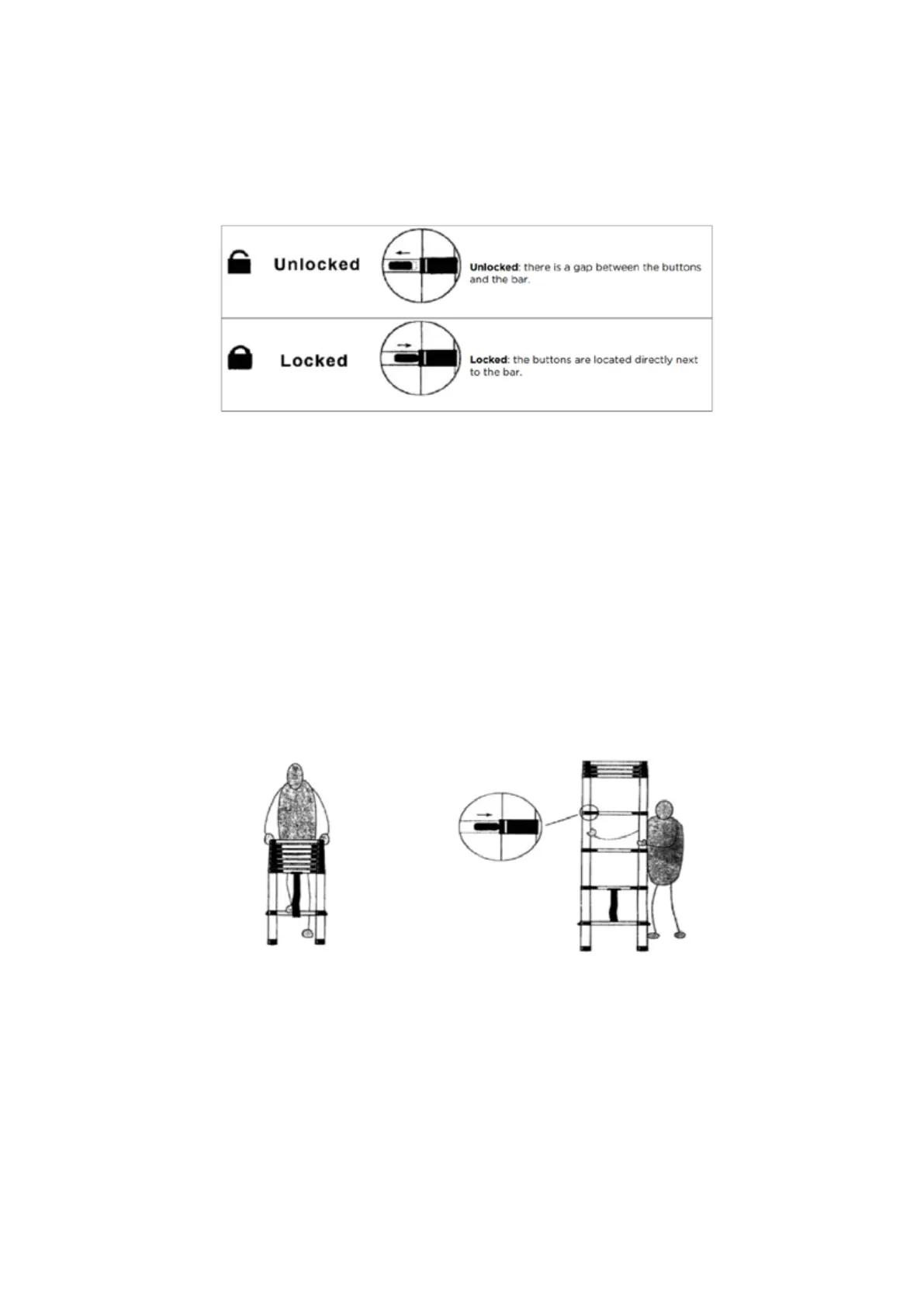
With automatic locking, each rung of the ladder has 2 locking pins that are blocked, which
are automatically inserted into the slots of the uprights when the ladder is extended.
The condition of the lock is indicated by the two black buttons on the side of each rung, as
shown below:
Complete Extension of the Ladder
1. Place the ladder onto firm and level ground, then place one foot on the lowest rung.
2. Lift the top rung up and ensure that the buttons are locked (as shown above) Repeat
this process with each of the lower rungs in turn, until the arms are completely extended.
Partial extension of the ladder
1. Place the ladder onto firm and level ground, then place one foot on the lowest rung.
2. Lift the top rung up and ensure that the buttons are locked (as shown above). Repeat
this process with each of the lower rungs until the desired ladder and rung height has
been achieved.
Shortening the Ladder
• Place the ladder on firm and level ground.
• Unlock the two buttons on the highest rung you can safely reach to lower the rung
down to the closed position. Continue doing this until the top rungs are all closed.
• Work your way down via each lower level, unlocking the buttons and then lowering
therungs until the ladder is all packed away.


 To Previous Page