71
6
12
Chapter 12. Using the SP-505 with other MIDI devices
* Do not use a MIDI cable to directly connect the SP-505’s
MIDI IN connector to its own MIDI OUT connector (creating
a loop). The SP-505 may fail to operate correctly if this is done.
About MIDI
MIDI stands for Musical Instrument Digital Interface. It is a
universal standard, designed to provide for the exchange of
performance data among electronic musical instruments,
computers, and other devices. The SP-505 supports the use of
MIDI, and provides two MIDI connectors: MIDI IN and
MIDI OUT. These connectors can be connected to other MIDI
devices, thus greatly expanding your performance
possibilities.
About the MIDI connectors
The SP-505 has the following MIDI connectors.
MIDI IN:
Receives MIDI messages from other MIDI devices.
MIDI OUT:
Transmits MIDI messages from the SP-505.
About the MIDI implementation chart
The MIDI implementation chart (p. 87) provides an easy way
to view the types of MIDI message that the SP-505 can
transmit and receive. Compare the SP-505’s MIDI
implementation chart with the implementation chart of some
other connected MIDI device, and use the MIDI messages
that are recognized by both devices.
For details of the SP-505’s MIDI functionality, refer to “MIDI
implementation.
Changing the MIDI settings
MIDI parameters
Pads Ch: 1–16, OFF
Specify the channel on which pad performance data will
be transmitted and received.
Part 1-4 Ch: 1–16, OFF
Specify the channel that will output the parts of the song
or pattern.
Prog Chg SW: OFF, ON
Specify whether program change messages will be
received and transmitted. On the SP-505, program
change messages are employed when switching the bank
that is to be played by MIDI (note messages).
Sync Mode: INT, MIDI, REMOTE, AUTO
Specify the mode used when synchronizing the SP-505’s
performance with an external MIDI device.
For details refer to “Synchronizing the performance of
the SP-505 and an external MIDI device,” p. 72.
Procedure
1. Press [SONG] or [PTN] to display the Play screen.
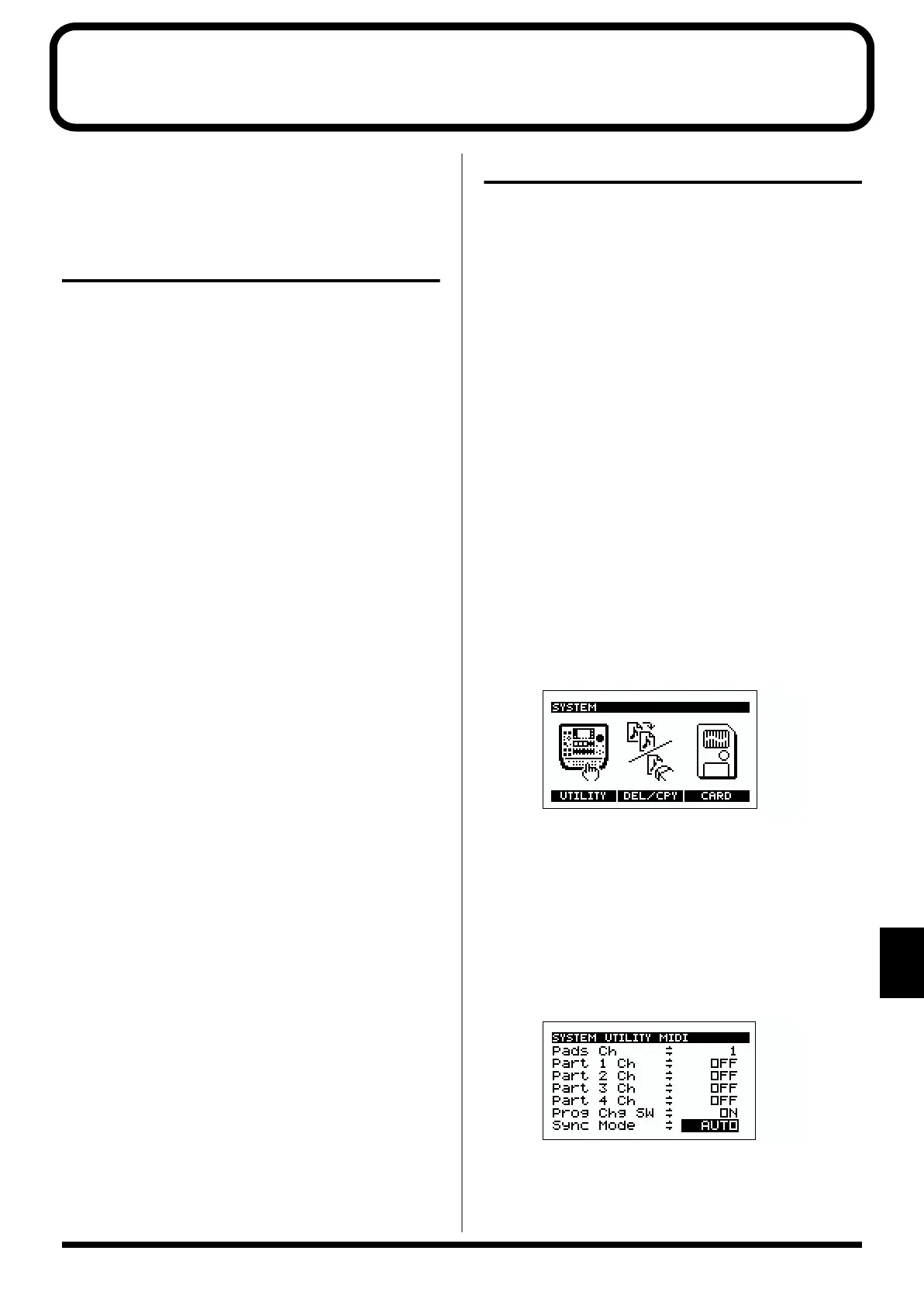
2. Press [SYSTEM] to display the System screen.
fig.10-01a
* It is not possible to display the System screen while a pattern
or song is playing.
3. Press [F1] (UTILITY).
4. Press [F2] (MIDI).
The MIDI Settings screen will appear.
5. Press CURSOR [↓] [↑] to select the parameter, and use
the VALUE dial to change the setting.
fig.12-02
6. Press [PTN] or [SONG] to return to the Play screen.
* It is not possible to change MIDI settings while the sequencer
is playing.


 To Next Page