EasyManua.ls Logo

Boss SX-700 - Power-on and Level Adjustment

Boss SX-700
20 pages
Print Icon
To Next Page IconTo Next Page
To Previous Page IconTo Previous Page
Loading...
SX-700
Feb,
1996
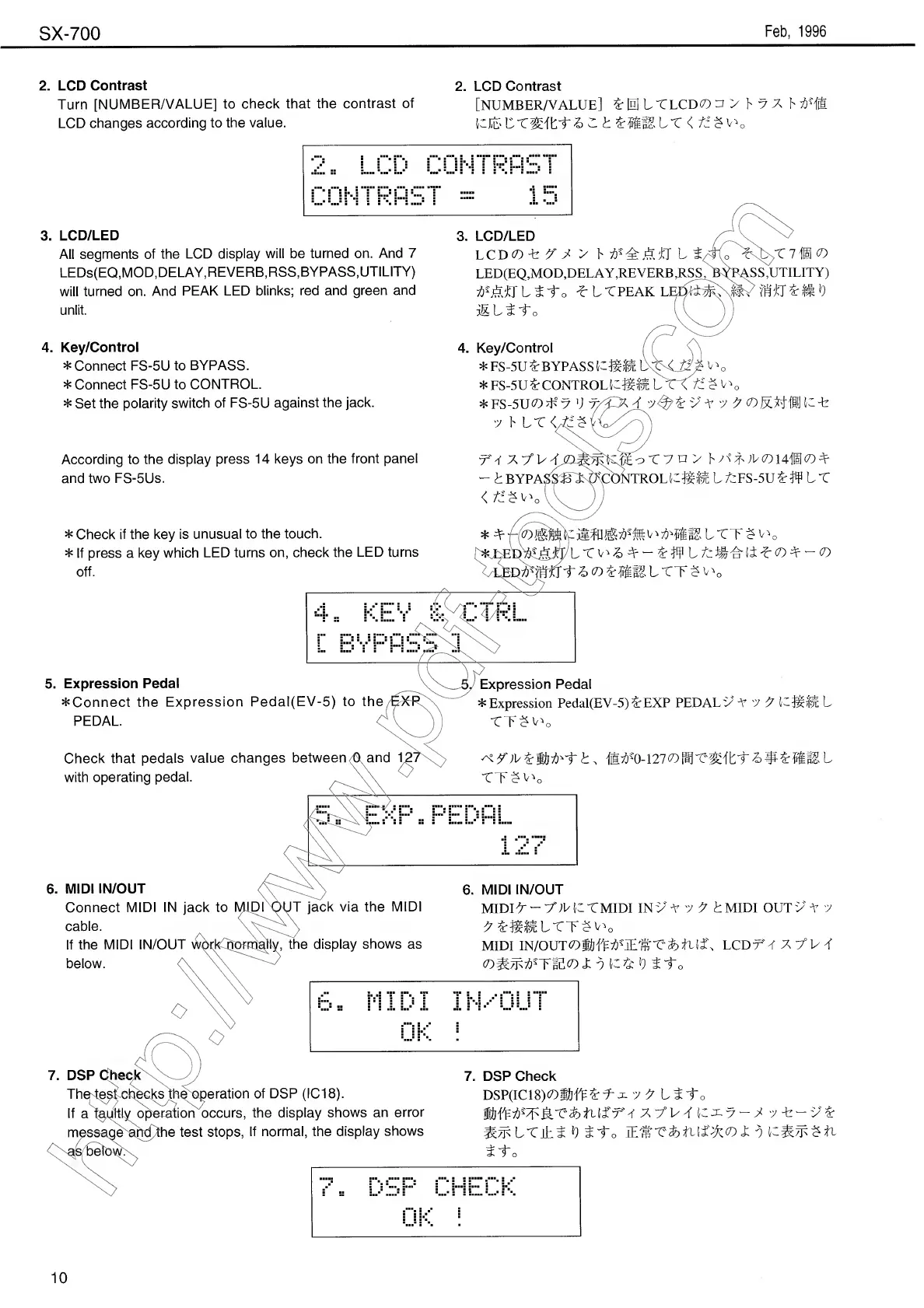
2.
LCD
Contrast
Turn
[NUMBER/VALUE]
to
check
that
the
contrast
of
LCD
changes
according
to
the
value.
3.
LCD/LED
All
segments
of
the
LCD
display
will
be
turned
on.
And
7
LEDs(EQ,MOD,DELAY,REVERB,RSS,
BYPASS,
UTILITY)
will
turned
on.
And
PEAK
LED
blinks;
red
and
green
and
unlit.
2.
LCD
Contrast
[NUMBER/VALUE]
£
0
L
T
LCD
CO
C
t
Zmmir
<
3.
LCD/LED
LCD(0-fe7
7
>
LED(EQ,MOD,DELAY,REVERB
,RSS^(PASS,UTILITY)
lito
*
t
TPEAK
L^^S^Y
U'f'JfT
£
It
b
MLtto
4.
Key/Control
*
Connect
FS-5U
to
BYPASS.
*
Connect
FS-5U
to
CONTROL.
*
Set
the
polarity
switch
of
FS-5U
against
the
jack.
According
to
the
display
press
14
keys
on
the
front
panel
and
two
FS-5Us.
*
Check
if
the
key
is
unusual
to
the
touch.
*
If
press
a
key
which
LED
turns
on,
check
the
LED
turns
off.
4.
Key/Control
*FS-5U£
BYPASS
*
FS-5U
&
CONTROL
U
H
H
L
T
\tz
§
V
*
FS-5UC7)
#
7
V
7^i
v
V
7
7
<D
K
M
I
l
U
U
7
F
LT
</
^
t
BYPA
o
X
7
n
>
F
X
)V(D
14®
CO
TROLUffit
LfcFS-5U£#
LX
m
V
>
Ltr$c
0
tSO«:lElTT?u
0
5.
Expression
Pedal
Expression
Pedal
^Connect
the
Expression
Pedal(EV-5)
to
the
EXP
*
Expression
Pedal(EV-5)
EXP
PEDAL
v
V
"J
X
Uficir
L
PEDAL.
CV
))
tTJOo
Check
that
pedals
value
changes
between^and
1
with
operating
pedal.
6.
MIDI
IN/OUT
Connect
MIDI
IN
jack
to
MIDI
OUT
jack
via
the
MIDI
cable.
If
the
MIDI
IN/OUT
vv^rj
,
the
display
shows
as
below.
%W}fr
1
r
t,
ffi^'
0
-
1
2
7
c
o
t
TT^'o
6.
MIDI
IN/OUT
MIDIX
X'VL
U
TMIDI
IN
v
MIDI
OUT
v
V
7
MIDI
IN/OUT^
S&ff^
?
7Ti'&’"C&
LCDrV
X
7°U
T
«t
0
K
&
b
i
-to
7.
DSP
Check
Th^t^ich^e^s^h^peration
of
DSP
(IC18).
If
a
faultly
operation
occurs,
the
display
shows
an
error
message^ahd/the
test
stops,
If
normal,
the
display
shows
as
below.
7.
DSP
Check
DSP(IC18)C0JilfF
£
f-
J.
"J
7
L1
1
o
fjjfl^M^'Cab
-7
-
U-v^
^^LTih^
b
£J;
o
Jto
10

Other manuals for Boss SX-700

Related product manuals