EasyManua.ls Logo

Boss SX-700 - Section 1 Try out the SX-700; Connections and Setup

Boss SX-700
20 pages
Print Icon
To Next Page IconTo Next Page
To Previous Page IconTo Previous Page
Loading...
Feb,
1996
SX-700
TEST
MODE/x
*
S
-
K
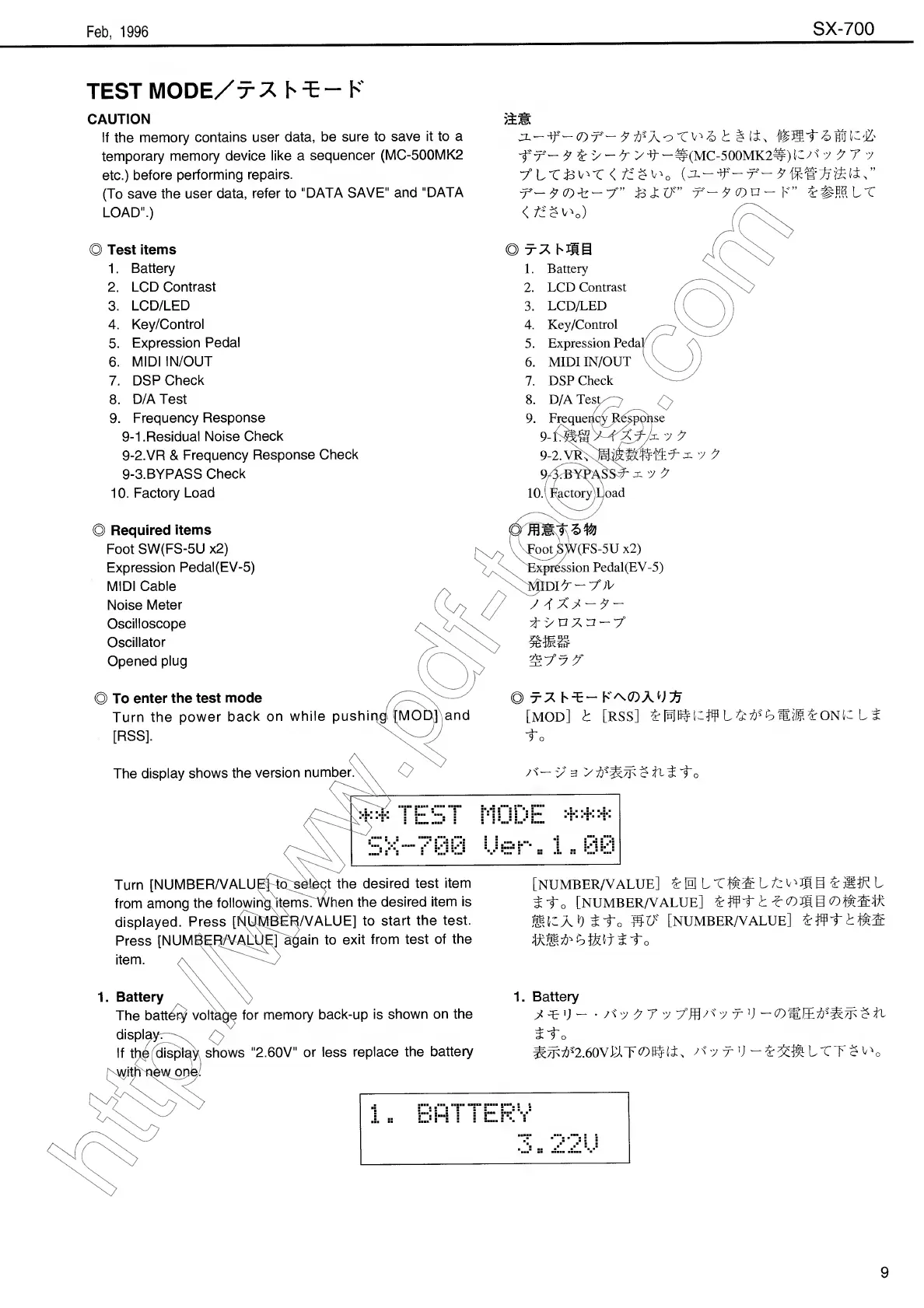
CAUTION
If
the
memory
contains
user
data,
be
sure
to
save
it
to
a
temporary
memory
device
like
a
sequencer
(MC-500MK2
etc.)
before
performing
repairs.
(To
save
the
user
data,
refer
to
"DATA
SAVE"
and
"DATA
LOAD".)
J3L
——
(T)'T^—
7
X
b
t
§
it
Hr
St
b
HIJ
K‘j&
f
r-
¥
i's-X's
t
“^(MC-500MK2^)^/^
"J
7
7
V
tLT&^T
<
tiZ
va
x-
7
(D
-
tr
7'”
L
1
If”
7'~
7
(DU
K”
L#HS
LT
</Xw)
XX
Test
items
1.
Battery
2.
LCD
Contrast
3.
LCD/LED
4.
Key/Control
5.
Expression
Pedal
6.
MIDI
IN/OUT
7.
DSP
Check
8.
D/A
Test
9.
Frequency
Response
9-1.Residual
Noise
Check
9-2.VR
&
Frequency
Response
Check
9-3.BYPASS
Check
10.
Factory
Load
)
Required
items
Foot
SW(FS-5U
x2)
Expression
Pedal(EV-5)
MIDI
Cable
Noise
Meter
Oscilloscope
Oscillator
Opened
plug
To
enter
the
test
mode
Turn
the
power
back
on
while
pushing
[MOD]
and
[RSS].
The
display
shows
the
version
numbers
1.
Battery
2.
LCD
Contrast
3.
LCD/LED
4.
Key/Control
5.
Expression
Peda^
6.
MIDIIN/OUT
7.
DSP
Check
8.
D/A
Test
9.
Frequency
Respc
9-f®KAt/n
"J
7
9-2.
VR,
"J
9
10.
F
actory
Load
o
Foot
SW(FS-5U
x2)
^Expr^ssion
Pedal(EV-5)
X*flDit-7>
77X7-7-
f
'>
n
7
n
-
^7°
7
7"
)
r7
hL-
[MOD]
L
[RSS]
L[WI0X#
Lt^Ctt^LONiXL
to
7''—
V
3
7
t'A/E
$
t
t
t
c
Turn
[NUMBER/VALUE]
to
select
the
desired
test
item
from
among
the
following
itemsTWhen
the
desired
item
is
displayed.
Press
[NUMBER/VALUE]
to
start
the
test.
Press
[NUMBER/VALUE]
again
to
exit
from
test
of
the
item.
a
[NUMBER/VALUE]
L
0
L
X
I
X
L
tvujig
L
MM
L
t-f
o
[NUMBER/VALUE]
L#t
1
t
<DM
S
XXt
]ilo
SL
[NUMBER/VALUE]
Lift
>
IX
lAiXiJLX
to
1.
Battery
The
batt^
voltage
for
memory
back-up
is
shown
on
the
1.
Battery
7
Tr
V
-
A
7
7
7
7
7
-j-
ij
t
9

Other manuals for Boss SX-700

Related product manuals