3
Owner’s Manual
Please save this owner’s manual for future reference. If you should need an additional
copy, it may be downloaded from the Boston Acoustics website:
www.bostonacoustics.com/microsystemcd.
Unpacking the MicroSystem CD
Please save all the original packaging because it will provide the safest way to transport
your unit.
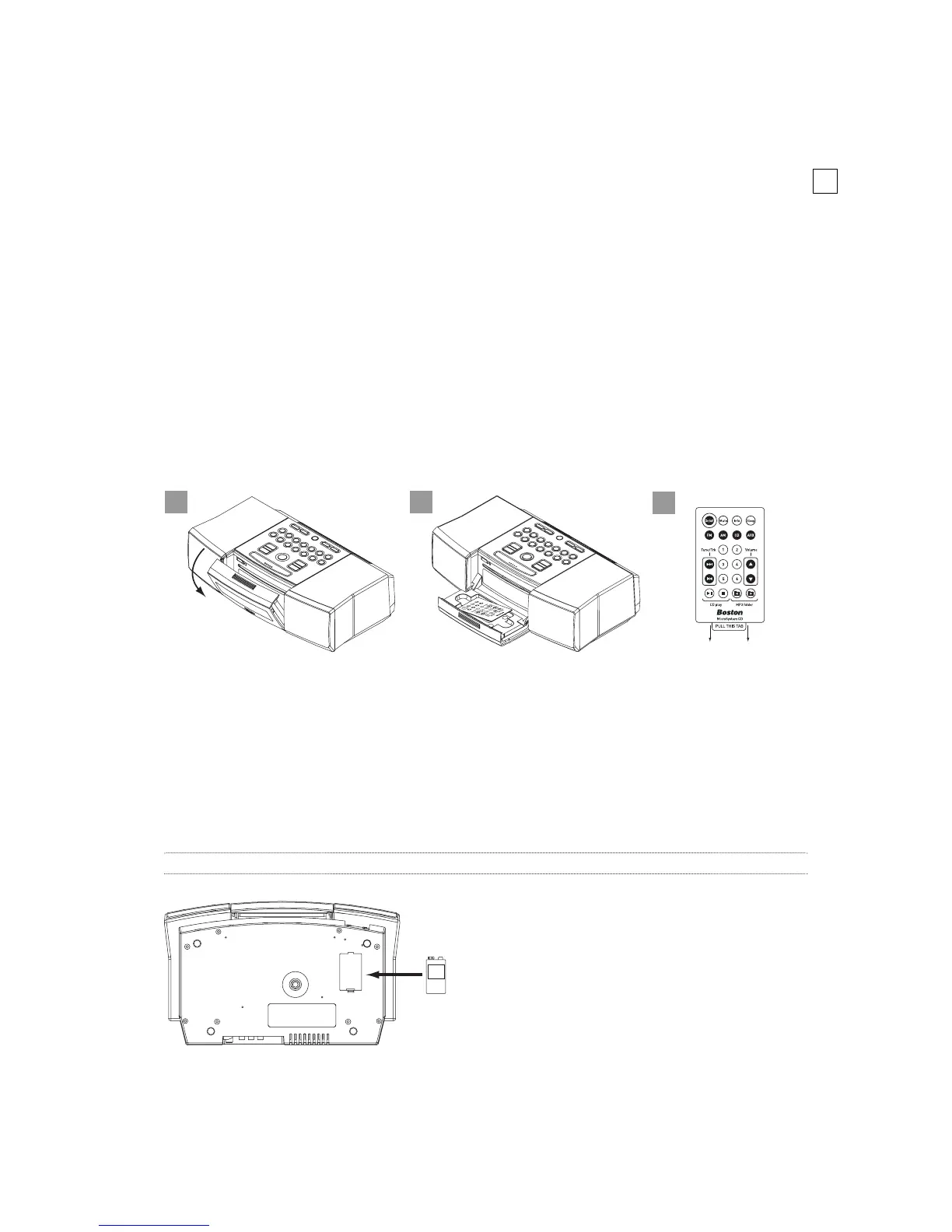
Once unpacked, open the flip-down door and remove the Remote Control. Remove
the paper tab on the Remote Control to activate the battery.
The backup alarm
Installing the supplied 9-volt battery in the compartment on the bottom of the
MicroSystem CD will ensure that a beeper alarm will operate even if there is a power
failure. If the battery needs replacement or if there is not a battery connected, you
will see a “battery low” message whenever the MicroSystem CD is switched on.
Note: Please check with local laws and regulations regarding the proper disposal of batteries.


 To Next Page