
 Need help?
Do you have a question about the Boston Acoustics MicroSystem CD and is the answer not in the manual?
Ensures beeper alarm operates during power failure with a 9-volt battery.
Instructions on setting the clock time using buttons and arrow keys.
How to power on the MicroSystem CD using buttons or remote.
Guide to selecting FM or AM bands and tuning to stations.
How to save favorite radio stations using preset buttons.
Instructions for inserting discs into the slot-loading CD player.
Guide to setting alarm times, sources, and volumes for alarms.
How to use the snooze feature to temporarily silence alarms.
How to set the unit to turn off automatically after a set time.
Checks for power issues when the unit does not turn on.
Steps to resolve no audio output issues.
Solutions for discs not playing or being recognized.
Troubleshooting steps for a non-functional remote control.
 General
| Karaoke | No |
|---|---|
| Speaker type | - |
| RMS rated power | - W |
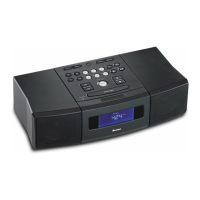
| Type | Home audio micro system |
| Product color | White |
| Disc loading type | Slot |
| Number of optical discs | 1 discs |
| Playback modes | Repeat, Shuffle |
| Disc types supported | CD, CD-R, CD-RW |
| Playback disc formats | CD audio |
| Audio formats supported | MP3, WMA |
| Supported radio bands | AM, FM |
| Preset stations quantity | 24 |
| Apple docking compatibility | Not supported |
| Audio (L/R) in | 2 |
| Headphone outputs | 1 |
| Headphone connectivity | 3.5 mm |
| Power source | AC |
| Input voltage | 230-240 V |
| Volume control | Digital |
 Weight and Dimensions
| Depth | 216.8 mm |
|---|---|
| Width | 355 mm |
| Height | 113.9 mm |
| Weight | 4000 g |

 To Next Page
