EasyManua.ls Logo

Boston Acoustics MicroSystem CD - Basic System Operations

Boston Acoustics MicroSystem CD
24 pages
Print Icon
To Next Page IconTo Next Page
To Previous Page IconTo Previous Page
Loading...
6
The Basics (continued)
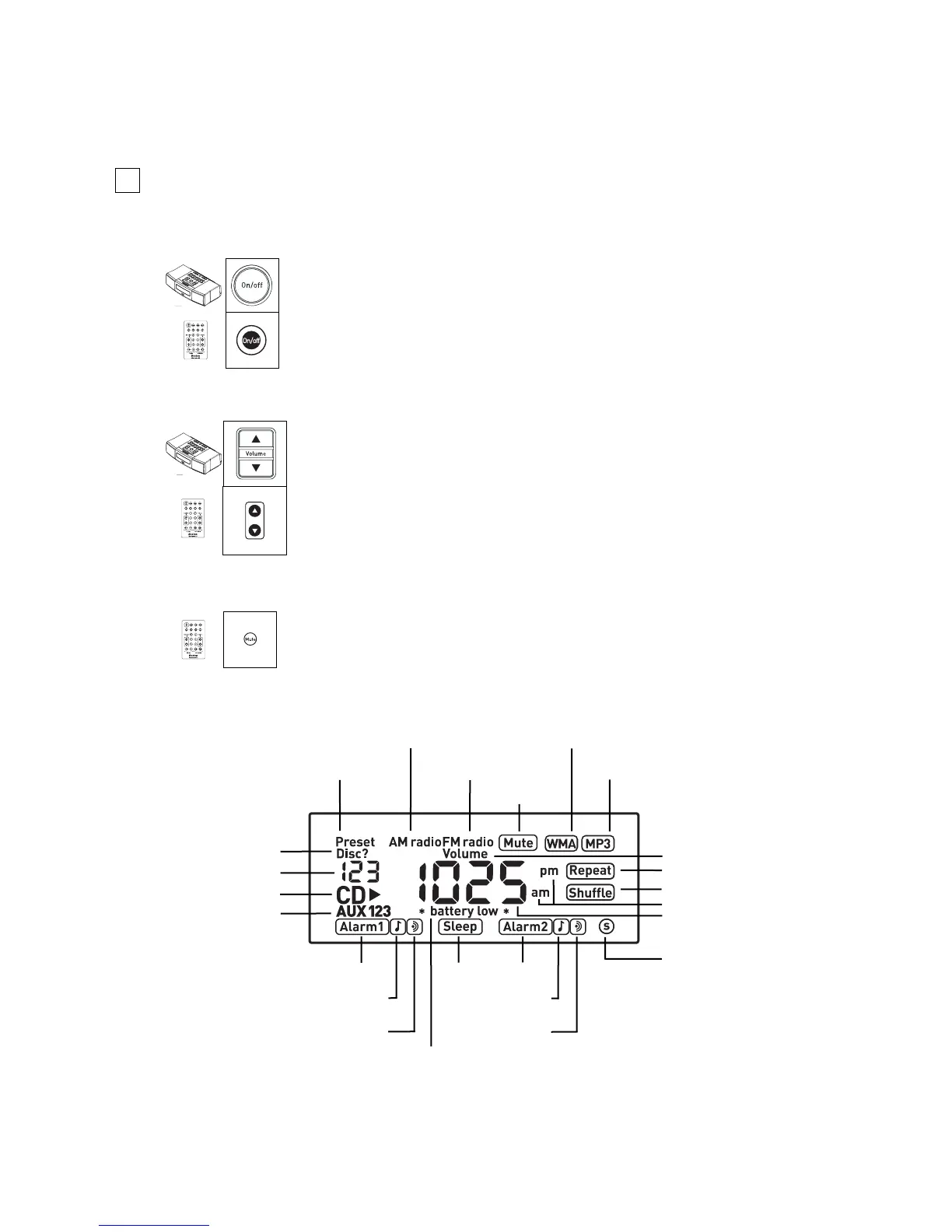
Turning off the system
Adjusting the volume
Muting the system
The Display
Press the Volume arrow buttons on the MicroSystem CD or on the
Remote Control to adjust the volume. When the MicroSystem CD is
turned on, the volume will return to the previous setting unless it
was very loud, in which case it will go to 60.
krT
/
e
nuT
DC
M
A
M
F
f
f
o/n
O
o
f
nI
e
t
u
M
1
pe
e
l
S
Press the On/off button to turn off the system.
kr
T
/
e
n
uT
DC
M
A
M
F
f
f
o/n
O
o
f
nI
e
tu
M
1
p
e
e
l
S
Preset Station
No CD Loaded
CD Track/Preset #
CD is Playing
Auxiliary Inputs
AM Radio Playing
FM Radio Playing
System Muted
WMA File Playing
MP3 File Playing
Volume
Repeat Selected
Shuffle Selected
Alarm 1
Sleep
Alarm 1 Beeper
Alarm 1 Music
Subwoofer Output
Alarm 2
Alarm 2 Beeper
Alarm 2 Music
Alarm Battery Low
AM or PM
Main Display
Pressing the Mute button on the Remote Control will mute all
sound. The sound will remain muted until the Mute button or a
Volume arrow button is pressed.

Other manuals for Boston Acoustics MicroSystem CD