-2- -3-
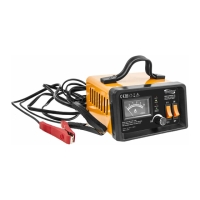
CONTROL BOARD AND DISPLAY
• Function Buttons and LED Display
• Switch of voltage Selection
Press switch up for charging 6V battery and press switch down for charging 12V
battery. Charge voltage cannot be selected after charging or during charging
when the charger is connected to the battery
• Power Switch ON/OFF
Press switch up is ON and press switch down is OFF. Before you press the switch
make sure that the battery charging voltage is selected correctly, it is very
important, if you choose wrong, it will damage the battery or charger.
• LED Display of Charging condition
The LED will indicate the charging condition when charging.
Red LED indicates “power”
Yellow LED indicates “fault”
Red LED indicates “charging”
Green LED indicates “charging full”
A
6 V
12 V
ON
OFF
SUPPLY
FAILURE
CHARGING
CHARGING
COMPLETE
Rated input: 230 V 50Hz 110W
Rated output: 12V/6V 0.5-7A adjustable
Max charging current: 10 A (short time)
6024# Art. 28110 R0616
Made in China
RECHARGE 10
BATTERY CHARGER
CARICA BATTERIA
6 V
12 V
ON
OFF
SUPPLY
FAILURE
CHARGING
CHARGING
COMPLETE
Rated input: 230 V 50Hz 110W
Rated output: 12V/6V 0.5-7A adjustable
Max charging current: 10 A (short time)
6024# Art. 28110 R0616
Made in China
RECHARGE 10
BATTERY CHARGER
CARICA BATTERIA
ON
OFF
SUPPLY
FAILURE
CHARGING
CHARGING
COMPLETE
Rated input: 230 V 50Hz 110W
Rated output: 12V/6V 0.5-7A adjustable
Max charging current: 10 A (short time)
6024# Art. 28110 R0616
Made in China
RECHARGE 10
BATTERY CHARGER
CARICA BATTERIA
SUPPLY
FAILURE
CHARGING
CHARGING
COMPLETE
Rated input: 230 V 50Hz 110W
Rated output: 12V/6V 0.5-7A adjustable
Max charging current: 10 A (short time)
6024# Art. 28110 R0616
Made in China
RECHARGE 10
BATTERY CHARGER
CARICA BATTERIA



 To Next Page