-3-
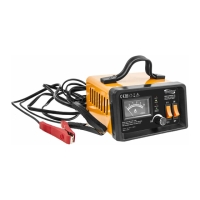
• Adjustable knob
In the process of charging, it is available to adjust the knob to select the
appropriate charge current. Do not charge the battery for a long time with the
maximum current charge, this would reduce charger life.
• LED display information
• Ammeter Display for Charging current
Refer to ammeter to select appropriate current.
0.5-7 A Charging current be appropriate for 6-100 AH battery.
CHARGING PROCESSION
Before starting charging, make sure that the charger is NOT connected to the power
cable (220V-240V).
• Connecting the battery charger to your battery
Connect the red clamp from the charger to the positive (+) battery terminal. The
black clamp from the charger to the negative (-) battery terminal. (The “Fault” LED will
indicate if output reverse polarity connection, please re-connect )
• Start the charging
Put the plug into power supply socket 230V AC, choose the charging voltage
6V or 12V depending on the battery, switch on the switch and start charging,
nally choose the right charging current.
• Floating charging function
Battery is fully charged and is ready for use. Chargers will output a constant safe
voltage, remained voltage between 7.2V for 6V battery or 14.3V for 12V battery.
When the battery has been charged, switch the charger o with the switch,
next pull the power cable from the socket, and then disconnect the clamps
from the battery terminals. Put the charger in a dry place. Remember to put the
battery caps back on.
A
6 V
12 V
ON
OFF
SUPPLY
FAILURE
CHARGING
CHARGING
COMPLETE
Rated input: 230 V 50Hz 110W
Rated output: 12V/6V 0.5-7A adjustable
Max charging current: 10 A (short time)
6024# Art. 28110 R0616
Made in China
RECHARGE 10
BATTERY CHARGER
CARICA BATTERIA
1. Red LED indicates “power” - the LED bright when charger is connected with AC power.
2. Yellow LED indicates “fault” - the LED bright will indicate if output reverse polarity
connection or output short-circuit.
3. Red LED indicates “charging” - the LED bright when charging.
4. Green LED indicates “charging full” - the LED bright when charge nish.



 To Next Page