
 Need help?
Do you have a question about the Bowers & Wilkins M-1 and is the answer not in the manual?
Guidance on optimal speaker angles for stereo listening, avoiding separation issues and 'hole in the middle' effects.
Instructions for positioning front and surround speakers in multi-channel systems like 5.1, 6.1, and 7.1.
Step-by-step guide to detach the speaker's table stand base using the supplied Torx key.
Procedure for removing the back cover to re-orient the ball joint for different speaker orientations.
Instructions on adjusting the stem position for landscape or portrait wall-mount orientations.
Detailed steps for connecting speaker wires to the base when using the table stand.
Comprehensive guide to installing the wall bracket and connecting the speaker, including cable routing.
How to loosen screws to adjust the speaker's tilt and angle for optimal sound.
Instructions for rotating the Bowers & Wilkins logo badge for landscape orientation.
Compliance with international directives regarding hazardous substances and electronic waste disposal.
 General
| Woofer | No |
|---|---|
| Tweeter | Yes |
| Driver diameter | 25 mm |
| Number of drivers | 2 |
| Speaker enclosure | Closed |
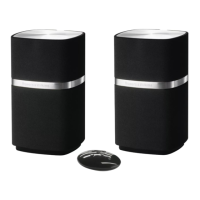
| Speaker placement | Tabletop/bookshelf |
| Audio output channels | 2.0 channels |
| Mid-range driver diameter | 100 mm |
| Product color | White |
| Housing material | - |
| Recommended usage | Speaker set unit |
| Amplifier output power | 100 W |
| Impedance | 8 Ω |
| Sensitivity | 85 dB |
| Frequency range | 72 - 50000 Hz |
| Crossover frequency | 4000 Hz |
| Total Harmonic Distortion (THD) | 1 % |
| Depth (imperial) | 6.8 \ |
| Width (imperial) | 4.5 \ |
| Height (imperial) | 9.6 \ |
| Weight (imperial) | 6 lbs |
| Dimensions (WxDxH) | 114 x 172 x 243 mm |
| Dimensions (W x D x H) (imperial) | 4.5 x 6.8 x 9.6 \ |
| Connectivity technology | Wired |
| Power source type | AC |
 Weight and Dimensions
| Depth | 172 mm |
|---|---|
| Width | 114 mm |
| Height | 243 mm |
| Weight | 2700 g |



 To Next Page

