
 Need help?
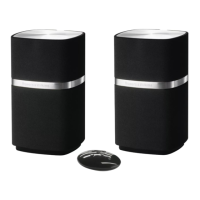
Do you have a question about the Bowers & Wilkins MM-1 and is the answer not in the manual?
 General
| Tweeter | Yes |
|---|---|
| Woofer diameter | 75 mm |
| Tweeter diameter | 25 mm |
| Number of drivers | 4 |
| Speaker enclosure | Closed |
| Speaker placement | Tabletop/bookshelf |
| Audio output channels | 2.0 channels |
| Product color | Black |
| Housing material | Aluminum |
| Recommended usage | PC |
| Amplifier output power | 72 W |
| Frequency range | 38 - 22000 Hz |
| Equalizer | No |
| Apple docking compatibility | iPod |
| Headphone outputs | 1 |
| Headphone connectivity | 3.5 mm |
| Connectivity technology | Wired |
| AC input voltage | 100 - 240 V |
| Power source type | AC |
| AC input frequency | 50 - 60 Hz |
| Power consumption (standby) | 0.8 W |
| Power consumption (typical) | 12 W |
 Weight and Dimensions
| Width | 100 mm |
|---|---|
| Height | 170 mm |
| Weight | 1700 g |
Connects the slave speaker to the powered speaker using a push-fit plug.
Connect PC/Mac to the powered speaker's USB socket for audio playback.
Connect analogue audio sources like TV or PC/Mac to the MM-1 aux in socket.
Connect the power supply to mains and then to the MM-1 for operation.
Plug headphones into the socket to mute MM-1 speakers.
Operate the MM-1 using its side controls or the remote handset.
Adjust volume using buttons on the speaker or handset.
Mute the MM-1 speakers using the handset mute key or standby button.
Return the MM-1 to standby mode using the handset or speaker standby button.
Table describing MM-1 indicator colours and their operational meanings.
Steps to download and install updated firmware for the MM-1.


 To Next Page