Failure to follow the battery-charging best practices outlined here and in the following
sections could result in unnecessary wear to the charging components, battery, and/or
charger, and could lead to an underperforming or non-functional battery. Batteries
damaged due to improper care will not be replaced under warranty.
Using a damaged battery or charger can create additional bike damage or a fire hazard.
Stop using your battery and charger and contact Bowhead immediately if any of the
following occur:
(1) Your battery or charger is physically damaged, non-functional, or performing
abnormally,
(2) Your battery or charger experienced a significant impact from a fall or crash, with or
without obvious signs of damage, or
(3) Your charger becomes too hot to touch (it’s designed to get warm with normal use),
makes a funny smell, or shows other signs of overheating. Store the damaged battery in a
safe location and, as soon as possible, recycle or otherwise dispose of it according to local
rules.
REMOVING THE BATTERY
• To remove the battery, first turn off your bike and unplug your battery from the power
extension cable and follow the remaining steps in the table to follow.
• Be careful not to drop or damage the battery when loose from the bike.
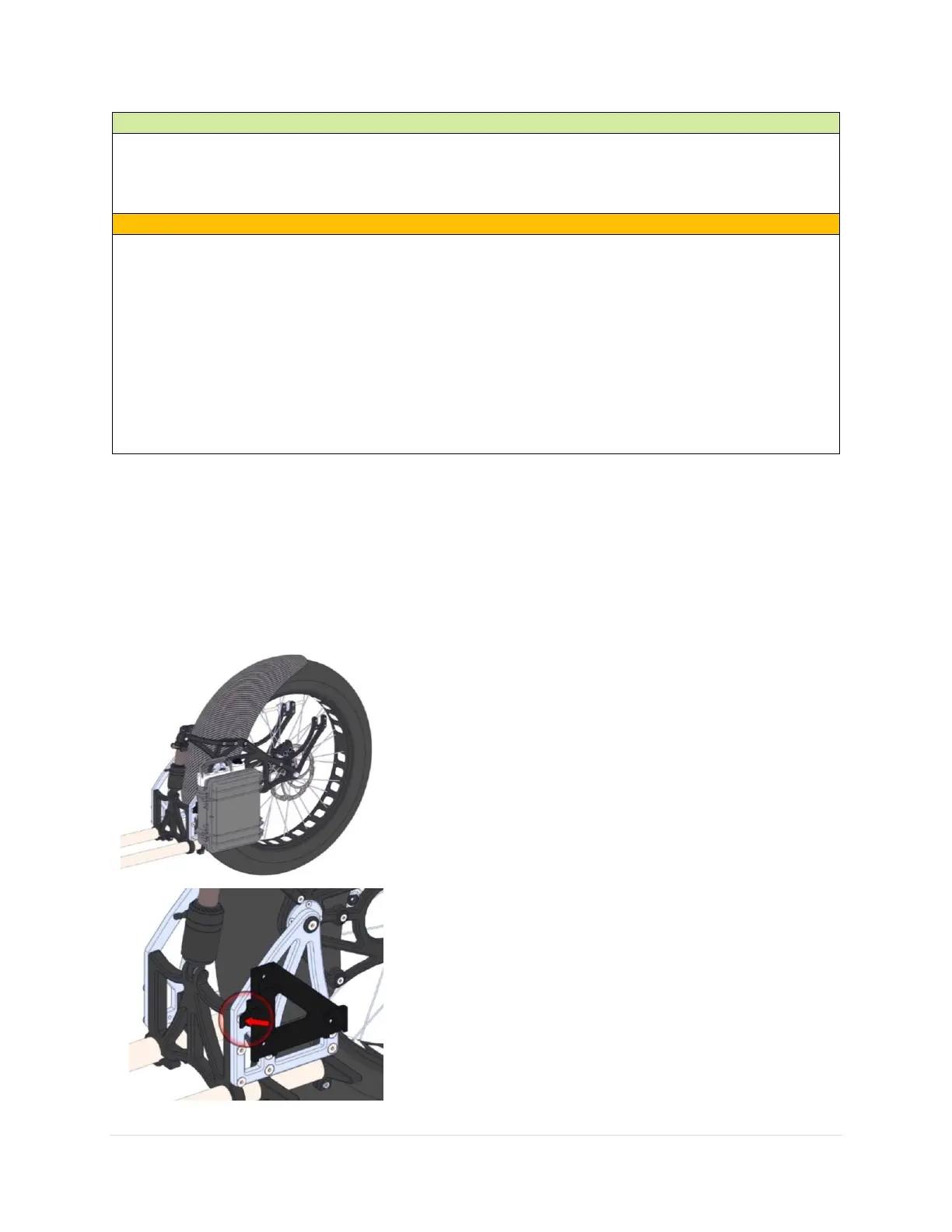
The battery is locked in place via a secure
magnetic locking system under typical
operating conditions.
User input is required to remove the system
and recharge the battery.
To remove the battery:
i. Press down (the direction indicated
by the red arrow in the diagram) on
the self-locking tab


 To Next Page