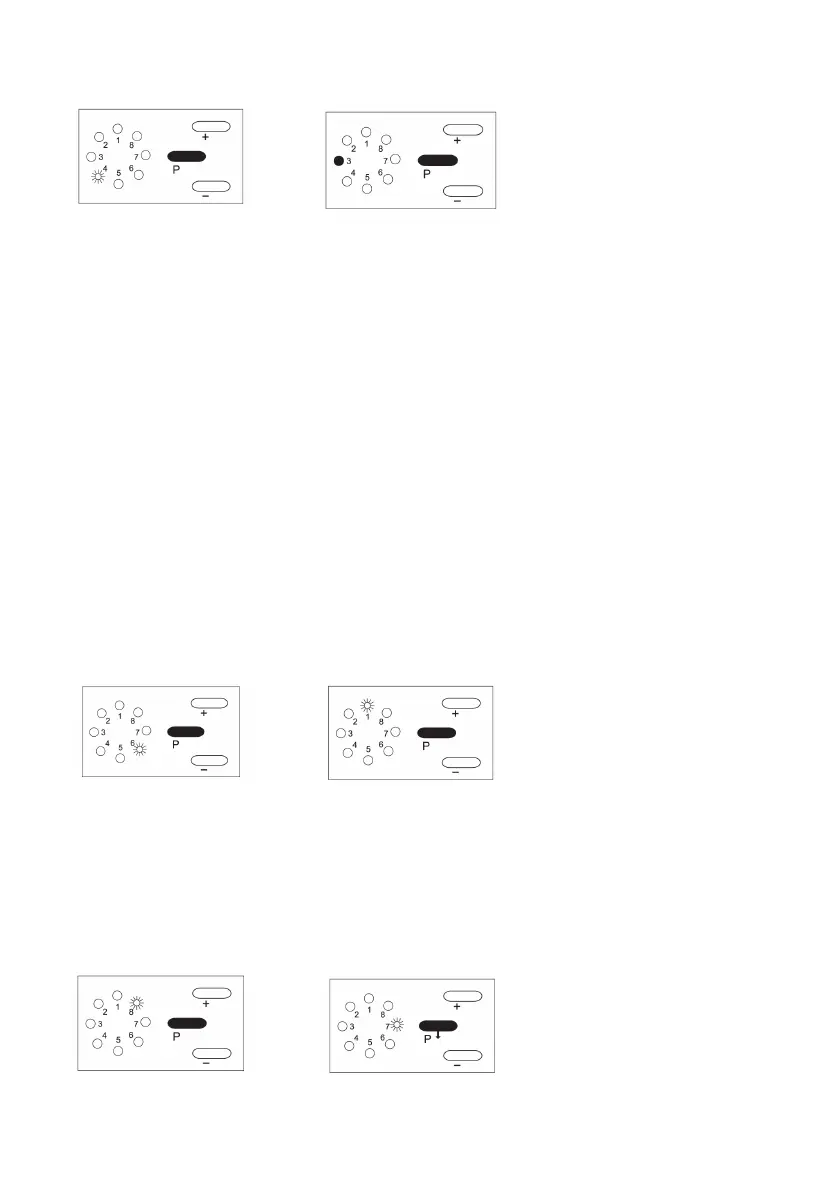
LED 4 ashes.
Press “-“ -button and hold to bring the door to the desired DOWN position.
Then press the “P” button once. The door will travel to the UP position and then
back to the DOWN position: automatically this cycle is to set the opening and
closing force of the opener.
LED 3 will stay illuminated when programming is complete.
REMARK: When you are setting the UP or DOWN limits, the + or – button can
be used for ne adjustment before pressing the “P” button to conrm.
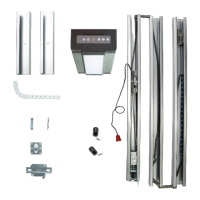
Forcesetup(manual)openingandclosingthedoor:
1. Press “P” button three times until LED 6 ashes. You can adjust the strength
of opening the door. Press “+” or “-“ button to raise or lower, to force
marking Number 8 LED is maximum strength. Then press “P” button to
conrm setting.
2. Press button “P” until LED no. 1 ashes. You can adjust the strength of
closing the door. Press “+” and “-“ button.
3. Number 8 LED is maximum and number 1 LED is minimum.
Then press P button to conrm setting. Press button “P” until LED no. 3
lights up and programming is completed.
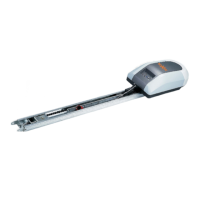
Chooseautomaticclosingdoorfunction
Press “P” button ve times until LED 8 ashes. Press “+” button as opening door
function.
Press “-“ button as closing door function. Press “P” button, save the data at
last.
Notice: Automatic close and open function are not activated when shipped from
manufacturer.
SetuptheDownLimitforclosingthedoor:


 To Next Page