Input / Output Description - 84” only
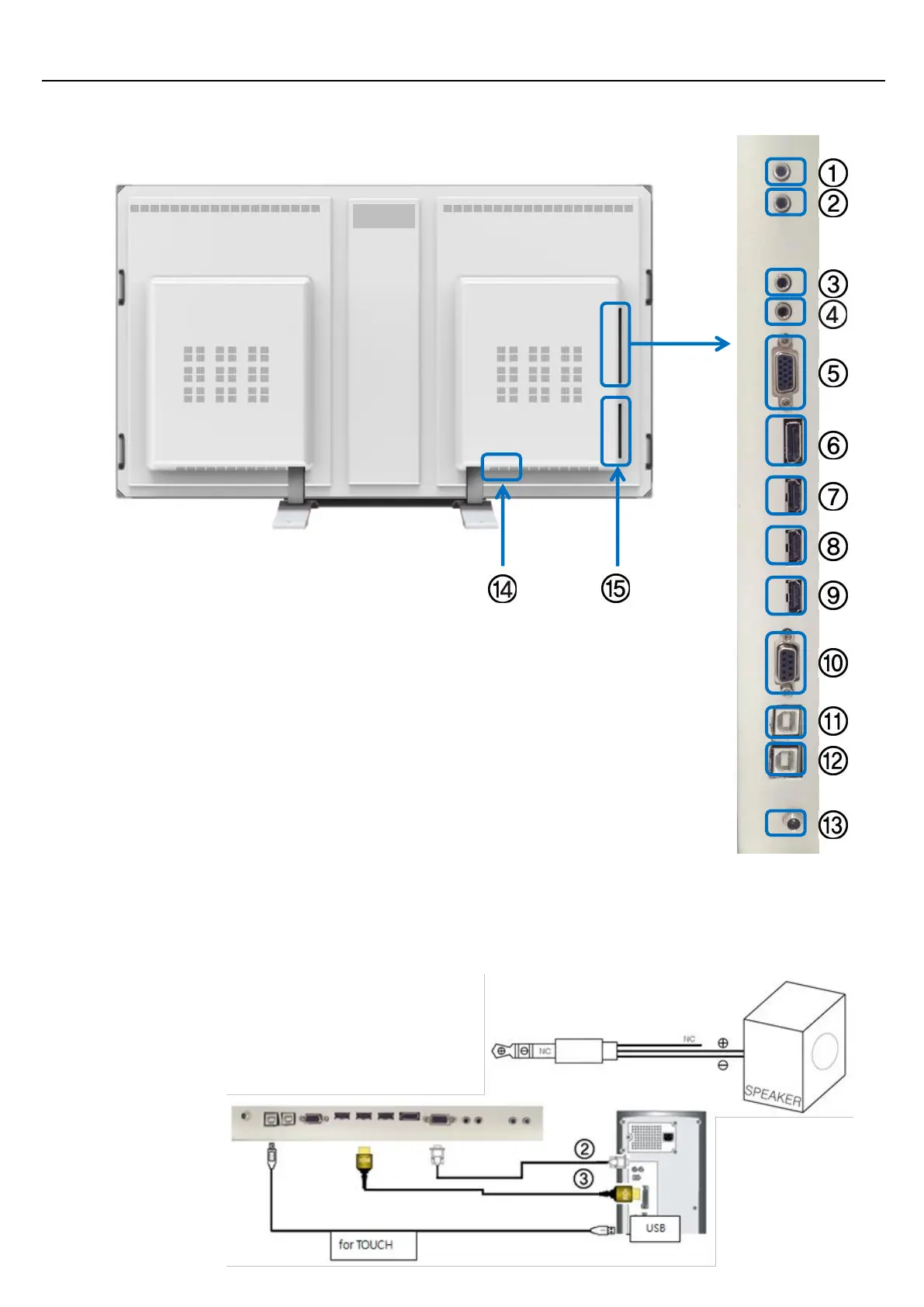
1. SPEAKER Out L. (2ch 10W , 8 Ohm )
2. SPEAKER Out R. (2ch 10W , 8 Ohm )
3. AUDIO LINE Out 4. PC AUDIO Input 5. PC RGB Input
6. DISPLAY PORT Input 7. HDMI 3 Input 8. HDMI 2 Input
9. HDMI 1 Input 10. RS232C 11. USB (Reserve) 12. USB for Touch
13. OPS DC 12V, 5A Power In (Option) 14. AC Power In. (100V ~ 240V)
15. Data cable OPS (Option)
PC Connection
1. Connect RGB cable to ⑤, an Audio connection will be made to ④ using a stereo cable.
2. HDMI cable may be connected to⑦⑧ or ⑨. Both Video and Audio are transmitted by HDMI.
3. External speakers will be connected to ① and ② inputs using a Ø3.5 stereo cable following the drawing below. L,
and R connections are the same. Internal speakers are muted if external speakers are connected.
(Note) Do not connect NC.
Aim the remote control towards the IR sensor to send commands using your display’s remote control.


 To Next Page