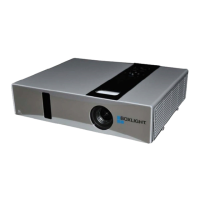
What to do if the video source is not turned on or connected correctly to my BOXLIGHT ProjectoWrite DX25N-U Projector?
- MMatthew BeckJul 30, 2025
First, turn on the video source. Then, verify that the signal cable is correctly connected.
What to do if the video source is not turned on or connected correctly to my BOXLIGHT ProjectoWrite DX25N-U Projector?
First, turn on the video source. Then, verify that the signal cable is correctly connected.
How to select the correct input signal on BOXLIGHT ProjectoWrite DX25N-U Projector?
Ensure the correct input signal is selected using the SOURCE key on either the projector itself or the remote control.
How to adjust focus on BOXLIGHT ProjectoWrite DX25N-U Projector?
Adjust the focus of the lens using the focus ring.
How to align BOXLIGHT ProjectoWrite DX25N-U Projector with the screen?
Adjust the projection angle and direction. If needed, also adjust the height of the projector.
What to do if there is an obstacle between the remote control and the BOXLIGHT ProjectoWrite DX25N-U?
Remove the obstacle that is blocking the path between the remote control and the projector.
What to do if I accidentally tried turning on BOXLIGHT ProjectoWrite DX25N-U during the cooling process?
Wait until the cooling down process has completed before attempting to turn the projector on again.
What to do if the remote control of BOXLIGHT ProjectoWrite DX25N-U Projector does not work from a distance?
Ensure you are standing within 5 meters of the projector for the remote control to function correctly.
Highlights key functional aspects of the projector.
Provides instructions for replacing the remote control's battery.
Advises on selecting the best location for projector placement.
Details image size based on projection distance and screen size.
Step-by-step guide for VGA connectivity to computers.
Instructions for connecting devices using composite video input.
Details setting up network control via Ethernet connection.
Guide for connecting external audio devices to the projector.
Explains the procedure for powering on the projector.
Explains how to select the video input source using the OSD menu.
Provides general advice on keeping the projector in good condition.
Instructions on how to clean the projector lens safely and effectively.
Guide for cleaning the projector's exterior case.
Recommendations for proper storage of the projector for extended periods.
Guidance on how to safely transport the projector.
Explains how to check the projector's lamp usage hours.
Advises on when and why to replace the projector lamp.
Detailed procedure for safely replacing the projector lamp.
Provides general product information and name.
Details resolution, display system, and lens specifications.
Lists input voltage and power consumption details.
Covers projector dimensions and weight.
Lists available input and output ports.
Specifies operating temperature, humidity, and altitude limits.
| Brightness | 2500 ANSI lumens |
|---|---|
| Resolution | XGA (1024 x 768) |
| Connectivity | VGA, USB |
| Display Technology | DLP |
| Output Ports | VGA |
| Power Consumption | 260W (Normal) |
| Operating Temperature | 41 - 95°F (5 - 35°C) |
| Keystone Correction | Vertical ±40° |
| Weight | 2.5 kg (5.5 lbs) |