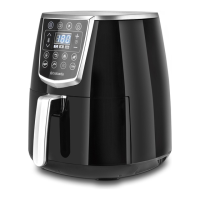
1. “ON/OFF” key
Press the “ON/OFF” key and the display panel will turn on.
2. “START” key
Press the “START” key and the appliance will begin to work at a
temperature of 180 degrees celsius for a period of 15 minutes.
3. “COOL” key
Press the “COOL” key and the product defaults to cool for 5 minutes.
4. “MENU” key
Press the “MENU” key to select the correct ingredients.
5. “TIME +” key
Press the “TIME +” key to increase the working time by 1 minute at one
time.
6. “TIME –” key
Press the “TIME –” key to reduce the working time by 1 minute at one
time.
7. "TEMPERATURE +" key
Press the "TEMPERATURE +" key, to increase the temperature in
increments of 5 degrees celsius.
8. "TEMPERATURE -" key
Press the "TEMPERATURE -" key to reduce the temperature in increments
of 5 degrees celsius at a time.
Power display
Insert the plug into the wall socket and then the appliance will make a noise.
Press the “ON/OFF” key and the display panel will turn on.
Time/ Temperature display
Press the “START” key and the appliance will be ready for use. The initial set
temperature is 175 degrees celsius. Press the "TEMPERATURE +" and
"TEMPERATURE -" keys to adjust the temperature. The initial time is set for 15
minutes, press the "TIME +" and "TIME -" to adjust the cooking time.
4



 To Next Page