6
OPERATION
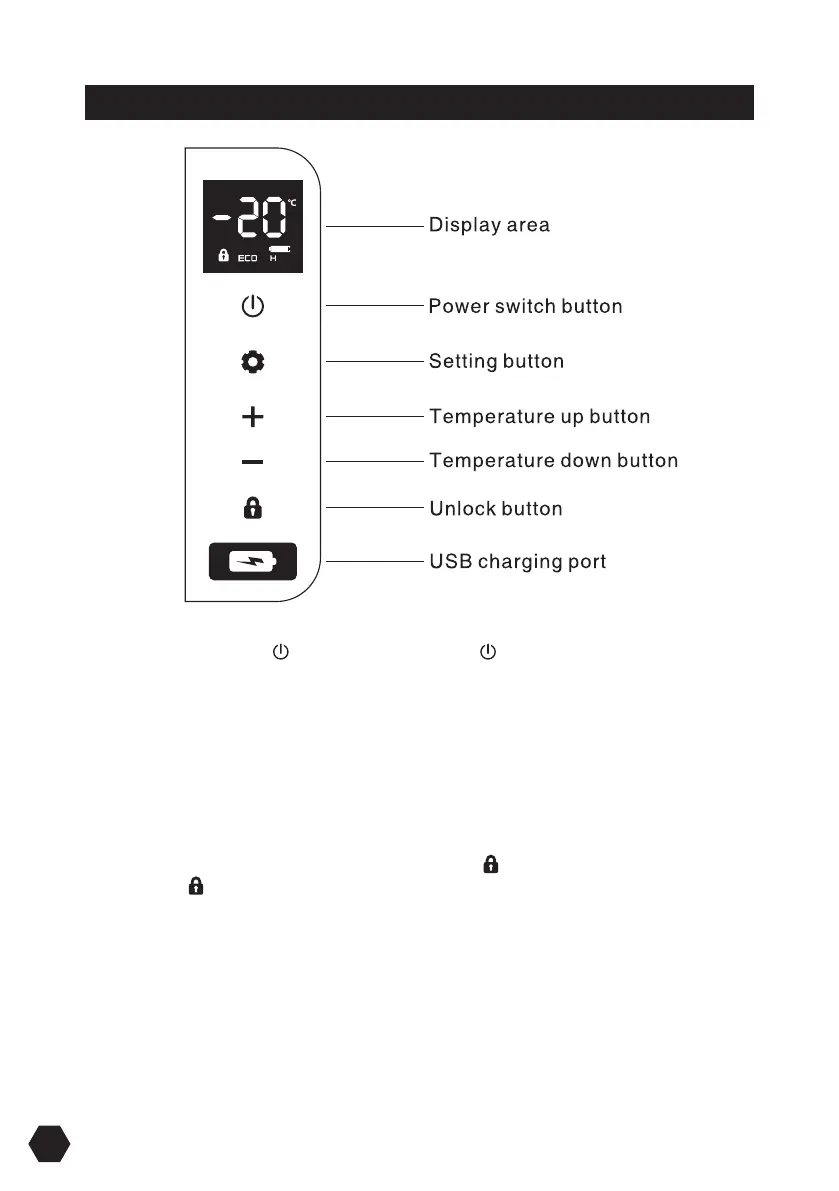
Power on and o: press to switch on, long press for three seconds to switch OFF.
Temperature adjustment: touch +or- button to adjust the temperature, the adjustment
range is minus 20 degrees Celsius to 20 degrees Celsius; After stopping the
adjustment for 3 seconds, the display stops flashing, exits the temperature setting,
and maintains the currently set temperature, and then displays the real-time
temperature in the box.
Fast cooling/energy saving mode: In the unlocked state, touch the setting button to
quick switch cooling mode MAX and energy saving mode ECO.
Lock/unlock screen: The operation panel automatically locks the screen within 10
seconds without any operation, the screen displays ; press any button in the lock
screen state, the on the screen flashes; long press the unlock button for 2 seconds
to unlock.
USB charging port:5V,2.1A, Charges for digital devices such as mobile phones and
tablets.


 To Next Page