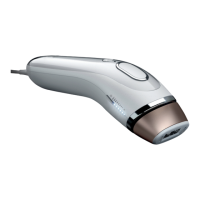
The Braun Silk-expert 5 is an Intense Pulsed Light (IPL) hair removal device designed for comfortable at-home use, leveraging professional light technology to help break the cycle of hair growth. It is intended for the permanent reduction of unwanted, visible hair for a single user.
Function Description
The device works by transferring light energy through the skin's surface, where it is absorbed by melanin in the hair shaft. This absorbed light energy converts to heat below the skin's surface, disabling the hair follicle. Treated hairs naturally fall out over one to two weeks. The device incorporates SensoAdapt™ skin tone sensors (2) to measure your skin color and automatically adjust the output power to a safe and effective level. If your skin tone is too dark for safe use, the device will prevent operation. It is designed for use on naturally black or brown hair and may not be as effective on white, grey, blonde, or red hair. The device emits flashes of Intense Pulsed Light, and direct exposure to the eyes is potentially harmful, so users are advised to look away when activating the treatment button.
Usage Features
The Silk-expert 5 is equipped with a treatment window (1), SensoAdapt™ skin tone sensors (2), LED Power bars (3) to indicate power level, a light intensity button (4) with an indicator light, and a treatment button (5). It connects to a power socket (6) via a power supply (7) and mains cord (8). A removable front with reflector (9) and a glass filter (10) are also part of the design.
Before treatment, all visible hair on the skin should be removed using your preferred method, and the area should be clean, dry, and free of cosmetics, lotions, or cream. A patch test is recommended for each new body area before the first full treatment. The patch test area should be approximately 3 cm x 2 cm (equivalent to two flashes applied side by side). After applying the flashes, wait 24 hours to ensure no adverse reaction before treating the surrounding area. The patch tested area should not be re-treated for at least one week.
To operate, plug the mains cord into an electrical outlet and the power supply into the power socket. The LED power bars will light up, and a fan will start, indicating the device is in READY mode. The treatment window must be placed firmly against the skin, ensuring both skin tone sensors are in contact. The device will not operate if only one sensor is in contact. Once a valid skin tone is detected, the pre-set output power is displayed on the LED Power Bars (white lights). If the skin is too dark, red lights will be shown, and the device will not operate.
The device offers two treatment modes:
- Gliding mode: Recommended for large skin surface areas like legs, arms, chest, and back. In this mode, press and hold the treatment button (5) while slowly and continuously moving the device across the skin, ensuring full skin contact for continuous flashes.
- Precision mode: Recommended for sensitive or small, hard-to-reach areas such as knees, shins, ankles, bikini line, underarm, and face (for females). In this mode, press and instantly release the treatment button (5) for a single flash, then lift the device and move it to the next adjacent spot. Wait for the power bars to show white LEDs before pressing the button again.
Users can adjust the light intensity using the light intensity button (4). The default is "Normal setting" (full light intensity, white indicator light). Pressing the button once activates "Gentle setting" (reduced light intensity, blue indicator light), and pressing it a second time activates "Extra gentle setting" (further reduced light intensity, blue indicator light). These gentle settings are suitable for sensitive areas and first-time users, though they may require more treatments to achieve desired effects.
The device needs 1-2 seconds to recharge between flashes. It is crucial to ensure the entire area receives treatment without overlapping flashes. If intense pain is experienced, treatment should be stopped immediately, and a physician consulted.
For optimal results, Silk-expert should be used once a week for 12 weeks. After this initial phase, monthly treatments or treatments as required are recommended to maintain results. The device will enter standby mode after 10 minutes of inactivity (indicated by one blinking light on the power indicator bars) and sleep mode after 60 minutes of inactivity (power bar LEDs off). To return to READY mode, press any button or remove/replace the power cord.
The device is intended for use on body areas including legs, arms, underarms, bikini area, and face (below the cheekbones) for women, and shoulders and below (chest, back, arms, stomach, legs) for men. It should not be used near the eyes, along the forehead, on the lips or nostrils, or in the genital area.
Maintenance Features
After each treatment, the device should be switched off by unplugging the power supply from the device and the electrical outlet. The handset, skin tone sensors (2), and treatment window (1) should be inspected for damage and wiped down with a dry, lint-free cloth. Any marks or black spots should be cleaned off immediately. Water or other cleaning fluids should not be used as they can damage the device. The glass filter (10) can get hot during use, so it should not be touched or cleaned for at least 5 minutes after use to allow it to cool down.
To ensure maximum performance, the removable front and reflector (9) must be kept free from dirt, hair, or other debris. The front section (9) is removable for cleaning with a slightly damp cloth, ensuring it is completely dry before re-fitting. To remove, grip the sides of the front section and pull it away. It fits only one way and should not be forced.
The device should be stored in a cool, dry place, with the treatment window and skin tone sensors protected from damage. Regular checks for visible signs of damage (including cords) are important, and the device should not be used if damaged or cracked.



 To Next Page
 General