6
7
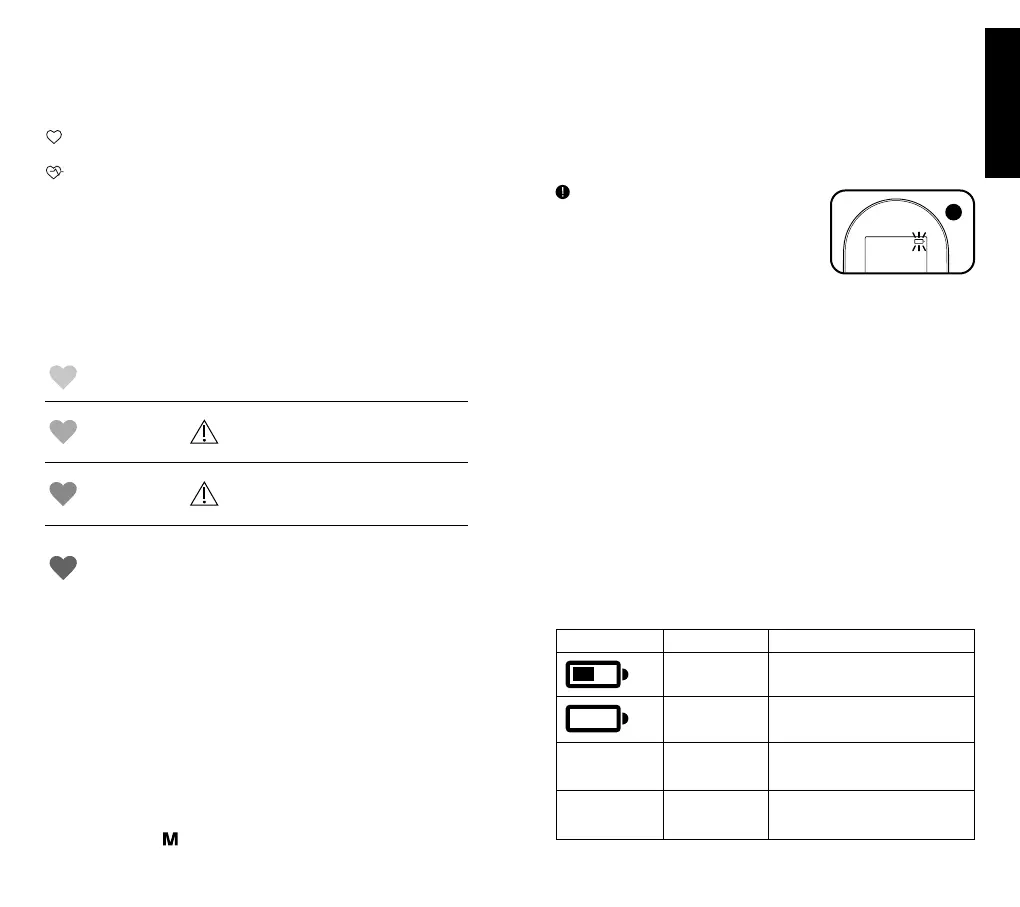
Irregular heartbeat detector
Talking, moving, shaking or an irregular pulse during the measurement can
result in the appearance of this icon. Usually this is not a cause for concern,
however if the symbol appears often, we recommend you seek medical advice.
The device does not replace a cardiac examination, but it could help
identifying pulse irregularities to be discussed with your doctor.
This symbol at the right-hand side of pulse reading indicates a
regular heartbeat.
This symbol at the right-hand side of pulse reading indicates that
pulse irregularities were detected during the measurement. This
irregular heartbeat can be caused simply by talking, moving or
shaking during a measurement. In this case, the result may deviate
from your normal blood pressure – repeat the measurement.
Normally this is not cause for concern. However if the symbol
appears frequently, and these guidelines are strictly followed, seek
medical advice.
Colour coded guidance
The instant read colour indicator follows the ESH and WHO recommendations
for interpreting readings and is described in the table below.
Green:
normal blood
pressure
Your blood pressure reading is normal,
and values are below 135 mmHg
systolic and below 85 mmHg diastolic.
Yellow:
mild
hypertension
Your blood pressure reading is in the
mild hypertension range with values
between 135-159 mmHg systolic and/or
85-99 mmHg diastolic.
Orange:
moderate
hypertension
Your blood pressure reading is in the
moderate hypertension range with
values between 160-179 mmHg systolic
and/or 100-109 mmHg diastolic.
Red:
severe
hypertension
Warning
Your blood pressure reading is in the
severe hypertension range with values
of 180 mmHg systolic and above and/or
110 mmHg diastolic and above. If you
get readings in this range, consult your
doctor straight away.
Blood pressure readings will be automatically saved in the device memory.
Results are displayed for approx. 60 seconds, then device will automatically
shut-o.
Memory function
Your blood pressure monitor can store the latest 30 readings.
Storing measurement data
After each blood pressure measurement, the systolic pressure, diastolic
pressure, pulse rate will be automatically stored. Memory #01 is always the
most recent one.
Once the memory is full, the oldest values will be overwritten.
Press memory button
to review the stored data. The last memory data (sys/
dia/pul), IHB and WHO indicator will show on LCD as “01”, “02”, “03”...”10”.
Press and hold memory button to scroll through previous stored data.
Press and hold power and memory button together for 3 seconds to clear the
memory of the device of all pre-existing information.
This device is not intended as a substitute for regular check-ups by your doctor,
please continue to visit your doctor on a regular basis for a professional
reading.
Battery charge indicator
Batteries discharged—replacements required
When the batteries are fully discharged, the
empty battery symbol is displayed. You cannot
take any further measurement and must
replace the batteries. Refer to the section
“Inserting batteries”.
Storage and cleaning
• Do not expose device to either extreme temperatures, humidity, dust or
direct sunlight.
• The cu contains a sensitive air-tight inatable bladder. Handle this
carefully and avoid all types of straining through twisting or buckling.
• Clean the device with a soft dry cloth. Stains on the cu can be carefully
removed with a damp cloth. Do not use gasoline, thinners or similar
solvents. Do not wash or dry clean the cu. Do not store the product in a
place exposed to direct sunlight or high humidity.
• Do not drop the device or treat it roughly in any way. Avoid strong
vibrations.
• NEVER open the device! This will make the manufacturer’s warranty invalid
and could adversely aect the device’s accuracy!
Calibration
This product has been calibrated at the time of manufacture. If used according
to the instructions for use, periodic recalibration is not required. If at any time
you question the measuring accuracy, please contact our service
representative (see last page for contact information).
What to do if ...
Error Description Potential cause and remedy
Batteries are low Get ready to replace batteries soon with
new ones.
Batteries are fully
discharged
Insert new batteries or check that
batteries are correctly inserted.
«Err0» MeasuringError The pulse signals on the cu are too
weak. Re-position the cu and repeat
the measurement.
«Err1» PumpingError The cu is not fastened properly.
Re-position the cu and repeat the
measurement.
!
English







 To Next Page