
 Need help?
Do you have a question about the Braun Oral B 3731 and is the answer not in the manual?
Details about the FlossAction brush head.
Description of the power button.
Description of the mode selection button.
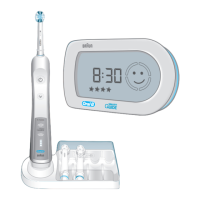
Information about the toothbrush handle.
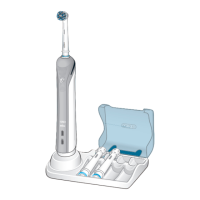
Details of the charger including ring and SmartPlug.
Description of the base plate component.
Information about the base station.
Description of the protective cover.
Details about the Stain Care brush head.
Description of the SmartGuide display unit.
Information about mounting the SmartGuide.
Details about the adhesive tape for mounting.
Description of the tongue freshener accessory.
Instructions for charging the toothbrush before the first use.
Steps to activate the SmartGuide display unit by inserting batteries.
How to set the time on the SmartGuide display unit.
How to choose between 12-hour and 24-hour time format.
Steps to assemble the charging base station.
How to place the handle on the charger and monitor charging.
Tips for keeping the handle at full power by storing it on the charger.
Recommendation to discharge and recharge the battery every six months.
Overview of different brushing modes available for various oral care needs.
Meaning of the 'Clean' mode icon.
Meaning of the 'Sensitive' mode icon.
Meaning of the 'Massage' mode icon.
Meaning of the 'Polish' mode icon.
Icon indicating too much pressure applied during brushing.
Indicator showing brushing progress by mouth quadrant.
Alerts for timely brush head replacement.
Icon indicating the toothbrush handle battery is low.
Icon indicating the SmartGuide unit batteries are low.
How to activate the 'Learn' mode for synchronization.
Steps for the automatic synchronization of handles and display units.
How to exit the synchronization 'Learn' mode.
 General
| Brand | Braun |
|---|---|
| Model | Oral B 3731 |
| Category | Electric Toothbrush |
| Language | English |


 To Next Page