
 Need help?
Do you have a question about the Braun TexStyle 7 TS 725 and is the answer not in the manual?
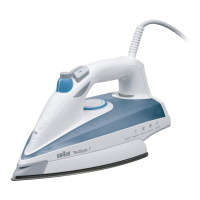
The Braun TexStyle 7 Steam Iron, Type 4661, is designed for efficient and safe household ironing. This appliance combines high temperatures and hot steam to effectively smooth out wrinkles, offering a range of features for various fabric types and ironing needs.
The iron features several key components for its operation. Preconditioning nozzles (1) and a spray nozzle (2) work in conjunction with the water tank opening (3) to deliver steam and water as needed. The Precision Shot button (4) and Spray button (5) allow for targeted steam bursts and water mist. The steam regulator (6) and temperature selector (7) provide control over steam quantity and heat settings, respectively. A temperature pilot light (8) indicates when the desired temperature is reached, and an "auto-off" light (9) signals the activation of the automatic shut-off mechanism. The iron rests on a heel rest (10), and certain models include a Textile Protector (11) for delicate fabrics.
Before use, the iron should be filled with water. Tap water is suitable, but for extremely hard water, a 50% tap water and 50% distilled water mixture is recommended. The water tank should be filled up to the "max" marking, ensuring the steam regulator (6) is set to "0" (steam off) beforehand. The iron should be held slightly inclined during filling. Once filled, the iron is placed upright on its heel rest and connected to the mains. The desired temperature is selected using the temperature selector (7) according to the ironing guide on the heel rest or garment label. The pilot light (8) will turn off when the iron reaches the set temperature (approximately 1.5 minutes).
For Vario steam, the steam quantity can be adjusted by turning the steam regulator (6) from "0" to "6". A minimum temperature level of 2 (••) is required for steam. A medium steam setting is recommended for normal ironing, while the maximum setting is suitable for linen, thick cotton, or similar fabrics. The steam regulator should not be turned beyond setting "6" during ironing.
Vario plus steam provides extra steam by pressing the steam regulator (6) for a maximum of 30 seconds. This function requires a minimum temperature level of 3 (•••).
The Precision Shot function delivers a powerful steam shot from the preconditioning nozzles. To activate, press the Precision Shot button (4) 3 to 4 times prior to use, then press it in intervals of at least 5 seconds for each shot. This function can be used during dry ironing but requires a minimum temperature level of 3 (•••). It can also be used vertically for steaming hanging clothes. Caution should be exercised as hot steam comes out from the preconditioning nozzles.
The Spray function is activated by pressing the spray button (5), emitting a fine mist of water.
For Dry ironing, the steam regulator (6) should be set to position "0" (steam off).
The iron features an Automatic shut-off mechanism for safety. A slight rattling noise during ironing is normal and indicates the mechanism is active. The red "auto-off" light (9) flashes when activated. This occurs if the iron rests horizontally on its soleplate for about 30 seconds or vertically on its heel rest for about 8 minutes. To reactivate the iron, simply move it. The "auto-off" pilot light will stop flashing, and electrical power will be restored. The automatic shut-off activates approximately 2 minutes after the iron is plugged into a socket.
The Textile Protector (11), available on certain models, protects delicate fabrics from heat damage and allows ironing of most dark fabrics without an intermediate cloth. Its special coating helps avoid shiny patches. Before attaching it for the first time, iron for approximately 2 minutes without the Textile Protector. To prevent damage to the coating, avoid ironing over zippers, metal buttons/rivets, or strass with the Textile Protector attached. It is recommended to test on a small, reverse section of fabric first. With the Textile Protector, delicate fabrics can be ironed from temperature setting (•••) to "max," utilizing all steam functions. After attaching, wait about 1.5 minutes before ironing. Always store the iron with the Textile Protector detached.
After ironing, unplug the iron and turn the steam regulator to "0". To prolong the iron's life, empty the water tank. The cool iron should be stored in a dry place, always standing on its heel rest.
For Maintenance and cleaning, the soleplate can be cleaned with steel wool. Scouring pads, vinegar, or other chemicals should not be used.
The Cleaning the anti-calc valve feature addresses the regular decalcification of the anti-calc valve, located at the lower end of the steam regulator, especially when steam development is insufficient. The water tank must be empty for this process. To remove the steam regulator with the anti-calc valve, turn the steam regulator clockwise towards setting "6", then firmly beyond the resistance until it lifts. Pull it out vertically when positioned at "•". The anti-calc valve should not be touched at its lower end. Immerse the anti-calc valve in vinegar (not vinegar essence) or lemon juice for at least 30 minutes. Brush off residues and rinse under running water (fig. G, 1-7). To re-insert, ensure the steam regulator base points to setting "•" (fig. G 8), then firmly push it down until it turns back to setting "6" (fig. G) and catches. The iron must never be used without the steam regulator.
The Anticalc system (Decalcifying/anticalc system) cleans the steam chamber from residues. This process is shown in picture section H, 1-8. Caution: Hot water and steam will come out from the soleplate when the steam regulator is turned clockwise beyond setting "6". After the soleplate cools down, clean it as described. Then refill the tank, heat the iron, and press the precision shot button 4 times to rinse the iron before ironing (fig. H, 9-13). Commercial decalcifiers should not be used as they may damage the iron.
 General
| Power | 2400 W |
|---|---|
| Steam output | 50 g/min |
| Steam shot | 200 g |
| Water tank capacity | 300 ml |
| Cord length | 2.5 m |
| Weight | 1.5 kg |
| Auto shut-off | Yes |
| Self-cleaning function | Yes |
| Anti-drip system | Yes |
| Type | Steam Iron |
| Soleplate | Ceramic |


 To Next Page
