B: Temperature unit setting
:
Open the battery cover and install the batteries, then the screen display all the
symbols and off. Press the memory key for 5s and the screen display “- - - - ° C”,
press the memory key one more time to change into “° F” and off after 3s. then the
setting is done.
Note: The default temperature unit is “°C”. The setting will come back to the
default when uninstall the batteries.
9. Measuring method
9.1 Forehead temperature measurement.
●Install the batteries to power on, make sure the screen display “ ”and the mode
conversion cover before the measurement.
●Hold the thermometer and point the device to the forehead,
measurement key directly or keep pressing measurement key, scan forehead ,when
buzzer beeps, the temp.will display on the LCD screen.Keep the probe cover
contacting the forehead when measuring.
9.2 Ear temperature measurement
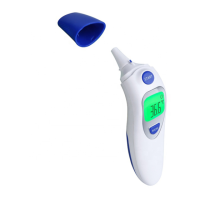
● Take off the mode conversion cover, then put on the ear probe cover .Insert the
probe into the ear. Press the measuring key to measure directly,when the buzzer
beeps, the temperature will display on the screen.
● Make sure that the probe cover is taken off and converted to the Ear and ambient
measuring mode


 To Next Page