2
3
Full manual and troubleshooting: braven.com/manuals
ENG
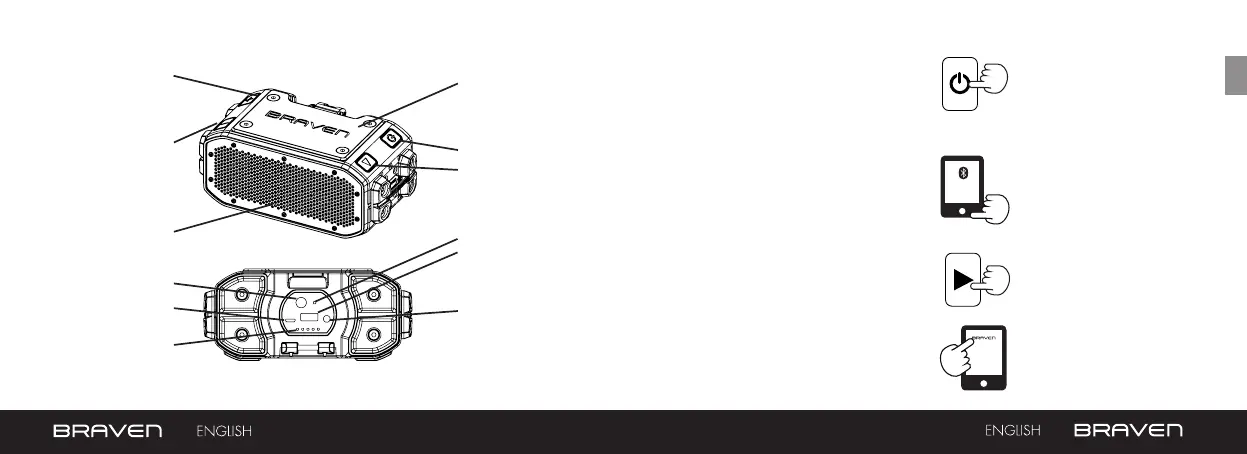
GET TO KNOW YOUR BRAVEN TURN ON & BLUETOOTH PAIRING
1. Press the Power button for 2-3
seconds to turn on your BRAVEN
(BRV-PRO). Press the same
button again for 2-3 seconds to
turn your BRAVEN off.
2. Activate Bluetooth
®
on the phone
or device you are pairing with (see
your device’s instruction manual
for information on activating its
Bluetooth
®
settings).
3. Press and hold the Play Button on
your BRAVEN until you hear the
BRAVEN pairing sound.
4. Go to your phone or device’s
Bluetooth
®
settings and select
“BRAVEN BRV-PRO” from the list.
5. If asked for a
passcode enter
“0000”
Your BRAVEN will
remember the last 8
devices it has paired with.
NOTE: If your BRAVEN
does not have an active
Bluetooth
®
connection
and is left on, it will
shut itself o after 30
minutes. To restart your
BRAVEN you will need
to press and hold the
power button for 2-3
seconds.
BATTERY INDICATOR
LIGHTS
POWER SWITCH
BATTERY CHECK
BUTTON
PAIRING / ANSWER-END
CALL / PAUSE-
RESUME MUSIC
REMOVABLE
ACCESSORY PLATE
POWER / PAIRING
STATUS LIGHT
BRAVEN CHARGING
PORT
VOLUME UP /
SKIP TRACK
(press and hold)
EXTERNAL USB
CHARGING PORT
RESET BUTTON
VOLUME DOWN /
SKIP BACK (press
and hold)
3.5 MM AUDIO-IN JACK
20% - 40% - 60% - 80% - 100%



 To Next Page