ENGLISH | 5
USING BRAVEN VOICE CONTROL
USING TRUEWIRELESS STEREO PAIRING
Use Siri or Google voice assistant by short pressing the mic button on your BRAVEN. Give a command through the
speaker to make calls, dictate messages and more.
TrueWireless allows you to wirelessly pair t wo BRAVEN READY
ELITE ™ speakers in right & lef t channel audio.
Activate TrueWireless by simultaneously long pressing the bat ter y check but ton on the back of both speakers
until the pairing chime emits. A voice prompt saying “Bluetooth connected” will indicate that both speakers have
successfully paired together within approximately 30 seconds.
For step by step instructions, visit our website BRAVEN.COM.
R E S E T T I NG YOUR BR AV EN
If your BRAVEN
READY ELITE ™ is unresponsive, press the reset but ton under the back cover for 1 to 2 seconds.
To restore your BRAVEN READY ELITE ™ to its original factory settings, press and hold the VOL - and PLAY buttons together until
you hear a tone. The speaker will then power off.
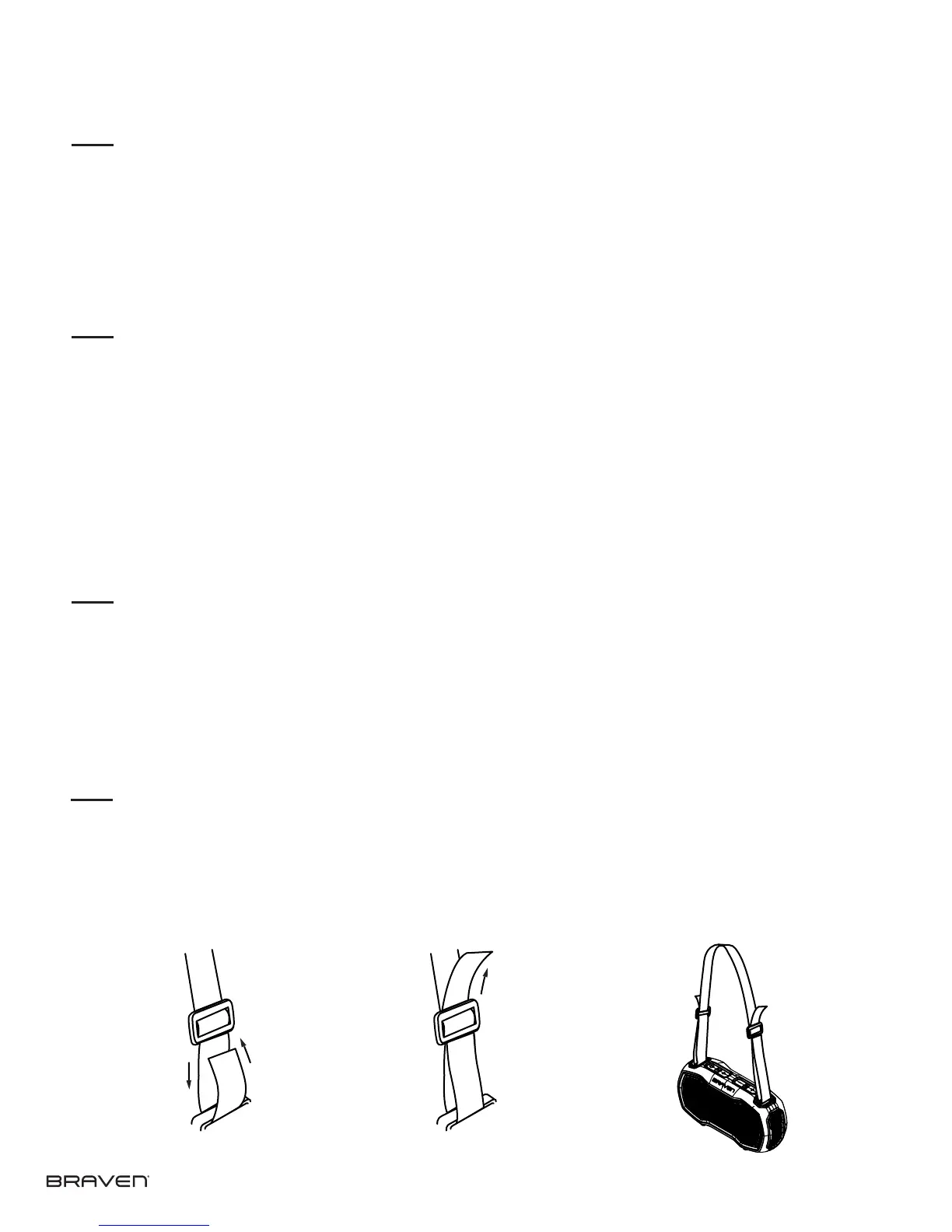
C A R R Y S T R A P INS T RUC T IONS
1. Loop each end of strap through your speaker’s tie down bars.
2. Weave strap back through the buckle attached to the strap.
3. Slide buckle to adjust.
1. 2. 3.



 To Next Page