Need help?
Do you have a question about the Breezair ILL239-D and is the answer not in the manual?
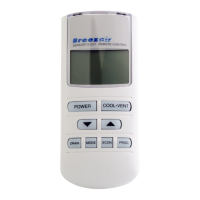
Guide on how to set the clock on the remote control before programming operations.
Instructions on how to select and operate the cooler in Manual mode using the remote.
How to switch the remote control and cooler on and select operating modes.
Automatic cooler control based on pre-selected comfort level and room conditions.
How to program the cooler to operate only during specific programmed time periods.
Limits cooling/ventilation and reduces power usage by up to 20%.
How to use the drain valve to empty and clean the cooler's water tank.
Saturates cooling pads before fan operation for improved initial cooling.
Manages water quality and salinity for optimal cooler performance and pad life.
Information on battery requirements, replacement, and low battery indication.
Explanation of DIP switch settings for controlling various cooler functions.
How to switch the wall control and cooler on and off.
Describes the cooler's initial start-up process involving water filling and pad saturation.
Instructions for operating the cooler using the wall control in Manual mode.
Instructions for operating the cooler using the wall control in Auto mode.
How to program the cooler to start or stop at a specific future time.
Steps to program delayed start/stop times for the cooler in auto mode.
How to interpret and respond to service indicators on the wall control.
Procedure to drain the water tank using the wall control.
How to adjust operating parameters via the wall control.
How to select between WATERMANAGER® and timed drain settings.
Adjusting the time delay before the tank is emptied after the cooler is turned off.
Explanation of the bleed system for diluting minerals and salts.
Details on how the drain valve operates with WATERMANAGER® or timed draining.
Regulations requiring periodic servicing of evaporative air coolers.
Procedures for maintaining the cooler at the start and end of the season.
Step-by-step guide for preparing the cooler for winter storage.
Step-by-step guide for preparing the cooler for operation at the start of the season.
Instructions on how to safely remove and refit the cooler's pad frames.
 General
| Brand | Breezair |
|---|---|
| Model | ILL239-D |
| Category | Remote Control |
| Language | English |

 To Next Page