Need help?
Do you have a question about the Breo iSeeM and is the answer not in the manual?
Product can be used by children aged 8+ and persons with reduced physical/mental capabilities with supervision.
Not intended for self-diagnosis or self-treatment; consult a doctor for medical conditions.
Be careful with the heated surface and avoid covering the massager during operation.
Lists the iSeeM Eye Massager, storage bag, power adapter, USB cable, and user's manual.
Identifies the power/mode button, mode indicator, and Micro-USB port on the massager.
Details the three preset modes: SOFT, MED, and HARD, including duration, heating, and air pressure.
Covers pre-use checks, charging time (2.5 hours), and indicator status during charging.
Instructions for turning the device on/off and switching between the three massage modes.
Guidance on cleaning the massager surface with a cotton cloth dipped in alcohol.
Recommendations for long-term storage and safe transportation of the device.
Steps to download the app, pair the device, and customize massage modes, temperature, and timer.
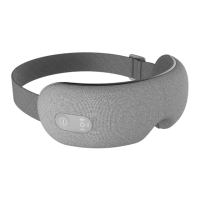
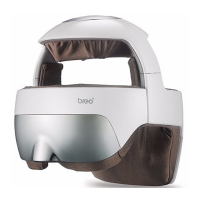
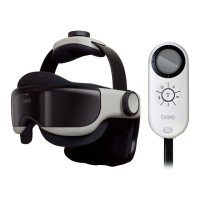
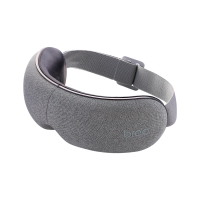
The Breo iSeeM Eye Massager is a personal care appliance designed to provide a relaxing and therapeutic eye massage experience. It is intended for general use to alleviate eye strain and promote relaxation, rather than for self-diagnosis or self-treatment of medical conditions. The device is portable and can be operated independently or customized further through a dedicated mobile application.
The iSeeM Eye Massager offers three preset massage programs: SOFT, MED, and HARD, each with a duration of 10 minutes. These modes vary in their application of heating and air pressure functions. The SOFT mode includes heating but no air pressure. The MED mode, which is the default setting upon power-on, incorporates both heating and air pressure. The HARD mode utilizes air pressure but no heating. The massager automatically shuts off after each 10-minute session.
Beyond the preset modes, the device can be connected to the Breo app, available on Android and iOS devices, to unlock a "Custom mode." This feature allows users to personalize their massage experience by adjusting various parameters. Within the custom mode, users can set up to three personalized modes. They can control the frequency of the massage (High, Middle, Low), select the temperature for the heating function (ranging from 42 to 47°C), adjust the air pressure from minimum to maximum, and customize the working duration from 3 to 20 minutes. The app also allows users to rename their personalized modes and play their preferred music through the device's audio Bluetooth connection during a massage session.
The core functions of the massager include air pressure massage, which gently compresses and releases around the eyes, and a heating function to provide soothing warmth. These combined actions aim to relieve tension and promote comfort around the eye area.
To operate the iSeeM Eye Massager, users first need to ensure the device is adequately charged. A full charge takes approximately 2.5 hours. The device should not be used while charging.
Powering on the device is done by a short press of the Power On/Off Button. This automatically starts the MED mode, which includes both air pressure and heating. To switch between the preset modes (HARD > SOFT > MED), a short press of the Mode Selection Button is required. To turn off the massager before the 10-minute session ends, the Power On/Off Button should be pressed and held.
For an enhanced and personalized experience, users can download and install the Breo app on their smartphone or tablet. After turning on the massager, it automatically enters pairing mode. Users must enable Bluetooth on their mobile device, run the Breo app, and add the iSeeM Eye Massager from the "Add products" section. To stream music, users also need to pair the device's audio Bluetooth (identified by a headphone icon) in their phone's Bluetooth settings. Once connected to the app, users can access the "Custom mode" to fine-tune the massage settings as described above. After configuring custom settings, tapping the Start/Pause icon initiates the personalized massage.
The device is designed with user safety in mind. It is suitable for children aged 8 and above and individuals with reduced physical, sensory, or mental capabilities, provided they receive supervision or instruction on safe use and understand the associated hazards. However, individuals under medication or with medical conditions should consult their doctor before use. Operation should be stopped immediately if any discomfort is experienced. The appliance has a heated surface, so persons insensitive to heat should exercise caution.
Proper maintenance ensures the longevity and safe operation of the Breo iSeeM Eye Massager. The device is not waterproof and should never be washed under water. For cleaning, the surface should be gently wiped with a cotton cloth dipped in alcohol.
For storage, especially for periods exceeding three months, it is crucial to check the device's functions and recharge the battery every three months. This helps preserve battery life and ensures the device remains ready for use. The massager should not be covered during operation, as this could lead to a rise in motor temperature, potentially causing malfunction or fire.
When storing the device, it is important to avoid placing heavy objects on it. The storage environment should have good ventilation and be away from direct sunshine and corrosive gases.
For transportation, the product features a simple shockproof design, making it suitable for transport by air, railway, highway, and ship. During transport, it is essential to avoid rain, snow, and impacts, and the device should always be kept right side up to prevent damage.
Children should not be allowed to play with the appliance, and cleaning or user maintenance should not be performed by children without supervision.
 General
| Type | Eye Massager |
|---|---|
| Heat Function | Yes |
| Vibration Function | Yes |
| Dimensions | 205mm x 97mm x 76mm |
| Power Source | Rechargeable Battery |
| Massage Type | Heat |
| Features | Adjustable Straps |
| Material | ABS Plastic |

 To Next Page