32
OUTDOOR SENSOR STATUS
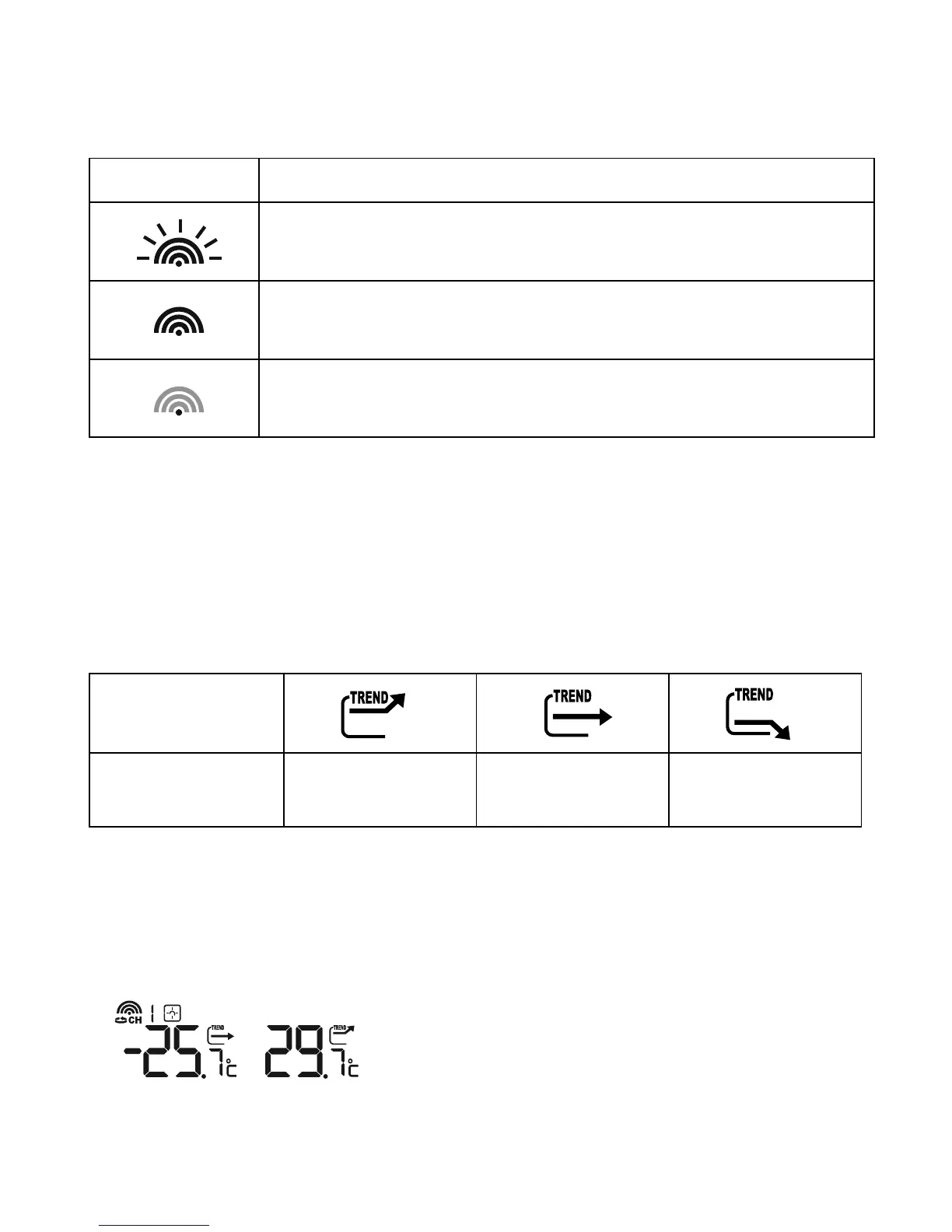
The wave icon above the current channel icon shows the connection status of the corresponding
outdoor sensor:
Icon Status
Searching for the signals from the outdoor sensor
Corresponding outdoor sensor signal received successfully
No signals received for over 1 hour
SEARCH FOR OUTDOOR SENSORS
• The weather station can be manually activated to search for the signals from the outdoor sensors
by pressing and holding the [
▼
] button.
TEMPERATURE TREND
• The trend indicator shows the trend of temperatures collected at that particular outdoor sensor.
Three trend indicators are possible: rising, steady and falling.
Arrow indicator
Temperature
Trend
rising steady falling
VIEWING OUTDOOR SENSOR (CHANNEL) TEMPERATURE
Static display
• Press the [CHANNEL] button to select measurements from different outdoor sensors, relevant to
the unique channels 1, 2, or 3
NOTE: The included outdoor sensor is defaulted to channel 1. Additionally available outdoor
sensors are required for channel 2 and 3.




 To Next Page